It puts a useful PC inside the browser
v86 has been around since 2013, and its purpose remains clear: emulate an x86-compatible computer in JavaScript while translating machine code into WebAssembly at runtime. A website can therefore offer an interactive PC without requiring visitors to install a desktop hypervisor. With 23,450 GitHub stars and a push on September 3, 2026, this is neither a tiny experiment nor an obviously dormant preservation artifact.
The emulated CPU is roughly Pentium 4 class and includes SSE3. v86 also models the surrounding machine: VGA with SVGA and Bochs VBE extensions, IDE, PCI, PS/2 input, NE2000 networking, SoundBlaster 16 audio, floppy control, timers, interrupts, RTC, and several virtio devices. That breadth turns a clever translator into a computer people can actually boot.
What happened when we ran it
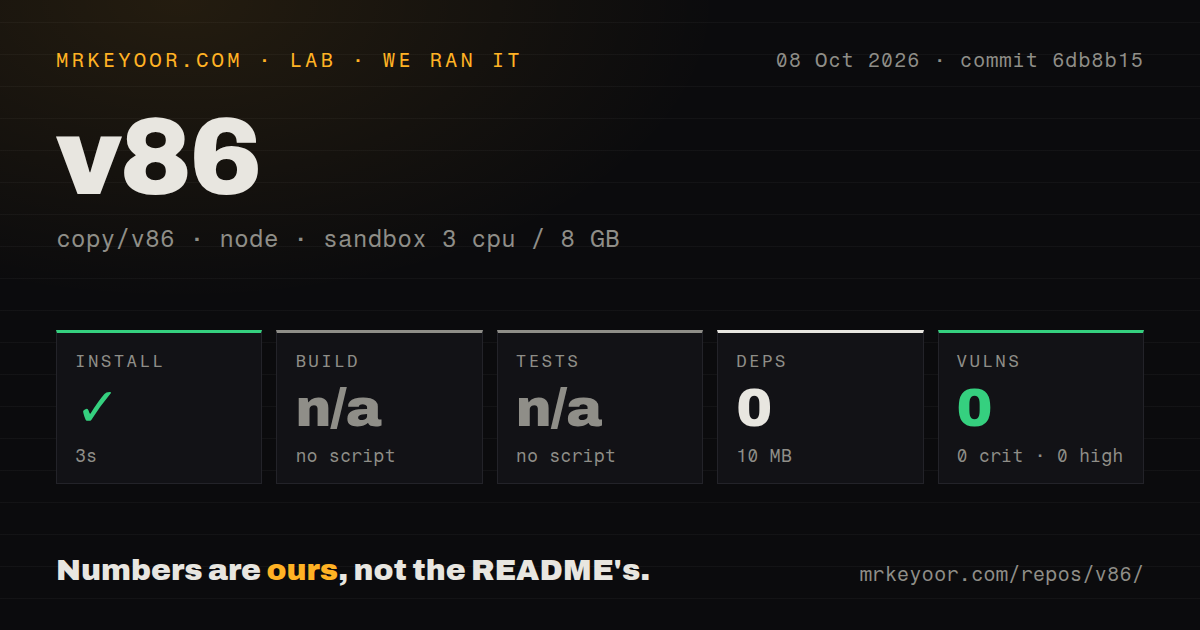
Our run used commit e02816a in an unprivileged Node 22 container with 3 CPUs and 8 GB of RAM. The repository held 591 files, about 168,786 lines of source, and occupied 6.8 MB when checked out. The ecosystem install succeeded in 12 seconds, installed 0 packages, and used 10 MB on disk. npm audit found 0 known vulnerabilities across all severity levels.
Our runner found no build script or target and no test script or target, so it skipped both steps. That is not evidence that v86 fails to build, and it is not a test pass. It means the standard Node-oriented path did not exercise the README's Make-based build or tests directory. We measured 1 CI workflow, no root Dockerfile signal, and no executed test count.
Its guest catalog is the strongest sales pitch
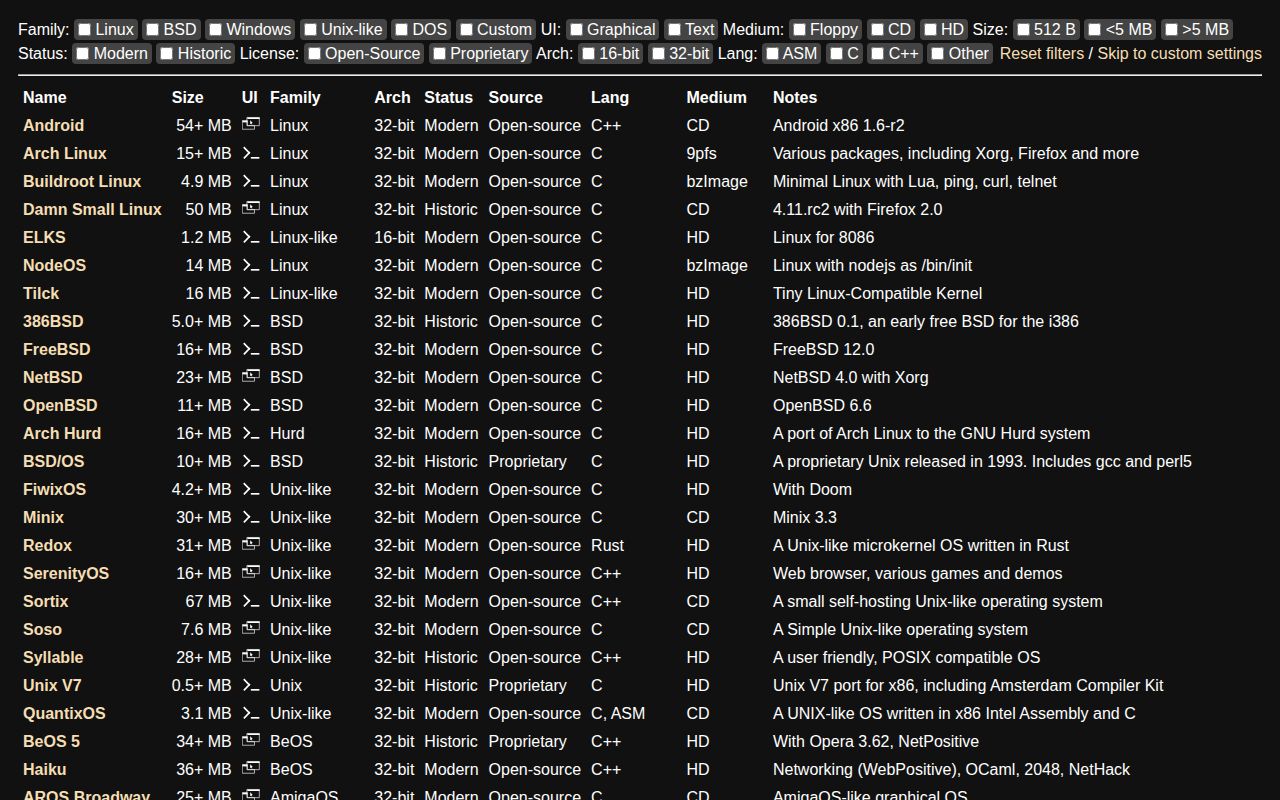
The ready-made demos cover more than 20 named systems, including Arch Linux, FreeDOS, Windows 95, Windows 98, Windows 2000, ReactOS, FreeBSD, OpenBSD, Haiku, 9front, and QNX. That range helps classrooms, preservation sites, and bug reproductions because a visitor can start from a known profile rather than assemble every image and boot parameter.
Compatibility is described with useful specificity. Linux works within the 32-bit ceiling; Arch Linux 32 and Alpine have documented image paths, while Ubuntu-family support is tied to releases that retained i386. Windows versions from 1 through 2000 are reasonable fits, while XP, Vista, and 8 work only under certain conditions. OpenBSD needs special boot options, and NetBSD needs a custom kernel. Those caveats are more credible than a flat logo wall.
The limits are architectural, not cosmetic
v86 lacks 64-bit extensions and multicore guests. It also omits task gates, protected-mode far calls, parts of 16-bit protected mode, single stepping through trap flags or debug registers, and some floating-point and SSE exceptions. Its FPU uses Berkeley SoftFloat for precision at a speed cost, while trigonometric and logarithmic operations use 64-bit floating-point calculations and may be less precise.
Some device support is partial: APIC support is incomplete, the PCI bus is unfinished, and not every device uses it. Plan 9 and OS/2 are explicitly listed as not working. A browser emulator should therefore be judged by whether its exact guest and workload work, not by the length of its 20-plus-profile demo menu.
Source builds demand a systems toolchain
The README requires make, Rust with the wasm32-unknown-unknown target, compatible clang, and recent Node.js; it names Node 24.16 as known working. Java supports the optimized Closure Compiler path but is unnecessary for debug.html. Full testing adds nasm, gdb, qemu-system, gcc, libc-i386, and rustfmt. That is reasonable for an emulator, but much heavier than our 12-second package step suggests.
Once prepared, developers get several practical entry points. make produces debug.html, make all produces index.html, and make run serves assets fetched over XHR. Websites can embed libv86.js, while Vite, React, Next, and Webpack projects can use the official v86 npm package. The README says publishing runs through GitHub Actions with provenance on pushes to master, a useful supply-chain detail despite the missing release listing.
Activity is healthy, release signaling is less clear
The repository was pushed on the review date and has 23,450 stars, evidence that it remains visible and actively changed. Its 112 open issues show a meaningful backlog, although the count cannot reveal response quality. No latest release is listed in the supplied data. That makes version selection harder, but a same-day push means sparse release metadata is not evidence of abandonment.
Documentation is a strength at this 168,786-line scale. Separate guides cover internals, networking, modem networking, 9p filesystems, profiling, and several guest families. The project offers a Docker build route and a test-image Dockerfile path, even though our automated scan found no root Dockerfile. These focused guides are more useful than one oversized setup page.
It belongs at the interactive edge of a stack
Use v86 as a client-side experience behind a conventional web application: the site handles content, access, and image distribution, while the emulator runs a chosen 32-bit guest in the visitor's browser. It is compelling for reproducible demonstrations, old software access, or hobby OS consoles. Treat disk images and networking as application concerns, and test the exact guest profile.
If browser delivery is unnecessary, QEMU is the stronger default for native virtualization and modern guest breadth; DOSBox Staging is more focused for local DOS software; PCjs suits curated computing-history exhibits. v86 earns its place when a URL must become the computer. Its 12-second ecosystem setup looked clean in our lab, but adoption still requires the documented native build and project-specific tests our runner did not execute.