V8 is infrastructure, not an ordinary JavaScript dependency
V8 is Google's open-source implementation of JavaScript, written in C++ around the ECMAScript standard in ECMA-262. It runs JavaScript inside Chromium, but can also run standalone or be embedded into another C++ application. That makes it a compiler and virtual-machine subsystem, not a library an application developer casually adds.
The scale reinforces that distinction. Our checkout contained 19,640 files, about 3,326,381 lines of source, and occupied 155 MB. Teams considering V8 should expect a large systems project with its own tools, conventions, dependencies, and release practices, not a tiny interpreter with a narrow API surface.
Our measured build passed, but the test command exercised nothing
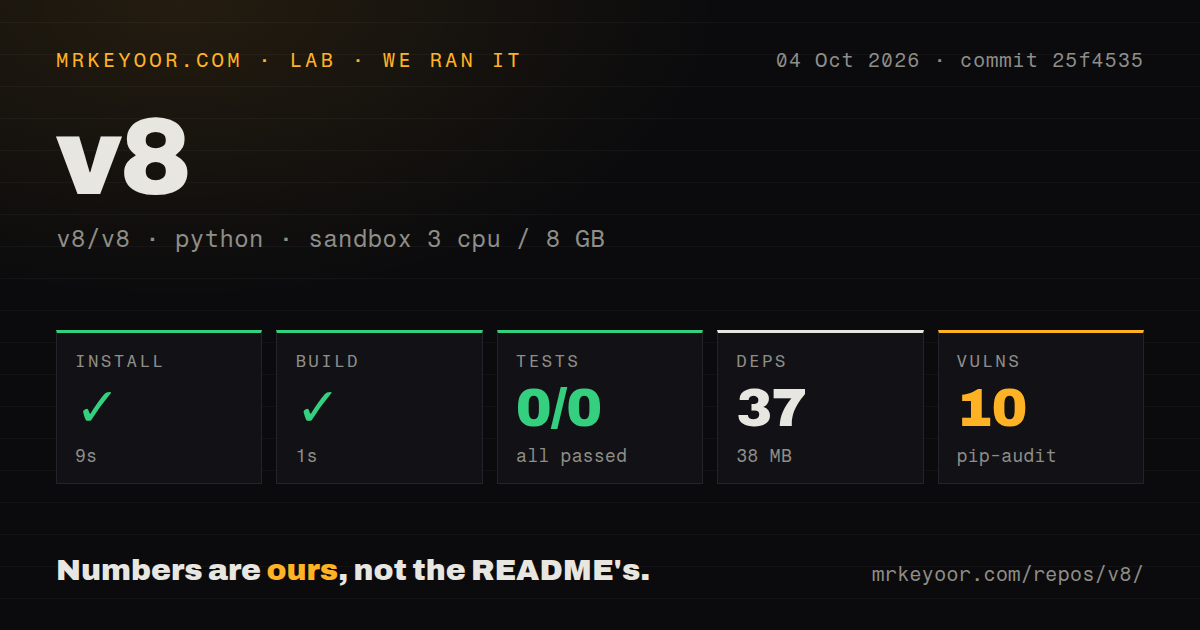
In our sandbox run, the detected Python project lived under ./bazel/. Installation succeeded in 16 seconds, adding 37 packages and consuming 38 MB on disk. The build then succeeded in 2 seconds. Those results describe that detected subproject, not a complete compilation of the V8 C++ engine. Treating them as an engine build benchmark would be misleading.
The test step failed after 5 seconds with exit code 5. Pytest reported no tests ran in 0.00s, leaving the result at 0 passed and 0 failed out of 0. The log does not establish why no tests were collected, so we will not guess. It does establish that this path provided no test validation. A tests directory exists, yet the harness did not execute a suite.
The dependency audit found 5 known vulnerabilities among the installed Python packages. That result belongs to the measured ./bazel/ environment, so adopters should inspect the affected packages before drawing a broader conclusion. We also found 0 CI workflow files and no Dockerfile. This only means conventional GitHub Actions and container onboarding were absent from the signals our harness checked.
The source and integration story are unusually credible
The clearest strength is purpose. V8 implements ECMAScript, runs inside Chromium, and supports standalone or embedded C++ use. For browser makers, runtime builders, developer-tool vendors, and applications that genuinely need an embedded JavaScript environment, that combination matters more than a checklist of peripheral features.
Development is visibly active. The repository was pushed on 2026-08-30, the day of our review, and the supplied snapshot lists 18 open issues alongside 25,213 stars. Stars are not a quality guarantee, and issue counts can reflect repository-specific tracking, but the recent push plus substantial adoption is a healthy signal. There is no latest release listed, so adopters should follow the documented branch and update workflow rather than expect GitHub Releases to tell the whole story.
The README is concise but practical. It identifies the language standard, implementation language, Chromium relationship, embedding option, project documentation, contribution guide, and commands needed to obtain the full source tree. It also explains how to fetch branch heads and tags. Most operational detail necessarily lives in the linked V8 documentation.
Setup demands Chromium tooling and disciplined updates
The biggest rough edge is onboarding. The documented path starts by checking out depot_tools, then running fetch v8, rather than cloning the repository and invoking a familiar package-manager command. Staying current requires git pull origin and gclient sync. V8's Chromium-centered dependency machinery may be unfamiliar to a general C++ team.
At roughly 3.3 million source lines, understanding modifications, debugging integration failures, and carrying private patches can be expensive. The supplied metadata reports the license as NOASSERTION. That is not proof that the source lacks licensing terms, but a team cannot rely on this metadata field for compliance review. Verify the actual license and third-party notices before distribution.
The README does not promise a one-command container environment, and our scan found no Dockerfile. That is reasonable for a low-level engine with specialized platform builds, but it shifts reproducibility work onto adopters. The failed 0-test run shows the danger: generic automation can report successful setup and build without reaching the engine's real validation workflow. Use the official testing documentation, and execute JavaScript through your actual embedding boundary.
It belongs deep inside a runtime or product
V8 fits at the execution layer of a browser, server runtime, desktop application, or developer tool. A real stack would place product code and a narrow native interface above it, with sandboxing, resource limits, update policy, and observability designed around the host application's threat model. Treat the engine as critical infrastructure because it processes executable code and changes frequently.
For teams that do not need Chromium's engine, QuickJS is the approachable comparison when small size and simpler embedding dominate. JavaScriptCore makes sense for products aligned with WebKit, while SpiderMonkey is worth evaluating when Mozilla's architecture fits better. None is a decision to make from star counts. Compare platform integration, standards requirements, security maintenance capacity, footprint, and the cost of keeping native bindings current.
V8 is an easy recommendation for organizations that need the engine Chromium trusts and can support its workflow. It is a poor default for ordinary application scripting, teaching, or a small utility that merely needs JavaScript evaluation. The technology is mature; the adoption burden is real. Choose it for engine and ecosystem fit, not because the 2-second subproject build looked trivial.