SOPS keeps secret values encrypted while Git keeps useful structure
SOPS edits YAML, JSON, ENV, INI, and binary files, wrapping each file's data key for one or more configured recipients. For structured formats, field names remain readable while values are encrypted. A code reviewer can see that a database password changed without seeing the password itself, and two branches can often merge changes to different values. Binary mode encrypts the file as one blob, so it does not offer the same diff behavior.
The repository we tested was compact: 156 files, about 27,964 source lines, and 1.1 MB at commit e3f6086. Its supported recipients span age, PGP, AWS KMS, Google Cloud KMS, Azure Key Vault, HuaweiCloud KMS, and HashiCorp Vault or OpenBao paths. That range lets a team use local keys for development, cloud identities in deployment, and more than one method for recovery.
SOPS is an encrypted-file workflow, not a secret server
There is no SOPS daemon to keep available. A user runs sops edit, the tool decrypts into an editor, then encrypts the modified data when that editor exits. Commands can decrypt to standard output for another process, update recipients, rotate a file's data key, or publish values. This is a good match for GitOps because the encrypted artifact is the versioned source and normal review still sees its shape.
The distinction matters during system design. Installing 366 Go packages in our lab built the tool, but it did not create identity, audit policy, rotation schedules, or a delivery channel. A KMS-backed setup depends on cloud credentials and permissions. An age setup depends on distributing private identities safely. PGP support remains available, though the security guide calls out private-key handling and weak-key risk. SOPS moves secret storage into encrypted files; it does not remove key management.
What happened when we ran it
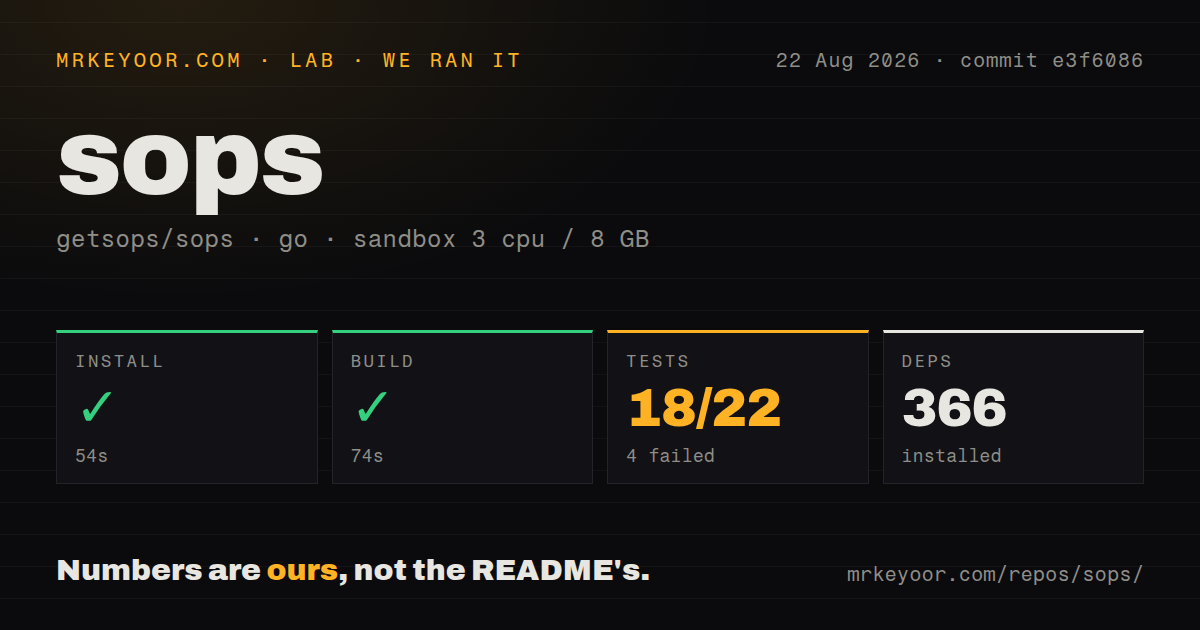
Our install finished in 54 seconds, with 366 packages installed in an unprivileged golang:1.24-bookworm container. The build succeeded in 74 seconds. We then ran the repository tests with 3 CPUs, 8 GB of RAM, and no secrets. Tests stopped with exit code 1 after 31 seconds: 18 packages passed and 4 failed out of 22.
The final log lines name a failure in pgp/keysource_test.go on a byte-array input. Packages for Shamir handling and the dotenv, INI, JSON, and YAML stores passed in the visible tail. That evidence is enough to say the PGP package failed in our run, but it does not reveal why or justify blaming missing GnuPG, container permissions, or a code regression. The checkout had 5 workflow files, no Dockerfile, and no top-level tests directory.
Configuration rules make access repeatable and easy to misread
A repository-level .sops.yaml can select recipients by filename pattern. Creation rules are evaluated in order, and the first matching rule wins. That lets development and production files use different KMS keys, age recipients, or PGP fingerprints without repeating long command arguments. The file must use the exact .sops.yaml name for automatic discovery; another name requires an explicit --config argument.
Our 31-second failing test run does not change a separate operational gotcha in the docs: SOPS searches for .sops.yaml from the current working directory, not from the encrypted file's directory. A command launched from the wrong directory can therefore select different configuration than an engineer expects. CI scripts should set their working directory, pass configuration explicitly when ambiguity exists, and test recipient metadata before merging newly encrypted files.
Rotation requires the right order after a key compromise
SOPS stores recipient metadata inside each encrypted file, so a user with a valid identity and permission can discover how to unwrap its data key. The updatekeys command adds or removes recipients according to .sops.yaml; rotate generates a fresh data key and re-encrypts values. The project recommends updatekeys for recipient changes and periodic data-key rotation rather than direct metadata editing.
After a recipient is compromised, the documented order is specific: remove that recipient from configuration, update each encrypted file's recipients, rotate the data key, commit the changed ciphertext, and only then rotate the passwords or API keys stored inside. Version v3.13.3 was published on July 23, 2026, and included a fix that brought decrypted sequence comments into the integrity check. A current open issue reports a related MAC mismatch involving encrypted sequence comments, so comment-sensitive YAML deserves a regression case.
Current maintenance and signed releases support careful adoption
The repository was pushed on August 24, 2026, and GitHub listed 443 open issues and pull requests together. Recent activity covered Vault or OpenBao compatibility, certificate revocation lists, AWS profile handling, documentation navigation, and release immutability. The project moved from Mozilla to the CNCF as a sandbox project in 2023 and uses MPL-2.0. Those are useful governance facts, while the dated push and issue activity are better evidence of present maintenance.
Our 74-second successful build and 4 failing test packages produce a mixed contributor verdict, not a reason to reject the released binary. SOPS is the right tool when Git review, structured diffs, and several recipient types are central requirements. Use age alone for simple whole-file encryption. Choose Sealed Secrets for Kubernetes-only decryption, or External Secrets Operator when an external vault should remain the authoritative store.