Sniffnet makes one computer's traffic understandable
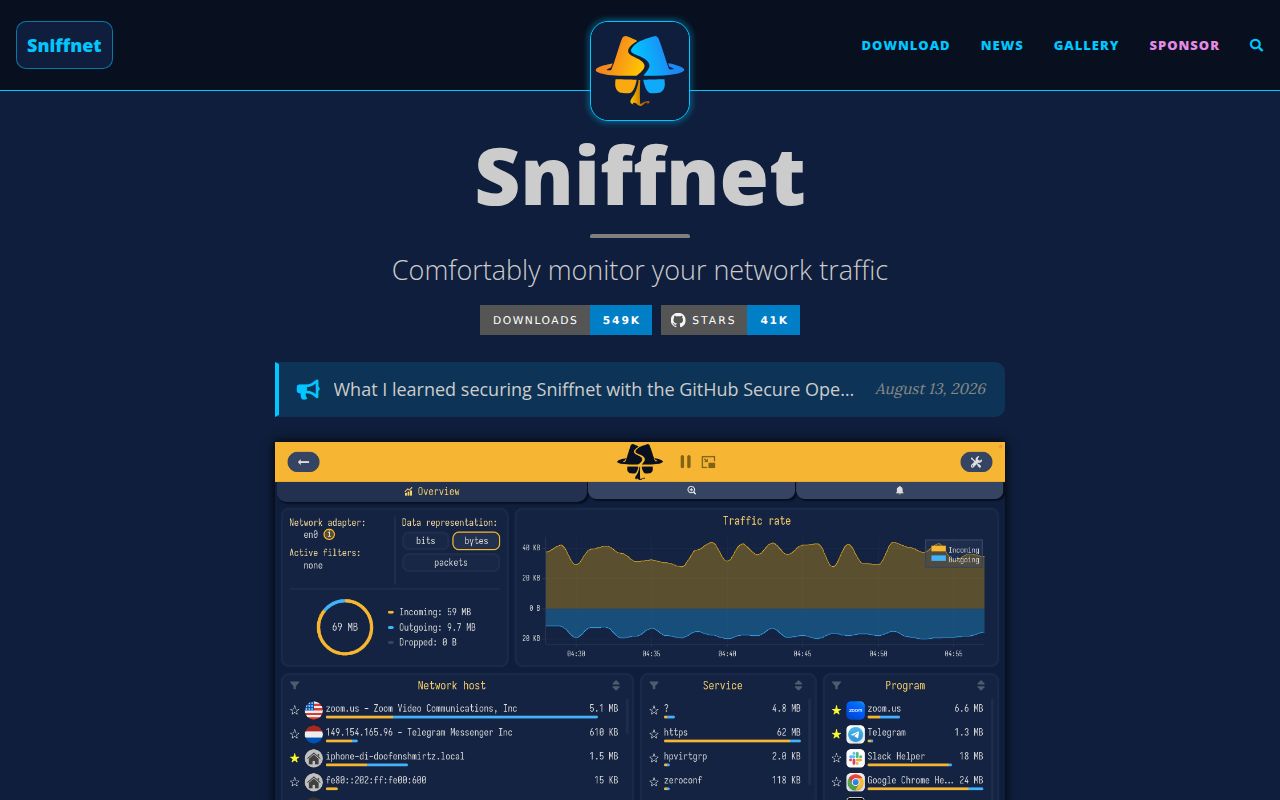
Sniffnet watches a chosen network adapter and organizes what it sees into connections, hosts, services, programs, charts, and notifications. It can import and export PCAP captures, resolve domains and autonomous system numbers, identify local traffic, and attach location data to remote hosts. The interface is meant for a person who wants an answer such as which application contacted this address, rather than a full protocol decoder.
The project recognizes more than 6,000 services, protocols, trojans, and worms. That catalog helps label traffic, but a label is not proof that a process is malicious. Imported IP blacklists similarly call attention to matching addresses; they do not turn Sniffnet into a firewall. Issue 863 remains an open request for blocking unwanted traffic. Use the alerts as leads to investigate, not automatic security verdicts.
Packaged downloads cover the major desktop platforms
Release downloads include Windows installers for x64, ARM64, and x86, macOS images for Intel and Apple silicon, plus DEB, RPM, and AppImage choices across several Linux architectures. That is a far easier route for ordinary use than compiling the 28,822 lines of Rust source. Version 1.5.1 was released on July 22, 2026, with connection latency, two more translations, CIDR blacklist support, and fixes for older Linux distributions.
Native capture access still matters after installation. Windows users must install Npcap in WinPcap-compatible mode. On Linux, the wiki tells users to grant cap_net_raw and cap_net_admin to the executable or run it with sudo; AppImage users are specifically told to use elevated execution. macOS has the needed system dependency but also requires administrator privileges. Those permissions are inherent to live packet capture, and teams should decide whether they are acceptable on managed workstations.
What happened when we ran it
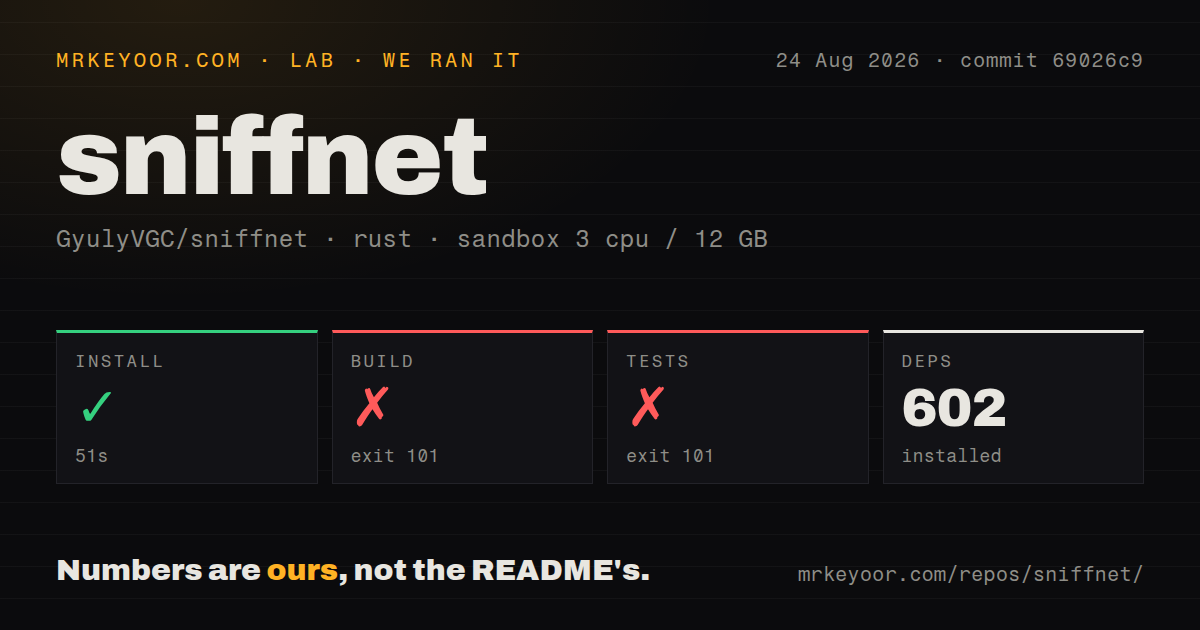
Our sandbox cloned commit 69026c9 into a fresh, unprivileged Debian container with 3 CPUs, 12 GB of RAM, and no secrets. The 114 MB checkout contained 545 files and about 28,822 lines of source. We found 5 CI workflow files and a Dockerfile, but no top-level tests directory.
Dependency installation succeeded in 51 seconds and installed 602 Rust packages. The build ran for 249 seconds, then failed with exit code 101. The linker message was specific: rust-lld could not find the library -lpcap, and Cargo therefore could not compile the Sniffnet binary.
The test command failed after 40 seconds with the same exit code. Its linker also could not find -lpcap, so Cargo could not compile the Sniffnet test binary. That log does not tell us whether any test would fail after linking. It tells us that a fresh Debian source environment needs the native packet-capture library before either build or test verification can begin.
The wiki lists libpcap-dev for Debian-based development, along with ALSA, Fontconfig, and GTK 3 development packages. The README links to that page from the download section and warns users to install required dependencies. The guidance exists, but cargo alone is not a complete setup path.
The friendly interface gives up forensic depth
Filters, favorites, thumbnail mode, and desktop notifications make Sniffnet useful as an everyday observer. A developer can watch a new application during setup, see its remote hosts, save a suspicious endpoint, and export a capture for someone else. Release 1.5.1 also added connection latency and improved reverse DNS lookup behavior, two details that make the connection list more useful during routine troubleshooting.
Wireshark remains the better instrument when the question lives inside a packet. Sniffnet's README focuses on connection inspection, traffic statistics, service recognition, and host metadata. It does not promise Wireshark's protocol field tree, stream reconstruction, or huge filter language. The simpler view is the reason to choose it, provided the simpler view answers the question.
macOS and integration coverage need caution
Two current macOS reports affect ordinary desktop actions. Issue 197 ties the administrator wrapper to trouble closing from the dock, using the clipboard, minimizing, and maximizing. Issue 878 reports that opening the PCAP import dialog closed the app on an M4 MacBook. These are reports, not proof that every macOS installation fails, but they touch basic workflows and deserve a trial on the exact machines being deployed.
Issue 1038 is unusually candid about testing. It says unit tests cover some important behavior, while integration testing of packet analysis and the Iced graphical interface remains inadequate. The proposed coverage includes crafted PCAP input, traffic statistics, filters, configuration compatibility, headless interface interactions, and screenshot checks. Our run could not reach those tests because libpcap was absent, so it adds no evidence either way.
Project activity is healthy. GitHub recorded a push on August 25, 2026, with 65 issues and pull requests open together. Recent work includes dependency updates, VLAN parsing, IGMP support, translation changes, and discussion of suspicious-connection identification. The July release also fixed a reverse DNS stall and Linux package compatibility. This is an active application with a visible backlog, including some desktop behavior that matters.
Sniffnet is easiest to recommend as a readable local traffic monitor. Install the release, grant capture access deliberately, and test PCAP import plus normal window controls on the target operating system. If the task turns into enforcement or packet forensics, move to OpenSnitch or Wireshark instead of forcing Sniffnet beyond its stated job.