Decide which sensing path you need
RuView's published pose benchmark and its live single-ESP32 pose path have different evidence behind them. That distinction matters more than a working skeleton visualization when deciding whether to adopt the project.
The README describes a workspace for CSI capture, sensing models, local automation and guided operation. It says advanced sensing needs CSI-capable hardware, with ESP32 and research NIC options. Consumer laptops are described as an RSSI-only route for coarse presence and motion. The Docker quick start uses simulated data, so it can help evaluate the interface without establishing live sensing accuracy.
What our recorded run established
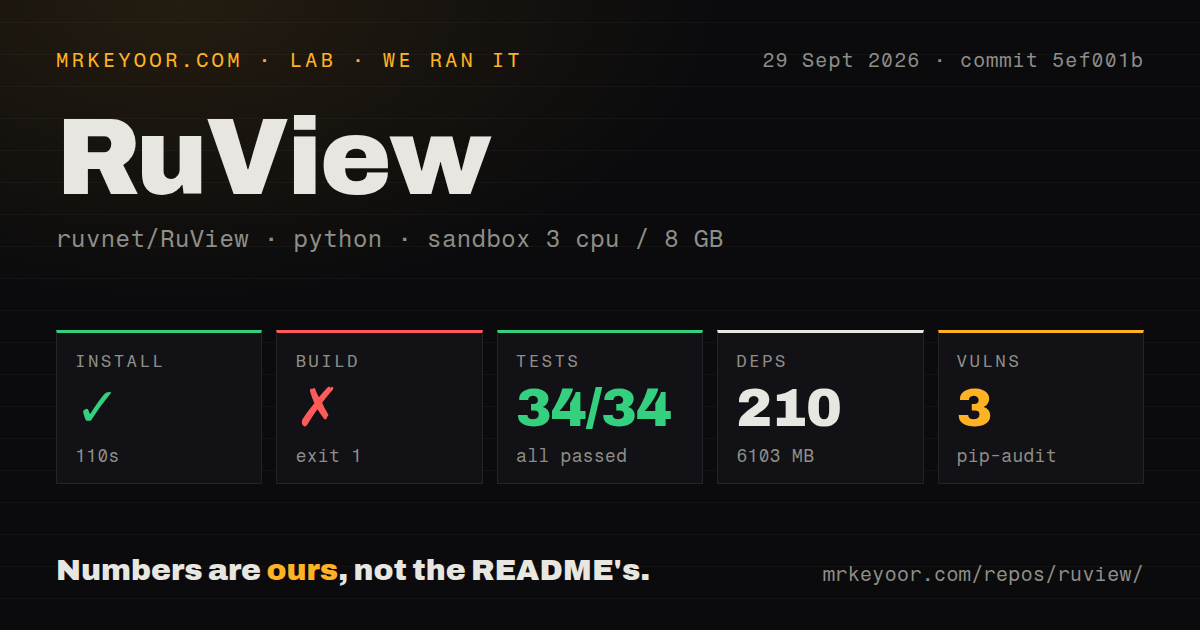
Our run was recorded on September 29, 2026 at 04:14:01.050 UTC against commit 5ef001b4fef3e08433043ebd248e6121f1221528. It used a container configured with 3 CPUs and 8 GB of memory; the raw logs report Python 3.12.12.
The dependency-install step completed in 110 seconds. The record lists 210 dependencies and a 6,103 MB install footprint. Completion of that step does not prove that an application or CLI was installed and usable. There is no installed-binary check or measured live sensing workload in this record.
The build step exited 1 after approximately 9 seconds. Its saved tail is empty. We cannot identify the failing command, diagnose a missing dependency or generalize this failure to other installation routes.
The test command exited 1 after approximately 15 seconds. Pytest reported 34 passed and 0 failed, with the visible collection running tests/test_invariant_Cargo.py. Coverage warned that module src was never imported and no data was collected. Reported coverage was 0.00%, below the configured 100.00% minimum. The passing assertions and the failed command are separate findings. Neither the parser summary nor this log tail establishes exhaustive unique test coverage across RuView.
Pip-audit recorded 3 known advisories across 2 packages. The supplied record does not identify the advisories, affected versions or number of packages scanned. Audit coverage is unknown, and this result does not establish the security of a deployment.
The checkout scan recorded 3,832 files, approximately 632,255 source lines and 116.3 MB. It detected 33 CI workflow files and a tests directory, but no Dockerfile or Compose configuration. These are observations about that checkout and detector, not a current inventory of every deployment option.
Pose benchmarks do not validate the live ESP32 path
The README reports 82.69% torso-PCK@20 for its separate MM-Fi pose model on the random_split protocol. This is a project-reported benchmark, not a result from our run, and the README says live ESP32 compatibility has not been established for that model.
For the committed on-device pose checkpoint, the README reports 3.0% PCK@20 on a 217-sample holdout, below its target of at least 35%. It also says the runtime path remains a centered-skeleton stub returning confidence=0, with the weights not yet wired in. A checkpoint evaluation is therefore not evidence that this runtime produces those evaluated predictions.
The README also describes a dual-modal demo in which the webcam supplies ground-truth pose. When evaluating a demonstration, check which input actually drives the output before treating it as camera-free CSI evidence.
Source fixes and published packages differ
Issue 2057 originally reported heart-rate problems in ruview / wifi-densepose 2.0.0a1 on synthetic inputs, including breathing-only input producing 120 BPM. An October 22, 2026 contributor comment reports that both named defects are fixed in the source tree but remain in the published wheel discussed there. The comment dates the empty-weights fix to July 27 and the respiratory-rejection fix to September 30. Release v2940 lists the latter filter change.
The contributor's comparison also reports a remaining limitation: one synthetic input still produces a BPM number with low confidence and an Unreliable status in the current tree. These are upstream reports and comparisons, not tests we performed. They support checking the exact installed artifact and interpreting status and confidence alongside any displayed BPM number. They do not establish clinical accuracy.
Issue 2058 likewise contains later developments beyond the initial fluctuating-count report. A maintainer described state-consistency fixes and synthetic regression tests. An October 23 contributor comparison at main commit fefb0f91, using one ESP32-S3 node with firmware 0.8.15, reported that a count dwell reduced changes during an empty-room window. The contributor explicitly states that the count can still settle on a non-zero value because the underlying activity score is not an occupancy estimator. A steadier count can still be wrong.
Model loading has its own boundary
The README and issue 1522 document a NUL-padded header in the published model.safetensors file that the reference safetensors loader rejects. The issue identifies three padding bytes and describes intact tensor data; it is a serialization defect rather than evidence of corrupted weights.
The README says csi-embed-v2.safetensors loads normally and that the sensing server accepts native RVF while converting safetensors or JSONL in memory. Those alternatives address loading routes. They do not supply a matching pose decoder or establish end-to-end sensing accuracy.
Choose a small evaluation before wiring automation
The README advertises 21 Home Assistant entities per node, including inferred states such as possible distress, bed exit and elevated fall risk. These are project-described outputs. Their availability does not validate the events they label, and our container run did not test them.
Begin with one low-stakes question, such as whether a controlled room is occupied. Pin the server commit, package version, firmware and model artifact. Compare timestamped output with known room conditions, retain source and confidence information, and distinguish simulated input from live CSI. If the task is simply CSI acquisition, ESP-CSI or Nexmon CSI may be a more direct starting point, depending on your hardware.
How to read the scores
These are editorial assessments of the supplied evidence, not benchmark scores. The scale is 1 for substantial obstacles or missing validation, 2 for limited readiness, 3 for useful evidence with material gaps, 4 for strong evidence across the intended scope and 5 for comprehensive corroborated evidence. Setup considers the recorded commands and hardware work; docs considers actionable instructions and disclosures; community considers visible technical exchanges rather than star counts; maturity considers validation of the live paths discussed here. Unknown adoption, compatibility and audit coverage earn no positive credit.