Should you evaluate RustDesk for self-hosted support?
RustDesk lets you choose who operates its rendezvous and relay infrastructure. Its README says you can use the project's service, set up your own, or write a compatible server. That is a concrete reason to evaluate it if control over connection infrastructure matters to your organization.
The source tree describes screen capture, keyboard and mouse control, clipboard handling, file-transfer utilities and direct or relayed peer connections. Those descriptions establish the intended capabilities. Our sandbox run did not exercise them.
For a support team, the next useful step is a client-and-server pilot on representative endpoints. For a contributor, it is a platform-specific build with the documented native prerequisites. Those are different evaluations, and this review's measurements cover only an incomplete source-build attempt.
What our recorded run established
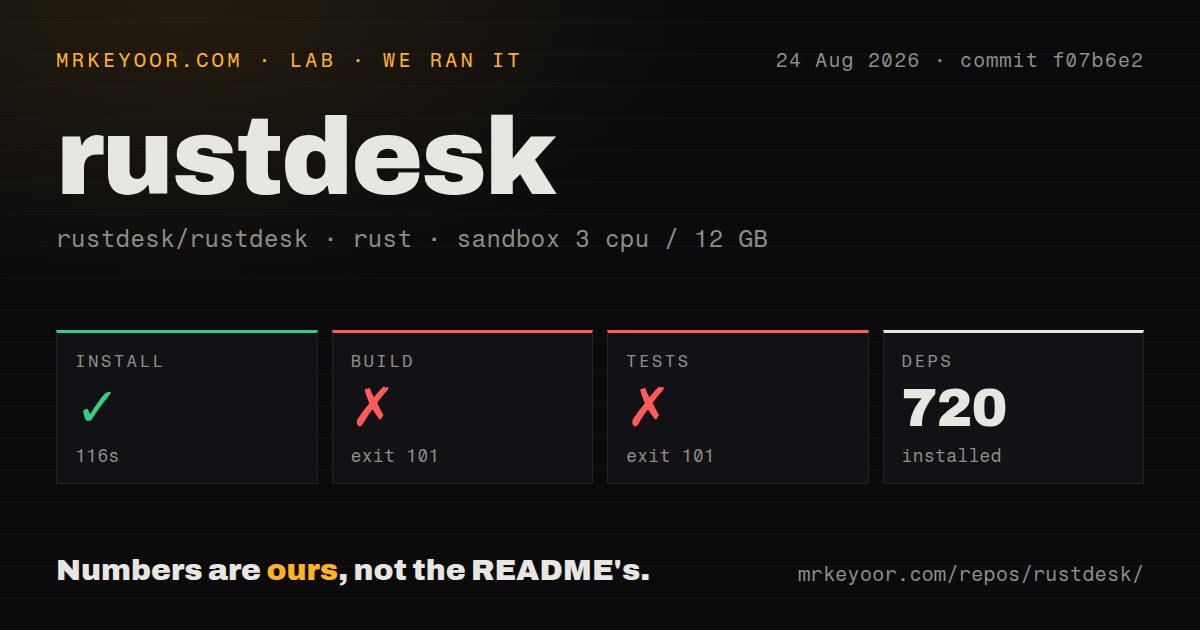
Our stored run began on 24 August 2026 at 21:00:06.829 UTC, using commit f07b6e2338b03ef24e88d5063747da616c2c9f1c. The recorded configuration was 3 CPUs, 12 GB memory and image lab-rust:1. We have not performed a new run for this correction.
| Stage | Recorded result | What it establishes |
|---|---|---|
| Dependency download | Exit 0 after 115.836 seconds, rounded to 116 seconds | The download step completed. The parser recorded 720 dependencies, without exhaustive unique-count reconciliation. |
| Build command | Exit 101 after 164.938 seconds, rounded to 165 seconds | Compilation stopped at native GStreamer discovery. |
| Test command | Exit 101 after 4.793 seconds, rounded to 5 seconds | Dependency compilation blocked the attempt before any individual test results appeared. |
Both unsuccessful commands reached gstreamer-sys v0.9.1. Their logs say pkg-config could not find gstreamer-1.0, its .pc file needed to be discoverable, and PKG_CONFIG_PATH was unset. This leaves open whether the library was absent or installed outside the search path. It does not identify a RustDesk runtime defect.
The dependency step was not an application installation check. We did not launch an installed binary, connect two machines, measure latency or transfer speed, verify unattended access, or audit security. There is no passing or failing test-case count to report.
The checkout summary recorded 959 files, approximately 181,855 source lines and 16.5 MB. It detected 11 CI workflows and a Dockerfile, but no tests directory. Directory detection is not a test inventory. The harness recorded 299 seconds overall, including time beyond the three listed steps.
The README documents the missing dependency layer
The Linux build instructions list GStreamer development packages, including libgstreamer1.0-dev and libgstreamer-plugins-base1.0-dev for the documented Ubuntu/Debian path. They also list compilers, GTK, audio libraries, X11 components, Clang and CMake. Rust dependencies alone do not satisfy that checklist.
The README uses vcpkg for libvpx, libyuv, Opus and AOM, with a documented vcpkg checkout of 2023.04.15. Its introductory GUI build tutorial covers Sciter, which it marks deprecated; it directs Flutter builders to CI. A contributor should identify the intended interface and target platform before following the tutorial's cargo run path.
The Docker instructions describe a build container with repository and Cargo-cache mounts. They say the executable is produced under target/debug/rustdesk or target/release/rustdesk, and should run from the repository root so resources can be found. Other Cargo subcommands such as install and run are unsupported through that container method. We did not execute this Docker route.
Published downloads and source builds answer different needs
The supplied 1.4.9 release page lists Windows, Ubuntu, Mac, Android, Flatpak, iOS and Web entries, with availability varying by architecture and distribution method. Use that page to select a published download for an end-user pilot. Our source-build result says nothing about whether those downloads install successfully on your devices, and we did not verify their signatures.
Before a rollout, test the operations your team needs: reconnecting, locked or sleeping hosts, monitor changes, clipboard and file transfer, and unattended access where required. These are proposed acceptance checks, not completed tests or measured compatibility claims.
Read the Wayland reports through their later updates
The August reports are useful test cases, but their timelines change the conclusion.
Issue 15952 reported high CPU use on Hyprland with a current-main build. A contributor explained that the affected path predated the DRM change blamed in the initial report and was not restricted to that feature. The reporter subsequently described improvement, and the issue was closed as completed through PR 15978 on 27 August 2026. It should not be presented as an unresolved preview-DRM defect affecting every RustDesk version.
Issue 15973 concerns a pending screencast portal request blocking other connections. On 13 October 2026, the owner distinguished that confirmed blocking path from a separate DRM display-wake and recovery question whose hardware-specific cause was not established. The timeline then records commit d011aa3 on 14 October with a fix message for the portal stall. That is evidence of a code change, not our verification of a released package or proof that every Wayland wake problem is resolved.
Our earlier Wayland announcement coverage addresses the feature announcement. For this deployment decision, check the exact client build, compositor, graphics drivers and locked-screen behavior you intend to use.
What self-hosting leaves you responsible for
Choosing your own rendezvous and relay infrastructure gives you an operational choice. The README's statement that users have no security concerns is a project claim, not a result of our review. The same README warns against unauthorized access and other misuse.
Before deployment, define endpoint authorization, updates, network exposure and incident handling. The recorded license signal identifies the client as AGPL-3.0. Confirm the terms and management capabilities of the server edition you intend to deploy separately; the supplied extracts do not establish Server Pro feature boundaries.
How to read the scores
These are editorial ratings on a five-point scale, not benchmark results. A 1 means the supplied evidence gives little basis for adoption in that category; 2 means substantial preparation or evidence gaps remain; 3 means there is a useful documented basis with important limits; 4 requires broader corroboration; and 5 requires strong evidence across the category. Unknown adoption and untested compatibility do not earn a high score. Setup ease here concerns the source-build path, not published-binary installation. Community concerns visible participation, not popularity or support response times.
The source-build prerequisite burden supports setup ease at 2/5. The documented native packages and build routes support docs at 3/5, with the Sciter-versus-Flutter distinction requiring care. Reporter, contributor and maintainer exchanges support community at 3/5 without establishing adoption or service levels. Published 1.4.9 downloads and visible maintenance support maturity at 3/5, while runtime reliability remains unmeasured here.
Two alternatives for browser administration
MeshCentral describes a self-hosted web server with agents on managed computers and browser-based remote desktop, terminal and file management. Consider it when that administration model matches your workflow.
Apache Guacamole describes an HTML5 application providing desktop access through remote desktop protocols. Consider it when a web application is the access point you want to deploy. Neither alternative was installed or benchmarked in our run.