raylib makes the game loop visible
raylib opens a window, reads input, draws shapes or models, plays audio, and closes cleanly through a small C API. A basic program fits on one screen because the library hides platform plumbing without hiding the loop itself. That is the appeal: learners see when drawing begins and ends, while experienced developers get quick access to graphics without adopting an editor's project model.
Version 6.0 exposes about 600 API functions and ships more than 215 examples according to its release notes. It covers 2D and 3D drawing, models, shaders, materials, skeletal animation, sound, streamed audio, fonts, compressed textures, virtual reality, and math helpers. The code remains C99, and bindings extend it to more than 70 languages. Those numbers describe a mature teaching library, not a tiny weekend wrapper.
Code-first design is both the feature and the limit
There is no scene editor, inspector, debug button, or visual asset workflow. You write the initialization, update, and drawing code yourself. For a prototype, course, or compact game, that directness keeps cause and effect legible. It also makes source control pleasant because the project is mostly code and ordinary assets rather than opaque editor state.
The same choice becomes costly as content grows. A team must design scene organization, entity behavior, UI structure, save data, asset import conventions, and tooling around raylib. Version 6.0 added an examples manager and redesigned build configuration, but those are library-development tools rather than a game editor. If designers need to lay out levels without changing C code, Godot or another editor-led engine will fit better.
The API spans many targets without pretending they are identical
The repository supports Windows, Linux, macOS, Raspberry Pi, Android, HTML5, and other targets. Hardware backends cover several OpenGL and OpenGL ES generations. Version 6.0 also introduced a CPU software renderer, a memory-framebuffer platform, and new direct Win32 and Emscripten backends. The release labels the latter two experimental, a useful warning for teams attracted by their reduced dependencies.
Portability still requires platform work. Window creation, displays, input devices, audio systems, browser constraints, and graphics drivers differ. The 11 CI workflow files in our checkout covered several operating systems and build paths, which is stronger evidence than a single cross-platform claim. It does not eliminate device testing, especially for portrait displays, high-DPI setups, Mali graphics, and the newer backends discussed in current issues.
Text and window limits rule out some products
raylib documents its boundaries unusually plainly. The default has one window and one OpenGL context. Moving or resizing a window can pause the render loop on windowed platforms. Render textures follow OpenGL's vertical orientation, leaving callers to flip them when drawing. These are manageable constraints for many games and awkward foundations for multi-window creative software.
Text is the clearer deal-breaker. The built-in renderer does not support right-to-left layout, ligatures, or emoji, and the README says its font rasterization is lower quality than FreeType, HarfBuzz, or Slug. A 2D game with simple Latin labels may never care. A multilingual productivity interface will care immediately and should budget for a separate text stack or choose another framework.
What happened when we ran it
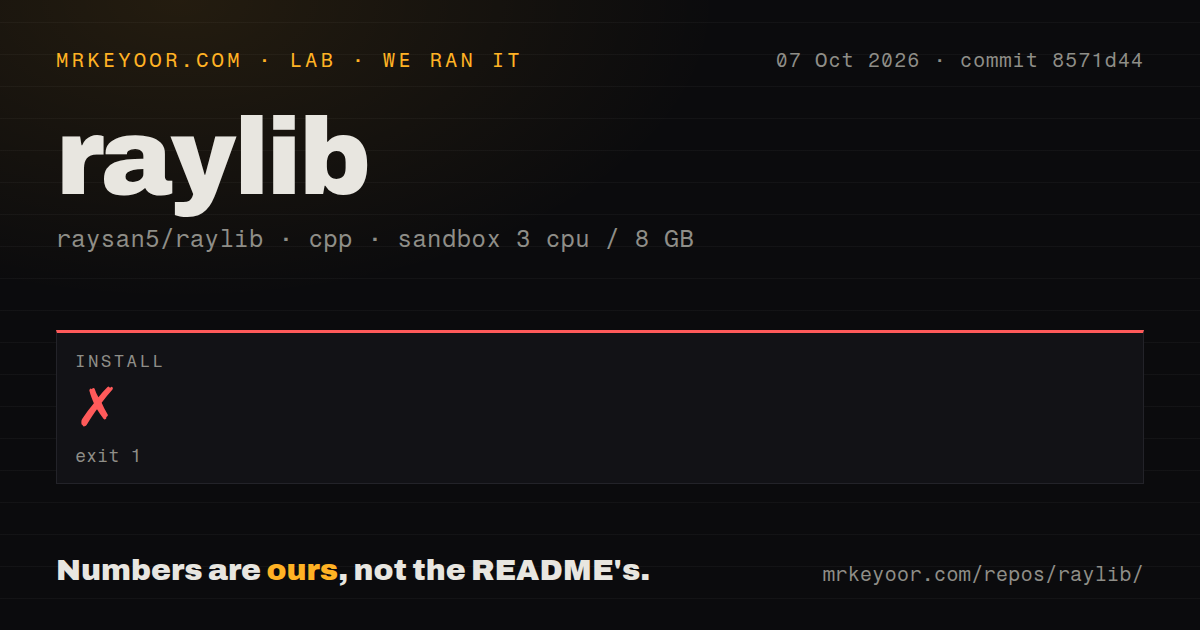
Our sandbox cloned commit 0fb5c98 into an unprivileged Debian container with 3 CPUs and 8 GB of RAM. The checkout contained 1,384 files, about 352,764 lines of source, and occupied 98 MB. CMake began normally, selected raylib's bundled GLFW, enabled X11 support, and stopped after 12 seconds with exit code 1.
The final error was specific: CMake could not find X11_X11_INCLUDE_PATH or X11_X11_LIB. Our run did not compile raylib, so it produced no build result and reached no tests. The repository had no tests directory and no Dockerfile in that checkout. We did count 11 CI workflow files, including platform builds and example builds, but CI presence is not a substitute for a result from our failed local configuration.
This is a setup dependency, not evidence about rendering speed or API quality. It also qualifies the README's statement that required libraries are included. raylib vendors its core third-party libraries, while a desktop Linux build can still need system headers and libraries for the chosen platform backend. The Linux wiki or a distribution package is the correct starting point on a fresh machine.
Twelve years of work show in the examples and release notes
GitHub recorded a push on August 25, 2026, and release 6.0 arrived on April 23. The repository listed 15 open issues and pull requests, with recent reports covering DRM page flips, Mali EGL linking, pixel-font rendering, monitor positioning, and example testing. The last-push date plus that specific issue activity shows active maintenance rather than a release archive left alone.
The documentation favors learning by example. There is no standard API manual, a choice the README acknowledges, but the cheatsheet lists functions and the wiki covers architecture, platforms, CMake, and IDEs. More than 215 examples make discovery easier, though teams building less common targets should expect to consult both wiki pages and source. The zlib license permits closed-source static linking, with bundled dependency licenses documented separately.
raylib is easy to recommend when the point is to write the game rather than operate an engine editor. Its constraints are specific enough to make the decision clean: simple text, one main window, code-owned structure, and platform setup are acceptable. If those assumptions hold, the readable API and deep example set are hard to beat. If they do not, picking a larger engine early will save a custom tooling project later.