Shared context is the reason to evaluate it
QwenPaw's appeal is continuity between interfaces. The README describes the terminal UI as using the same agent, memory, skills, MCP tools, and sessions as the Console and messaging channels. It lists DingTalk, Lark, WeChat, Discord, Telegram, iMessage, and QQ, along with a desktop app for direct access. These are documented capabilities, not workflows verified in our sandbox.
That scope suits someone who wants an assistant to work with files, tools, and scheduled tasks across several places. It also creates configuration work: models need to be selected, channels connected, persistent data backed up, and tool access reviewed. Our evidence does not establish response quality, model speed, or reliable unattended automation.
What our recorded run establishes
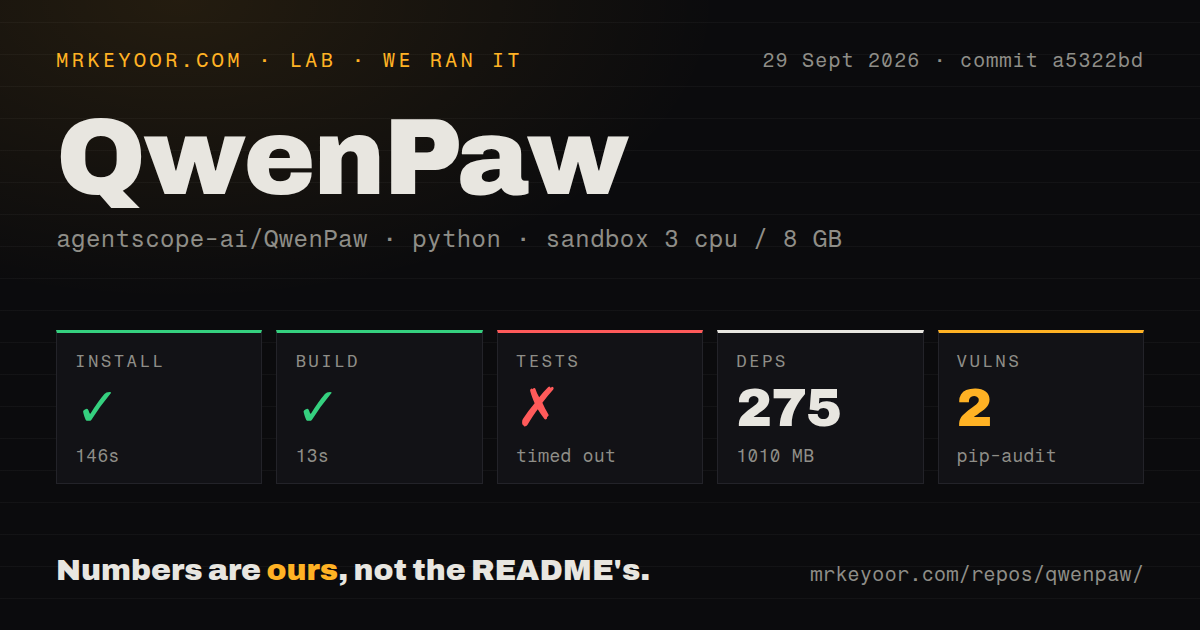
Our run began on September 29, 2026, at 03:44:28.306 UTC, using commit a5322bdf11f6ab0954a2a9dcfe4f2713bee961ee. The install step completed in 146 seconds and the build step in 13 seconds. The dependency record lists 275 packages and 1,010 MB of installed storage. This is a dependency measurement, not runtime RAM use or a model-storage requirement.
The test command ran for 900 seconds before the time limit stopped it with exit 124. The retained output contains F failure markers around 2% progress, as well as passing dots, skipped cases, and an X marker. Later output reaches 4%. The run therefore contains evidence of test failures as well as an incomplete suite. It does not provide the final failure report, identify the failed cases, or establish their causes. We cannot derive an exhaustive pass, fail, or skip count from this tail, and 4% is the displayed progress rather than verified coverage.
The sandbox configuration records 3 CPUs, 8 GB of RAM, and the image ghcr.io/astral-sh/uv:python3.12-bookworm. The actual install tail says it used Python 3.11.2 at /work/home/venv. We do not have interpreter output for every later step.
Pip-audit recorded two advisories affecting one package. The record does not identify the advisories or the total number of packages scanned, so coverage and deployment relevance remain unknown. The dependency count is not an audit coverage count.
The checkout scan recorded 5,933 files, 1,344,278 lines of source, 117.5 MB of repository storage, 35 CI workflow files, a tests directory, and a Compose file. It detected no Dockerfile. Those are scan results for this checkout, not proof of a packaging defect, exhaustive test coverage, or maintenance quality.
The supplied record does not include the exact install, build, and test command text or a standalone installed-binary check. A successful step is not enough to establish that the CLI was installed and usable. No model download, inference workload, channel conversation, or agent-quality benchmark was measured.
Setup decisions the quick start leaves to you
The README's pip route installs the package, initializes defaults, and starts the app on port 8088. It requires Python >= 3.11 and < 3.14. Source installation also requires building the Console frontend and copying its output into the package before installing Python dependencies. The script installer is documented as installing uv, a virtual environment, dependencies, Node.js, and frontend assets; the README warns that restricted networks or corporate firewalls may interfere.
Initialization deserves attention. The README says interactive initialization asks whether to opt in to telemetry, while qwenpaw init --defaults accepts it automatically. It describes collection of version, install method, operating system, Python version, CPU architecture, and GPU availability once per version. Local model execution should not be read as a blanket claim that every configuration makes no outbound requests: cloud providers, connected services, and initialization telemetry have separate behavior.
For Docker, the README documents the published agentscope/qwenpaw image and separate volumes for working data, secrets, and backups. It also points image builders to scripts/README.md. Our scan's lack of a detected Dockerfile does not contradict those published-image instructions. When Ollama or LM Studio runs on the host, the container needs a reachable host address because its own localhost refers to the container.
The pinned README at a5322bd lists QwenPaw-Flash 2B, 4B, and 9B models. The supplied current README additionally lists 35B-A3B and 27B and announces v2.2.2 on October 15, 2026. Those later README details are not results from our September run. The README also documents Ollama, LM Studio, and 14+ cloud providers. Local models need no API key; cloud model access does. For Ollama, it specifies a context length of at least 32k. We did not measure hardware requirements or model performance.
Desktop and runtime controls need deployment checks
The README marks the desktop application as beta, lists Windows 10+ and macOS 14+, and warns of incomplete compatibility testing and possible startup, memory, and feature issues. It explicitly says the macOS app is not notarized. Notarization and code signing are different properties; this evidence does not establish whether the app is signed.
The README describes Sandbox, Tool Guard, File Guard, Skill Scanner, and Access Policy. The v2.2.1 release notes also report enforcement of MCP server tool allowlists on the agent runtime path. These are upstream descriptions of controls and changes. Our run did not validate isolation, approval enforcement, or resistance to malicious inputs. Check the relevant permissions before granting access to important files or connecting additional tools.
Issue reports have versions and changing status
Issue 8064 reports a PDF tool-result problem with QwenPaw 2.2.1, agentscope 2.0.7.post1, and DeepSeek in the Console. The reporter describes subsequent HTTP 400 responses after PDF delivery. On October 8, 2026, a maintainer said the problem was fixed on current main, asked the reporter to update to 2.2.2-beta.4, and closed the issue as completed. It is a historical report with an upstream fix statement, not an open defect established across current releases. We did not reproduce or verify the fix.
Issue 8059 remains open in the supplied extract. Its reporter used QwenPaw 2.2.2b4 on Windows 10 with a desktop backend bundle and a manager/worker multi-agent setup. The report describes task IDs returning 404 and finished tasks returning empty final responses. These observations belong to that report, not our sandbox. If background tasks matter to your deployment, test retrieval after completion and backend restart, and confirm that expected output survives.
How to read the scores
The scores are editorial judgments about the evidence available for this evaluation. The scale is 1 for weak support or a substantial documented obstacle, 2 for partial support with major verification gaps, 3 for a workable evaluation path with material caveats, 4 for well-documented breadth with remaining validation needs, and 5 for strong direct evidence across the relevant scope. They are not benchmark results or adoption measurements. Community considers visible contribution and support evidence; maturity considers operational verification and documented limitations. Unknown adoption or compatibility earns no extra credit.
Setup earns 3/5 because the recorded install and build steps completed and several setup routes are documented, while CLI readiness and model workflows remain unverified. Documentation earns 4/5 for concrete installation, storage, model, telemetry, and desktop guidance; linked documentation was not comprehensively tested. Community earns 2/5 because the supplied issues show reports and maintainer follow-up, but do not establish adoption, response-time consistency, or support capacity. Maturity earns 2/5 because the run contains test failure markers without a completed summary, the desktop is beta, and important operational workflows remain unverified. None of these observations alone proves the product is broken.
Choose the workflow before the assistant
OpenClaw's README describes an assistant running on your computer, with a Gateway connecting chats, interfaces, and device capabilities. It supports both personal and shared team deployments. Evaluate it when those connections are your main requirement; the supplied evidence does not establish a performance or reliability advantage over QwenPaw.
Khoj's README describes answers from your documents, semantic search, and custom agents, with self-hosting available. Evaluate it when personal document retrieval is the main job. No comparative retrieval test was supplied.
For QwenPaw, begin with a pinned version and a small trial: verify the installed CLI, configure one model, complete one conversation, and check one intended channel. Then exercise file permissions, backup restoration, and any background-task workflow you plan to depend on. Our recorded install and build results make that evaluation concrete; they do not replace it.