QtScrcpy adds a desktop GUI and custom controls to scrcpy
QtScrcpy displays an Android screen and sends mouse or keyboard input back to the device. It works over USB or the local network without root access, and the normal run does not leave an app installed on the phone. The desktop window also handles screenshots, recording, file transfer, APK installation, clipboard exchange, and multiple connected devices. Its English README links to a separate Chinese version.
Custom mapping is the reason to choose it over a plain mirror. A text file can turn desktop keys and mouse movements into touches, swipes, or a virtual joystick, and bundled maps cover several games. Group control can send input to several phones at once. Those features suit a game setup or a small device bench, provided you are willing to maintain mappings when a game layout or phone resolution changes.
Packaged downloads avoid the full Qt and Android build chain
The project publishes Windows archives, macOS disk images, and a Linux AppImage. AUR is another Linux route, though the README warns that package may be outdated. For most users, a release archive is the sensible path. The source instructions themselves recommend using a Linux CI artifact when possible instead of compiling the application.
Building everything is a larger job than the 143-file checkout might suggest. The desktop app needs Qt newer than 5.12, CMake or qmake, platform compilers, and recursively cloned submodules. The server has a separate Android Studio and Gradle path. On Windows, the documented compiler is MSVC 2019. On Arch Linux, the README names the Qt 5 multimedia and X11 packages needed by the build.
What happened when we ran it
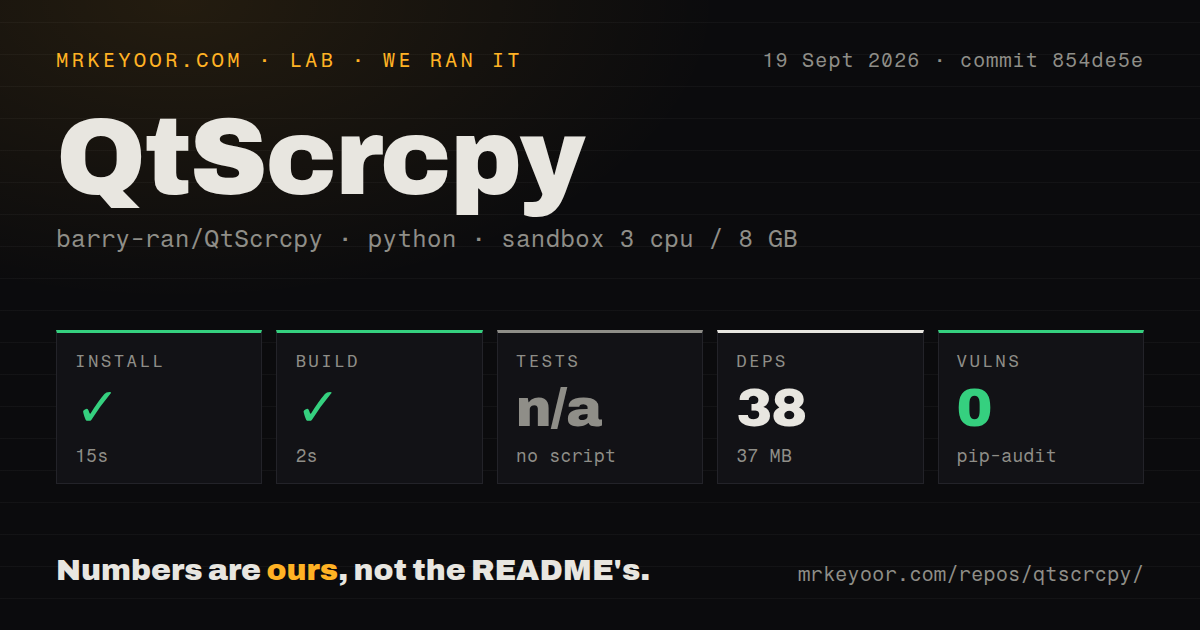
Our sandbox entered ./ci/mac/package/ at commit 854de5e, because that was the measured Python project in this repository. Installation succeeded in 15 seconds, bringing in 38 packages and occupying 37 MB. Its build step succeeded in 2 seconds. The container was fresh Debian with 3 CPUs and 8 GB of RAM, running without privileges or secrets.
That green result belongs to the macOS packaging helper. It does not prove that the C++ GUI compiled, that a window opened, or that ADB controlled an Android phone. The harness found no test script or target, so tests were skipped. Pip-audit reported 0 known vulnerabilities in the measured Python packages. The repository contained 143 files, roughly 10,449 source lines, and no tests directory or Dockerfile.
Wireless control still begins with USB and ADB debugging
QtScrcpy requires Android 5.0 or newer and asks users to enable ADB debugging. The normal USB path is direct: connect a phone, refresh the device list, and start the service. Wireless setup has 8 documented steps and initially uses USB to fetch the device address and start adbd; the cable can be removed after the network device appears.
This matters in locked corporate or school environments. ADB access is a security decision, and the app can install APKs or transfer files once connected. Treat a QtScrcpy workstation like any other machine authorized for Android debugging. Use a trusted local network for wireless control, and remove stale ADB authorizations when the workstation or device changes hands.
Text input and audio have device-dependent limits
Clipboard support works in both directions, but the README says pasting non-ASCII characters as text events does not yet work. Issue 1264 describes failed Spanish accented characters and other input-method text, then asks for a text-injection mode. That gap is easy to miss if your test phrase is plain English, and it can disqualify QtScrcpy for multilingual chat or support work.
Speaker audio sync is documented for Android 10 and newer through sndcpy, while an open July 2026 issue asks why a recording has no sound. The issue contains no diagnostic details, so it proves only that one user reported the symptom. A separate report against version 3.3.3 describes a Pixel 8a on Android 16 reaching the server but showing no usable window. Neither report establishes the behavior of v4.2.0.
Version 4.2.0 is current, while 622 issues remain open
Version 4.2.0 was released on September 19, 2026, the same date as the repository's latest push. It introduced a new interface, encoder presets, MediaTek tuning, an advanced configuration page, and configuration storage outside application bundles. The macOS packages received ad-hoc signing plus a guide for quarantine removal. Those are concrete maintenance signs, not proof that every reported device combination now works.
GitHub search returned 622 open issues, and the repository had 32,019 stars when fetched. Many recent issue titles are in Chinese even though an English README is maintained. The queue includes current reports about wireless reconnection and macOS installation, alongside much older game maps and hardware questions. Expect community knowledge to be useful, but do not assume a maintainer response will arrive before your device deadline.
Upstream scrcpy is the safer default for command-line users
Genymobile's scrcpy is the upstream project and remains the cleaner first choice when a command line is acceptable. Its current documentation covers audio forwarding, virtual displays, camera mirroring, and physical keyboard or mouse simulation. viarotel-org/escrcpy is the closer GUI alternative, with visual mappings and multi-device management, though its README says some advanced features live in a paid private extension.
QtScrcpy wins when its Qt interface, custom game mappings, or group-control view saves more time than the extra compatibility surface costs. Our 2-second helper build cannot answer that for your phone. Download the v4.2.0 package, try USB control before wireless, type the languages you actually use, and record a clip with sound before committing a device bench to it.