Podman runs OCI containers without a manager daemon
Podman manages containers, images, networks, volumes, and pods through a command line that deliberately resembles Docker's. On Linux it can run containers directly as root or as an ordinary user. There is no permanent manager daemon sitting idle between commands. A REST service is available when applications need one, with both Docker-compatible endpoints and Podman-specific APIs.
The engine delegates major jobs to other OCI projects. Netavark and Aardvark handle networking, containers/storage manages local data, Buildah supplies image-building code, and an OCI runtime such as crun or runc starts containers. That split gives operators choices, but a source checkout is not one self-sufficient binary plus nothing else. Packaging and distribution integration provide much of the system around it.
Rootless mode still needs host preparation
Rootless Podman maps container identities into user namespaces, so container root does not gain privileges the host user lacks. The README says almost all normal functionality is available, while its dedicated limitations page lists the exceptions. An administrator may need to populate /etc/subuid and /etc/subgid, and the user needs writable storage on a filesystem suitable for user namespaces.
Ports below 1024 cannot be bound by default without changing the host's unprivileged-port setting or adding redirection. NFS and GPFS home directories do not work for rootless container storage. Cgroups v1 cannot apply resource limits in this mode, device-node creation fails without the host capability, and checkpoint or restore through CRIU requires root. These are kernel and host-policy constraints that a Docker-compatible command spelling cannot hide.
What happened when we ran it
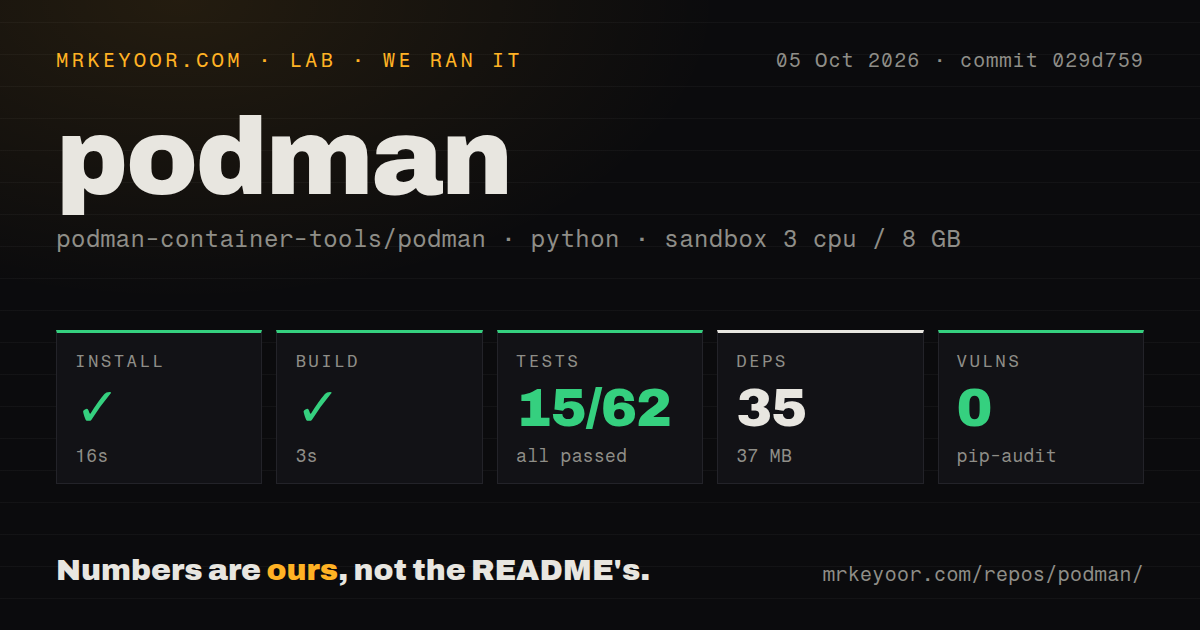
Our 3-CPU, 8 GB sandbox cloned commit 21326bf and classified the detected project as Python. Installation succeeded in 20 seconds, adding 35 packages and consuming 37 MB. The detected build completed in 2 seconds. Pip-audit found 0 known vulnerabilities in that installed Python package set.
The test step failed with exit code 1 after 7 seconds. Pytest reported 0 passed, 0 failed, and 47 collection or setup errors out of 47. The repeated error was FileNotFoundError: [Errno 2] No such file or directory: 'bin/podman' across container, network, pod, volume, and other REST API cases. The final pytest summary reported those 47 errors in 2.93 seconds.
Those tests exercise Python calls against the Podman API and require the engine binary. Our run did not produce or locate bin/podman, so no API assertion executed far enough to pass or fail. The result does not measure container startup, image pulls, networking, or the Go test suite. It proves that the generic detected install and build path did not prepare this checkout's Python REST harness.
The repository contained 2,959 files, about 295,597 lines of source, and used 14.7 MB before installation. Our scan found 16 CI workflow files, no Dockerfile, and a tests directory. Visible automation and extensive source do not repair the local missing-artifact result; contributors need the project's actual build instructions and must confirm where the expected bin/podman is created before invoking these API tests.
macOS and Windows add a Linux virtual machine
Containers run natively on Linux. On macOS and Windows, podman machine creates and manages a Linux virtual machine, and the local client talks to the engine inside it. That is a clean product boundary, but disk allocation, VM startup, host networking, filesystem sharing, and architecture differences become part of the developer experience.
Release 6.1.0, published August 12, 2026, added podman machine restart and a Windows WSL port-forwarding setting for newly created machines. It also fixed interrupted Mac machine starts leaving a VM in an inconsistent state and a Hyper-V startup race involving mounts. These are useful fixes, and they show why desktop users should evaluate the VM path separately from a Linux server installation.
Docker compatibility is broad rather than identical
Podman's CLI can run many familiar Docker commands locally or against a remote system. Its REST service exposes a compatibility interface as well as richer Libpod endpoints. Release 6.1.0 continued work on Docker API v1.44 compatibility and began preparation for v1.45. Compatibility here is active engineering work, not a claim that every field and edge case already behaves exactly like Docker.
Migration testing should cover compose tooling, socket discovery, bind mounts, networking, registry authentication, health checks, and scripts that parse command output. Podman's pod model and rootless behavior may be reasons to switch, while software hard-coded to a Docker daemon socket can add work. The transfer guide maps commands, but a command table cannot validate an application's assumptions about permissions or service lifetime.
Release 6.1.0 and August activity show current maintenance
GitHub reported 32,703 stars, 1,137 combined issues and pull requests, and a last push on August 27, 2026. Same-day work covered rootless process handling, API filters, Hyper-V, dependency updates, networking, and volume paths. The combined open number is not a bug count. It is consistent with a large engine spanning Linux kernels, storage, networks, virtual machines, APIs, and several host operating systems.
Podman publishes major or minor releases 4 times per year, with patch releases between them, and says releases are PGP signed. Only the newest version normally receives upstream support. The stated exception keeps v5.8 on CVE and critical-fix support until June 2027 after the 6.0 transition. Distribution users should separate an operating system vendor's lifecycle from upstream's narrower promise.
Podman is a strong default for Linux teams that value rootless containers and systemd-friendly Quadlet units. The lab failure says source contributors must build the real engine before running its Python REST suite. Production buyers should prefer signed packaged releases, document host preparation, and prove storage and networking on the target kernel. If CRI integration or specialized image transport is the main job, CRI-O or Skopeo is the project the README itself points toward.