What happened when we ran it
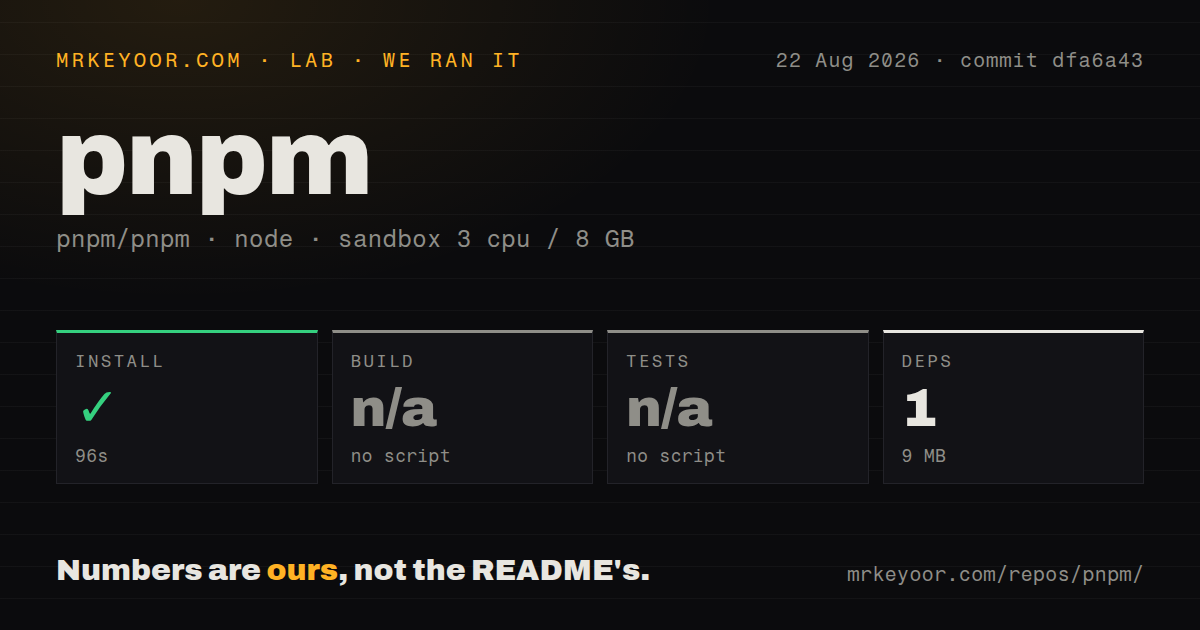
Our Node 22 sandbox installed the 1 package exposed by the detected target in 96 seconds, using 9 MB on disk. commit dfa6a43 was a 38.9 MB checkout with 5,851 files and about 787,801 source lines. That mismatch is important: the install step did not exercise the dependency graph of every workspace in this large monorepo.
The repository exposed no build script or target and no test script or target to our generic runner, so both stages were skipped. The tree contains 24 CI workflow files but no top-level tests directory. We did not turn a missing generic target into a passing result; our run only confirms that the detected install completed.
Shared storage and strict imports are the practical case
pnpm stores package files in a content-addressable store and links them into projects, allowing multiple repositories to reuse identical content. Its isolated layout also stops application code from casually importing transitive packages absent from its manifest.
The project claims installs can be up to 2 times faster than npm and Yarn Classic. That is its figure, not ours, and cache state or CI architecture can change it. Shared storage and strict dependency declarations are the dependable reasons to choose pnpm.
Strict dependencies catch real mistakes
pnpm's default isolated layout places package contents under node_modules/.pnpm and uses links to recreate the dependency graph. Application code sees packages declared in its own manifest, instead of accidentally importing a transitive package that happened to be hoisted to the root. A lockfile records the selected graph in pnpm-lock.yaml.
This catches a class of bugs that npm's traditionally flat layout can hide. If an application imports a library without declaring it, pnpm is more likely to fail locally rather than let the mistake reach a consumer with a different dependency tree. Packages can still access an internal hoisted area for ecosystem compatibility, but undeclared modules are not generally exposed to application code.
The downside is that parts of the JavaScript ecosystem still assume flat folders or follow symlinks poorly. pnpm documents a hoisted linker for React Native, serverless systems that reject symlinks, bundled dependencies, and certain Node flags. Targeted hoistPattern and publicHoistPattern settings can accommodate flawed tools. The tempting shamefullyHoist option makes everything visible at the root, but the docs strongly discourage it. Use it only after identifying the package that breaks and trying a narrow pattern.
Workspaces are a first-class reason to switch
A pnpm-workspace.yaml file turns a repository into a workspace. The workspace: protocol can require a dependency to resolve to a local package, so an absent or mismatched local version fails instead of silently pulling a registry copy. During packing or publishing, pnpm converts that protocol into a regular version range that consumers can install with any package manager.
That is a small feature with large practical value. Local development tests the code that will actually be released, and accidental registry fallbacks become visible. Recursive commands and filters let teams run scripts over selected packages and their dependents. Catalogs centralize versions shared across packages, while patches and overrides handle upstream defects without forking an entire dependency.
Migration is still work. Teams must replace the old lockfile, change CI installs to pnpm, define cache paths, pin the package-manager version, and test publishing. Cyclic workspace dependencies can prevent scripts from running in topological order. The current tool has native release-management features, but organizations already using Changesets or Rush should compare workflows before replacing a proven release process.
Security defaults that users will notice
Since v10, pnpm has stopped treating a dependency's install script as automatically trusted. Current v11 settings put allowed and denied package matchers in pnpm-workspace.yaml; unreviewed build scripts are disallowed, and strictDepBuilds makes the install fail by default. This blocks a common route for a compromised package to execute code immediately. It also means packages such as native compilers may not work until a maintainer approves their builds. That friction is deliberate and belongs in onboarding documentation.
pnpm 11 also defaults minimumReleaseAge to 1,440 minutes. A package version published less than a day ago is normally held back, giving registries and security services time to identify malware. Teams can opt out or increase the delay. Other controls can block transitive Git or direct-URL dependencies, enforce a no-downgrade trust policy, qualify packages by named registry in the lockfile, and refuse a tarball whose current checksum differs from the committed integrity.
These are excellent defaults for an organization, but not invisible ones. A just-published bug fix may appear unavailable, and a dependency that previously built itself may stop at review. Document how maintainers grant exceptions, commit the decisions, and handle emergency upgrades. Do not solve the inconvenience with dangerouslyAllowAllBuilds, which restores execution rights for every present and future transitive dependency.
Version pinning matters more than the installer
Stable pnpm 11 can be installed through common system package managers, a standalone executable, or npx get-pnpm. If it is not installed through the standalone build or @pnpm/exe, it requires Node.js 22 or newer. Intel Mac users cannot use the v11 standalone script, and Windows users are steered toward npm because Defender may block the executable. CI should use a frozen lockfile, which pnpm enables by default when it detects a CI environment.
The repository labels its Rust pacquet CLI port experimental, while v11.24.0 is the current numbered release. That release arrived on August 24, 2026, and the repository was pushed on August 26. GitHub listed 2,500 open issues and pull requests, a large combined queue; same-day patches and bug reports show intense activity rather than neglect.
For most teams, the sensible choice is pinned v11.24.0 with an exact version pinned in the repository. Trial it against representative development, CI, container, and deploy paths. Fix manifest mistakes instead of masking them globally. If those tests pass, pnpm offers a rare combination: lower storage waste, better monorepo ergonomics, stricter dependency boundaries, and security policy that lives with the code.