
Existing Pi sessions are the reason to try this desktop app
Pi Agent Desktop passed 2,844 tests in our sandbox, but its strongest attraction is simpler: it opens the Pi sessions you already have. The application reads the local Pi data directory and organizes conversations by project. You can resume a branch without hunting through session files, inspect tool calls, and switch Git worktrees from the sidebar. Existing Pi users get a concrete reason to add a desktop window.
The English README, also available in Chinese, describes a packaged Next.js server and Node runtime inside a Tauri application. Model credentials and session files remain local, while the configured model provider still determines where inference happens. You need working provider authentication for useful agent work. A desktop wrapper does not supply a model subscription or establish offline processing just because its session storage lives on your machine.
What happened when we ran it
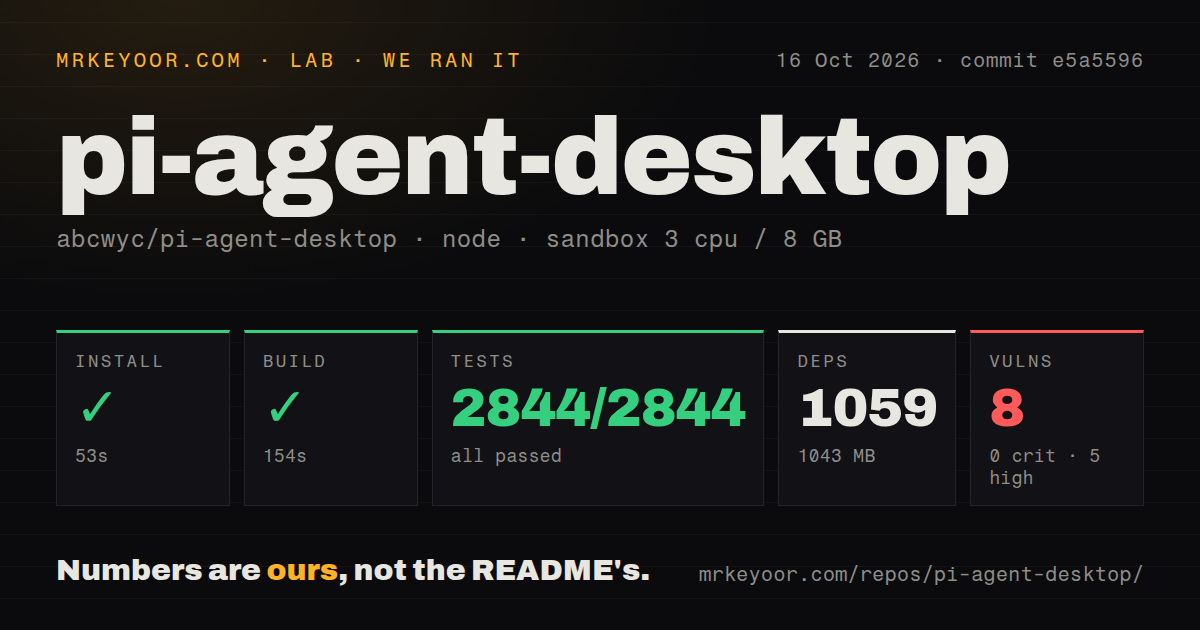
Our run installed commit e5a5596 in 53 seconds, adding 1,059 packages and occupying 1,043 MB. The build succeeded in 154 seconds. Node's test runner then passed all 2,844 tests in 126 seconds, with 0 failures. We used an unprivileged Debian container running lab-node:22 on October 16, 2026, with 3 CPUs, 8 GB of RAM, and no secrets. These results give the repository a credible development starting point.
Npm audit reported 8 known vulnerabilities: 5 high and 3 moderate, with none critical or low. The supplied summary does not name affected packages or show exploitability, so it cannot support a claim that a particular desktop feature is vulnerable. It also cannot support dismissing those findings as harmless development dependencies. Before using this with sensitive repositories, inspect the advisories and which packages reach the deployed application.
The checkout contained 1,279 files, roughly 205,210 source lines, and occupied 15.6 MB. Our scan found 6 CI workflow files, no Dockerfile, and no tests directory, despite the passing Node suite. A directory-name heuristic plainly does not describe test coverage. The successful build result also does not establish a signed native package or a verified macOS first launch. That needs separate platform evidence.
Official downloads cover Apple Silicon, Windows, and Linux x64
The README excludes Intel Macs from official builds. Linux x64 users need WebKitGTK 4.1 and GTK 3, while Windows uses WebView2. The packaged application includes its own Node runtime, which reduces the ordinary user's setup burden. Building or modifying the desktop shell brings Rust and native platform tooling into the picture. That distinction matters when comparing a downloadable application with a source checkout you intend to maintain yourself.
Our 1,043 MB installed environment describes the npm development path, not the size of a downloaded desktop application. Mac users face another practical limit: the README says the build lacks Apple Developer ID signing and notarization, so Gatekeeper can block its first launch. Updater signature verification is a separate mechanism. An organization that requires notarized desktop software should resolve that policy mismatch before trying to distribute this internally.
Scheduled tasks stop depending on you, but still depend on the app
Saved prompts can run on a schedule while Pi Agent remains open, including when its window is hidden. The README says scheduled runs default to read-only tools and catch up once after sleep. That suits a recurring local repository report. It is a poor substitute for a server job that must run while a laptop is closed or the application has quit. Choose where the schedule should live before relying on it.
The 2,844 passing tests are encouraging evidence for the measured code path, without proving unattended work will complete against your model provider and repository. Keep the initial scheduled prompt narrow and check its completion notification and resulting session. If a task requires persistent availability, the terminal Pi toolkit or a separately operated service is a more direct foundation than keeping a desktop application alive as infrastructure.
LAN mode gives reachable clients your agent's authority
The README explicitly warns that clients reaching the LAN port can use the agent's shell and file access as your user. The normal desktop application uses loopback and a per-process authentication token. Choosing a LAN launch command changes that boundary. The documented password setting is necessary before that mode, and the connection still needs HTTPS or a trusted VPN because the underlying server connection is plain HTTP.
Our sandbox had no secrets and 8 GB of RAM, so it did not exercise an authenticated household or team network deployment. Do not turn a convenient browser connection into an assumption of multi-user isolation. The documented file-browser directory limits are useful, but shell tools carry broader authority. I would keep this as a personal desktop application unless there is a specific, reviewed reason to expose its server elsewhere.
October fixes show maintenance, while update documentation needs care
The repository was pushed on October 16, 2026, and release v0.7.2 shipped that day. GitHub reported 796 stars and 1 open issue or PR. Recent issue and PR activity included repairs to the conversation navigator and platform window controls, matching the release notes. Linked fixes give the small open queue useful context. The release also records updated bundled Pi components.
The ownership-boundaries document explains how upstream merges can succeed while reintroducing conflicting behavior. It describes routing risky overlaps through review. The separate desktop-update document still describes direct automated sync without a PR, so the written accounts disagree. Check the actual workflow before relying on that policy. Our 6 detected workflows establish their presence, without resolving the discrepancy or certifying every release path.
Keep the terminal or browser if desktop packaging adds little
The upstream Pi toolkit is the more direct choice when terminal operation and scripting already suit you. pi-web is worth considering when the browser interface is what you want. Choose this desktop fork for the native application and session navigation, after accepting its platform and advisory findings. Resume an existing project locally and check a worktree switch before expanding its role.