A current Kotlin rewrite supports Views and Compose
MPAndroidChart's current branch is a Kotlin rewrite with a separate Jetpack Compose module. It draws interactive Android charts, including line, bar, pie, and candlestick displays, with selection markers and control over axes. For an app that needs someone to tap a point and open its underlying record, that combination is more useful than a static chart image. The README also shows the same data moving into a conventional Android View or a Compose screen.
Our checkout at commit fae4ad7 contained 551 files, roughly 37,781 source lines, and occupied 11.9 MB. That is a real library project with examples and multiple modules to understand. Its advertised large-data smoothness remains a publisher claim: our sandbox did not measure rendering, gestures, or frame rates. Choose the API for the interactions your screen needs, then check those interactions with your own records and devices.
What happened when we ran it
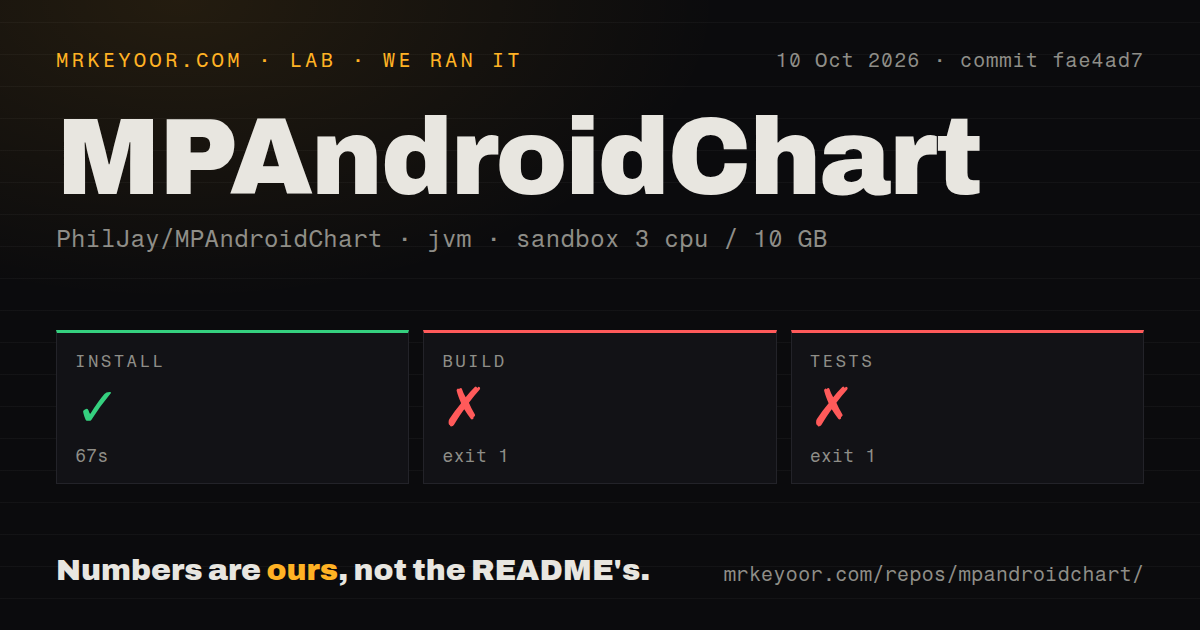
Our run installed MPAndroidChart in 67 seconds, then the build failed after 9 seconds and the test command failed after 8 seconds. We cloned commit fae4ad7 on October 10, 2026, into a fresh unprivileged Debian container with 3 CPUs, 10 GB of RAM, and the lab-jvm:21 image. The container held no secrets. Successful installation established that this step completed, without establishing that the project could compile in that environment.
The build stopped while determining dependencies for :MPChartCompose:extractDebugAnnotations. The test command stopped at :MPChartCompose:testDebugUnitTest. Both logs said the Android SDK location was missing and named the same remedies: an ANDROID_HOME environment variable or sdk.dir in /work/repo/local.properties. Both commands exited with code 1. That is a setup prerequisite we can identify directly, without guessing about chart code or how any test would behave after SDK configuration.
The harness timings were 9 seconds for build and 8 seconds for tests. Gradle's own tails printed 8 seconds and 7 seconds respectively, so those are separate reporting clocks. Our scan found 1 CI workflow file, no Dockerfile, and no tests directory. The directory signal doesn't prove an absence of checks elsewhere in an Android project. Our testing method covers the supplied run, which reached neither a successful build nor a completed test suite.
The Compose module needs an Android SDK, even on a JVM image
The README requirements specify Android tooling alongside Java and Kotlin. The main library needs minSdk 23 and compileSdk 35, while the Compose module needs compileSdk 37. Java 17 and Kotlin 2.0 or newer are documented. A Java environment by itself is therefore insufficient. The README does mention the Android requirements, so our missing SDK is not evidence of an undocumented dependency.
The 67-second installation is the only successful setup step we measured. For an application consuming a published artifact, the README uses JitPack and distinct coordinates for MPChartLib and optional MPChartCompose. Pin a version and configure that repository in Gradle. No chart-service credential appears in the quick start. Your data source may need authentication, but drawing the supplied entries isn't a hosted analytics service.
The move from Java changes formatter and data code
The migration file documents actual source edits for the Kotlin rewrite. Getter and setter pairs become properties, the old ValueFormatter base class disappears, and entry payloads become typed and read-only. These are material changes if a production screen has custom labels or attaches business objects to points. A dependency bump needs a screen-level review, even when familiar class and package names remain.
Our failed 9-second build cannot tell you how much work those edits take. The migration guide also describes changed label density: the x-axis keeps labels apart, and value labels depend on entries visible in each data set. A chart may therefore look different after migration without a crash. Check long date labels and dense series deliberately. Those are the sort of small visual differences a developer can miss while concentrating on compilation.
Compose setup runs once, while selection lives in state
The Compose quick start passes changing chart data as state and says setup runs once. ChartState exposes the selected entry, visible range, and zoom, with functions for moving the viewport and animating it. That is a useful split for a chart whose selection controls another part of your screen. It also means you should understand which values belong in changing state before putting configuration logic into the setup callback.
With 10 GB available in our sandbox, the measured obstacle was still SDK discovery rather than a reported memory shortage. That finding should steer your first adoption check toward Android tooling. Once configured, exercise your screen's own behavior: data updates, a selection that opens the correct record, and labels that remain readable. The library's example app provides styling code, but its screenshots don't establish usability for your particular chart.
Recent fixes and a reset tracker show active maintenance
The last push was October 9, 2026, and release v4.0.1 shipped on September 28. Its release notes describe fixes for combined-chart bar selection and clipped limit-line labels, among other changes. GitHub returned 38,184 stars and 1 open issue or PR. That small queue needs context: issue 5525 explains the deliberate closure of older reports and reassessment against the rewrite.
The unresolved 8-second test step keeps this from being a lab-confirmed recommendation. I'd shortlist MPAndroidChart for an Android app that needs both View and Compose charts, especially with markers or unusual chart types. Vico deserves comparison when Compose Multiplatform is a requirement, while tehras/charts documents a smaller set of Compose chart examples. For MPAndroidChart, make SDK configuration the first checkpoint, then verify your custom formatters and selection behavior before migrating a shipped screen.