VS Code's editor comes without its extension host
Drop Monaco into a browser application and you get the code-editing component extracted from VS Code. The surrounding VS Code application, including its extension host, stays outside your page. The README explicitly says ordinary VS Code extensions won't run there. That distinction decides whether this is a sensible starting point: Monaco suits a product whose users edit code or configuration, provided your team owns the surrounding application and language integration.
Our checkout contained 981 files and roughly 150,056 lines of source. That is substantial machinery to adopt for an editing surface, though the repository footprint says nothing about your final browser bundle. Models hold text, language selection, and edit history, while editors display those models. This separation is useful for a tabbed workspace: switching the visible document needn't mean throwing away the document's state. Your application still has to manage that state deliberately.
What happened when we ran it
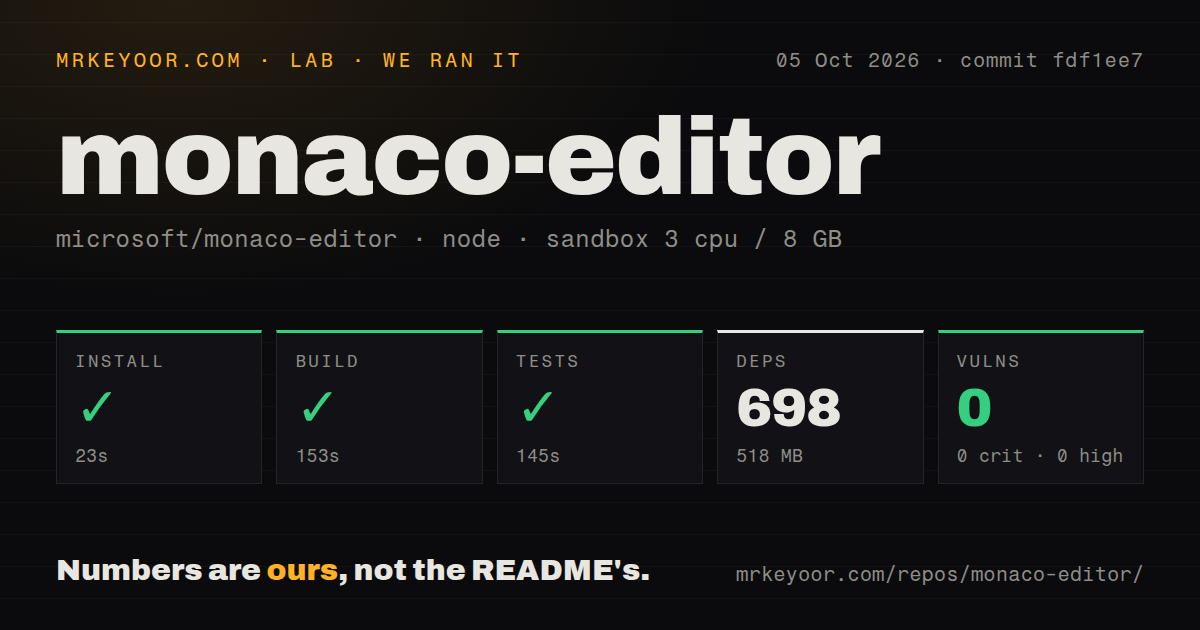
Our sandbox installed Monaco commit fdf1ee7 in 23 seconds, adding 698 npm packages and occupying 518 MB on disk. The build succeeded in 153 seconds, and the tests succeeded in 145 seconds. We ran it on October 5, 2026, inside an unprivileged Debian container with 3 CPUs, 8 GB of RAM, the lab-node:22 image, and no secrets. All reported steps finished successfully.
Npm audit reported 0 known vulnerabilities, including 0 critical, high, moderate, or low findings. The scan found 2 CI workflow files, a tests directory, and no Dockerfile. That gives a prospective contributor a concrete baseline for this commit. It doesn't establish editor responsiveness, mobile behavior, accessibility in your application, or the security of code users later execute. No browser benchmark or test count was supplied, so the passing test step remains a command outcome.
File identities determine whether language help makes sense
Monaco identifies each model with a unique URI. The README explains that TypeScript import resolution and JSON schema selection can depend on that identity. Creating anonymous models everywhere may be enough for isolated text fields, but a workspace needs filenames and paths that reflect its documents. A configuration editor should make that choice before wiring up completions, otherwise seemingly cosmetic naming can affect the help users receive.
The 21 MB checkout grew to a 518 MB installed environment in our run. That is the source-development cost, separate from integrating the published editor into your app. The README points consumers toward ESM and says the declared public API lives in monaco.d.ts. Other internals may change between releases. Stay on that public surface, give documents stable identities, and dispose of editors and models when your application no longer needs them.
Worker loading needs a served page
The README documents a specific failure: pages opened through file:// cannot create the web workers Monaco uses for language services. Serve the application over HTTP or HTTPS. A working text area can still leave language features misconfigured, so check completion and hover behavior in the deployed app rather than stopping when characters appear. The ESM integration guide and samples are the useful starting points for deciding how your bundler loads worker code.
Our 153-second build proves that the checked-out project built in the supplied container. It doesn't settle worker paths behind your own asset hosting or routing. Basic embedding needs no hosted AI credential, but your application must provide its web server and content lifecycle. The README also deprecates the older AMD distribution and says it will be removed in future versions. Starting a new integration around that compatibility path buys migration work you can avoid.
Mobile support is an explicit reason to walk away
Microsoft's FAQ says mobile browsers and mobile web app frameworks are unsupported. If editing on a phone is a product requirement, I would choose another component before building the rest of the interface around Monaco. The same applies when the requirement is to run an existing VS Code extension unchanged. The README describes a narrow possibility for extensions based entirely on a JavaScript language server, which is quite different from general extension compatibility.
Passing the 145-second test step doesn't erase those documented boundaries. Accessibility also needs application-level attention: the README links an integration guide, and open issue 5530 reports inaccurate or missing keyboard instructions for the editor component. That report is evidence to investigate, not a defect we reproduced. Review focus entry, keyboard escape, and visible instructions in your own integration before making the editor the only route to editing an important document.
Recent activity supports adoption, with integration work attached
The last push was October 13, 2026. GitHub showed 46,864 stars and 878 open issues and PRs, while release v0.57.0 was published on September 24. Recent activity includes dependency pull requests and editor accessibility reports. Taken together, the push date and live discussion show maintenance. The combined backlog doesn't mean 878 confirmed bugs, and a familiar Microsoft name doesn't exempt your application from checking its own behavior.
CodeMirror is worth considering when you want a modular editor whose extensions you assemble for the application. Its former GitHub development repository now points to its new upstream home, so use that destination for current development information. Ace is another established browser component, with documented embedding and configurable language modes. I would accept the 518 MB source environment we measured for a desktop coding workspace, then check a deployed document with stable paths, working workers, and a keyboard route out.