Decide which LocalStack you are adopting
LocalStack's archived source and its current unified product require separate adoption decisions. The repository README describes an AWS emulator that runs in a container, then announces that this source repository is archived and read-only. Existing integrations need a maintenance owner; new users should evaluate the continuing product rather than assume this repository represents its current development workflow.
The README lists services including Lambda, S3, DynamoDB and SQS. Those are documented capabilities, not workloads verified by our sandbox. Check the specific operations your application needs before choosing an emulator.
What our recorded run establishes
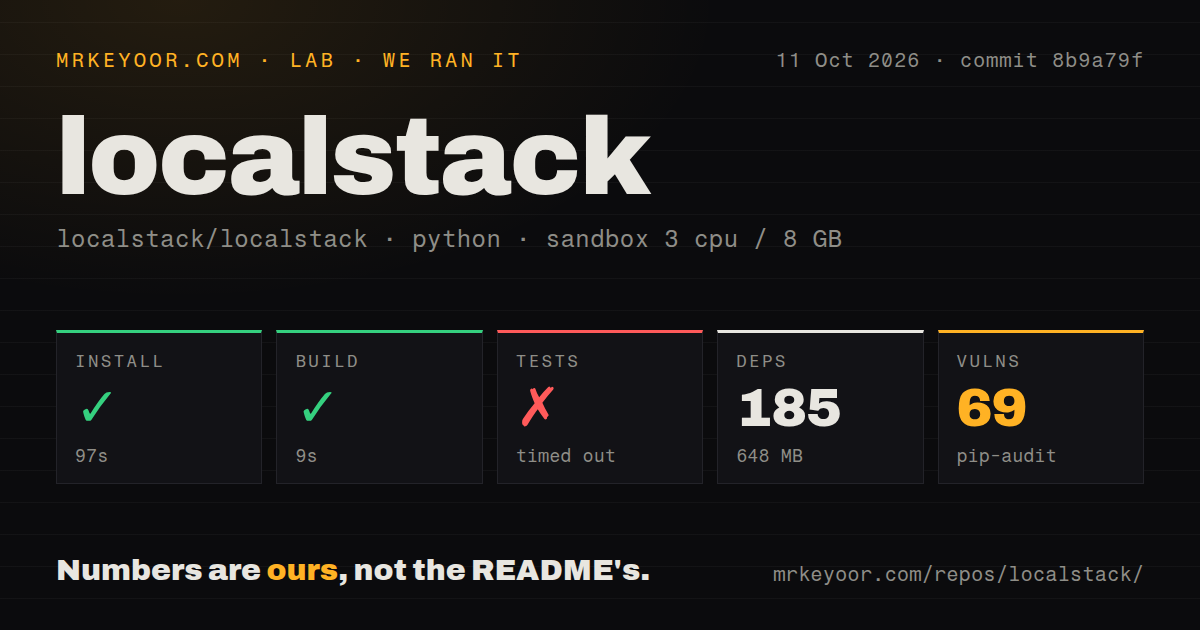
Our run took place on October 11, 2026 at commit 8b9a79f05846835cf4dff63ab7eefdde9df83783. The recorded sandbox configuration was 3 CPUs, 8 GB of memory and image ghcr.io/astral-sh/uv:python3.12-bookworm. The install log explicitly reports Python 3.13.16, so the image's name should not be read as the Python version used.
The install step exited successfully in 97 seconds. The parser recorded 185 dependencies and a 648 MB environment. The build step exited successfully in 9 seconds, with SyntaxWarning messages about invalid escape sequences. Successful step completion does not establish an installed-binary check, working CLI, running Docker container or successful AWS workload. The supplied record does not expose the exact install, build and test command lines.
The test step reached its 900-second limit and exited with code 124. Its tail includes thread stacks, LocalStack's Twisted reactor polling, a timeout marker and failure indicators. It supplies neither a complete passed-versus-failed count nor the cause of the timeout. No new execution or complete-log reconciliation was performed. This result cannot establish that LocalStack itself is broken or that Docker access or activation caused the timeout.
Pip-audit recorded 69 advisories across 19 packages in this environment. Audit scan coverage is unknown: the record does not state how many packages were scanned. The dependency count is not a substitute for that missing denominator. Without the advisory details, package versions, severity information and deployment context, the result does not establish exploitability of a LocalStack endpoint. Inspect those findings before accepting the environment.
The checkout scan recorded 3,730 files, approximately 542,339 lines of source and 42.7 MB, plus 27 CI workflow files, a Dockerfile, a Compose file and a tests directory. These describe the measured checkout and its development infrastructure. They do not supply additional passing tests or evidence about application compatibility.
Docker setup extends beyond the source steps
The archived README requires a functional Docker environment. It distinguishes the LocalStack CLI from the separately installed awslocal helper used in its SQS example. Our source-step results do not verify either command or reproduce that queue example.
The current installation guide recommends lstk to manage authentication and container startup. It says LocalStack for AWS features require an Auth Token: lstk handles browser login, while Docker and CI workflows can use LOCALSTACK_AUTH_TOKEN. Its container examples mount the Docker socket, which the guide requires for services that start additional containers, such as Lambda.
Check whether your runner permits that configuration. Then verify startup and exercise the API calls your application needs. A reachable gateway or healthy container is a useful startup check, but application compatibility still needs its own verification. Our 648 MB environment figure does not measure a container image download, Lambda execution or application state.
Archival changes the maintenance decision
Pull request 13901 and GitHub's archive notice identify March 23, 2026 as the repository's archival date. The supplied repository metadata also marks it archived. Stars and an empty open-issue count do not establish current support quality or a defect-free product, so neither is used as evidence of reliability here. The supplied text also does not establish where the README's bug-report links lead; this review makes no claim that reports moved to GitHub Discussions.
The README describes a free Hobby plan for non-commercial use with the same capabilities as this project. Its license section states Apache License, Version 2.0 and also refers to an EULA; GitHub's metadata reports Other with SPDX identifier NOASSERTION. Review the applicable terms for the artifact you intend to use rather than extending the archived source's licensing statement to the unified product.
The supplied release page labels v4.14.0 as the latest release and shows February 26 as its release date. Its notes include S3 URL-encoding and API Gateway fixes. They also say state created before 4.14 is incompatible and must be recreated, including Cloud Pods, snapshots and PERSISTENCE=1 state. Teams retaining an integration should account for that documented migration boundary. Our run tested commit 8b9a79f, not a separately verified v4.14.0 deployment, and does not validate those fixes or migration behavior.
Choose alternatives by the testing task
Moto is relevant when Python tests need mocked AWS interactions. Its README demonstrates an S3 test wrapped with mock_aws and directs readers to implementation coverage. That supports considering it for test mocks, without assuming it replaces every LocalStack integration.
Dynalite implements a DynamoDB HTTP server with in-memory storage by default and optional LevelDB persistence. Its README recommends DynamoDB Local when JVM or Docker startup overhead is acceptable. It also lists transactions and DynamoDB Streams as TODOs. Consider Dynalite for that specific in-memory use case after checking its operation coverage, rather than treating it as a general AWS emulator.
For an existing LocalStack integration, the next useful step is to reproduce its required service workflow on the actual runner, inspect the recorded dependency advisories and assign maintenance responsibility. For a new integration, compare the current unified product's coverage and terms with the narrower testing approach your application needs.
How to read the scores
These are editorial assessments of the archived repository, not benchmark results or ratings of the current unified product. The five-point rubric is: 1 means a major adoption obstacle; 2 means substantial follow-up; 3 means a usable basis with material limits; 4 means strong documentation or verification for the assessed scope; 5 means unusually complete evidence with few unresolved limits. Unknown adoption, untested compatibility and star counts earn no extra credit. Setup reflects documented prerequisites and recorded step completion; docs reflects the clarity of the supplied instructions; community reflects the upstream contribution path; maturity reflects documented capabilities, maintenance status and verification limits.