One interface covers robots, datasets, and learned policies
LeRobot joins parts that robotics teams often assemble separately. Its Robot interface handles observations and actions, LeRobotDataset stores synchronized video with state and action data, and the training commands run several policy families in PyTorch. The README names 13 natively supported hardware types, including SO100, LeKiwi, Reachy2, OpenARM, and Unitree G1. Community plugins can register more robots, cameras, and teleoperators through package-name conventions.
That range is the main reason to choose it. A lab can record a demonstration, publish the dataset through Hugging Face Hub, train a policy, and evaluate it without inventing a format between every stage. The model list spans imitation learning, reinforcement learning, vision-language-action policies, world models, and reward models. Some entries are marked as coming soon, so the table needs to be read literally rather than treated as a list of finished implementations.
A 7,302 MB install changes the cost of trying it
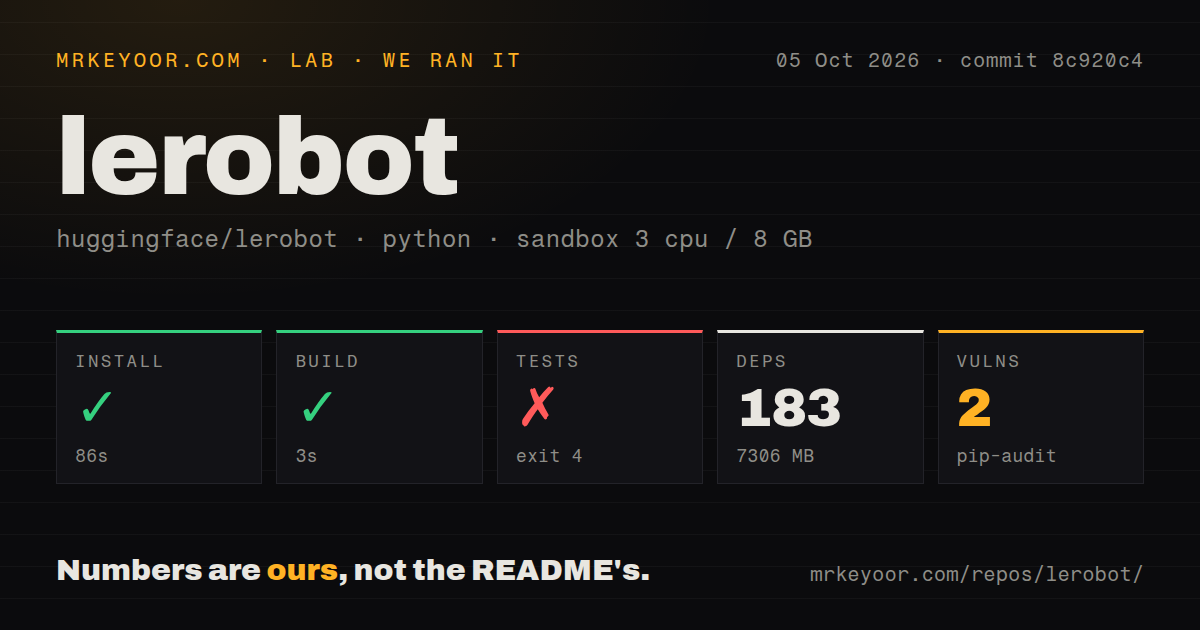
Our clean Debian sandbox installed 183 Python packages in 153 seconds and ended with 7,302 MB on disk. The checked-out repository itself was 16 MB, with 1,046 files and roughly 245,159 source lines. That gap matters on CI runners and developer laptops. A simple pip install lerobot command looks ordinary, while the resulting environment is closer to a full machine-learning workstation than a small hardware library.
The package is still only one part of a useful setup. Hub datasets and pretrained policies must be downloaded, cameras and motor buses need configuration, and physical arms need assembly or calibration. Simulation environments use their own extras. The README points to separate installation, hardware, dataset, policy, and compute guides, which is sensible for a project this broad, but it also means the quick start cannot tell you the effort for your chosen robot and policy.
What happened when we ran it
Our run at commit 4aaff99 installed successfully in 153 seconds, then completed the build in 9 seconds. The container had 3 CPUs, 8 GB of RAM, Python 3.12 on Debian, no secrets, and an unprivileged UID. Pip-audit found 2 known vulnerabilities in the installed environment. The supplied audit result does not identify their packages or severity, so those details need a fresh audit before deployment.
Tests exited with code 4 after 19 seconds. The log shows TorchInductor asking Python for the current username while pytest was collecting tests. Python called pwd.getpwuid() for UID 1000 and received KeyError: getpwuid(): uid not found: 1000. The log does not show failed assertions or a robot-policy defect. It shows that this checkout's suite did not get through collection in a container whose numeric user had no passwd entry.
The repository has a tests directory and 14 CI workflow files, which provides more visible project machinery than many research releases. It has no Dockerfile. Anyone reproducing our container run should create a named user or otherwise ensure the runtime can resolve its UID, then rerun the same suite. That follow-up is necessary before treating the failure as cleared; the current result is a failed test step, not a partial pass.
Supported hardware still demands hardware-specific work
The common Robot class reduces application-level differences, but it cannot erase the physical ones. An SO100 arm, a phone teleoperator, and a RealSense camera have different drivers and failure modes. Third-party plugins make extension cleaner because packages can register a robot, teleoperator, or camera type. They also move part of the compatibility surface outside the main repository, so teams should pin and review every plugin used on a real machine.
Safety deserves the same plain reading. LeRobot can send an action selected by a model to connected hardware. The README does not claim certified limits, collision prevention, or safe unattended operation. Evaluation support includes LIBERO and MetaWorld, but a simulation score does not validate a physical cell. Put speed, travel, workspace, supervision, and emergency-stop rules around the library according to the machine you connect.
Current issues affect setup and policy correctness
Issue 4388 reports that the libero extra can install on macOS while leaving out the simulator, with failure arriving later when the environment is used. A linked change proposes checking platform support at training startup. That is a concrete reason for Mac users to verify the simulator immediately after installation instead of accepting a successful package command as proof that the evaluation path works.
Issue 4517 is more serious for fine-tuning work. It reports that policy input features can remain from a base checkpoint when the new dataset should replace them, and ties that behavior to an official SmolVLA LIBERO configuration and its normalizer. A pull request was already open on August 30, 2026, but an open fix is not a released fix. Compare the resolved policy features with the current dataset before spending a long training run.
August activity is high, and so is the change rate
GitHub showed 27,071 stars, a last push on August 30, 2026, and 840 open issues and pull requests combined. Release v0.6.1 arrived on August 3 and included a breaking module rename from lerobot.types to lerobot.lerobot_types, alongside many policy, dataset, camera, and documentation changes. The recent push and active discussions indicate live maintenance. The queue size also means adopters need to search current reports for their exact hardware and policy.
LeRobot is a good foundation for a lab that wants shared formats and intends to work across data collection, training, and deployment. The 153-second install is manageable, but 7,302 MB of dependencies, 2 audit findings, and a collection-stopping test result make casual adoption hard to defend. Start with one supported device and one policy, confirm the full suite under your user model, and keep physical safety outside the learned control loop.