K9s makes repeated cluster inspection much faster
K9s watches Kubernetes resources and presents them as navigable terminal tables. A short command opens pods, deployments, services, namespaces, custom resources, logs, YAML, or an XRay ownership view. Filters support regular expressions, labels, and fuzzy matching. Common actions such as describing a resource, opening a container shell, viewing previous logs, editing YAML, and starting a port forward stay one or two keys away.
The project has grown well beyond a small terminal wrapper. At commit 24cf462, our checkout contained 1,077 files, about 75,073 lines of source, and occupied 9.8 MB. It included a Dockerfile and 4 CI workflow files. Configuration covers global preferences, per-cluster settings, custom columns, hotkeys, aliases, skins, shell pods, log behavior, and plugins. That depth is useful once K9s becomes daily equipment.
Your kubeconfig and RBAC remain the security boundary
K9s acts with the identity selected from kubeconfig. Its RBAC documentation says basic exploration needs get, list, and watch privileges at both cluster and namespace levels, with metrics access where available. Editing or deleting requires extra permissions. The application cannot exceed Kubernetes authorization, so the best safety control is a deliberately limited account rather than a powerful kubeconfig paired with careful keyboard use.
Read-only mode disables cluster modification commands and is worth making the default for support or production observation. The standard key map still deserves study: ctrl-d deletes with a confirmation flow, while ctrl-k performs an immediate delete and has no confirmation dialog. K9s is fast because actions are close. The same speed raises the cost of attaching an administrator identity to an everyday terminal session.
Plugins trade convenience for local command execution
Plugins map keyboard shortcuts to local commands and pass selected resource details through environment variables. A plugin can receive the resource name, namespace, container, cluster, context, user, groups, current filter, and kubeconfig path. This makes it easy to bolt in kubectl subcommands or organization scripts without changing K9s. Context-specific plugin files let different clusters expose different actions.
Those YAML snippets are executable configuration. Review community plugins before installation and avoid shortcuts that conceal destructive commands. The docs still label plugin options and layout as work in progress. K9s also offers built-in node and persistent-volume shell features that create pods with configurable images, limits, TTY settings, and optional host-path mounts. Enabling a Docker socket mount, for example, is a cluster-security decision rather than a cosmetic preference.
What happened when we ran it
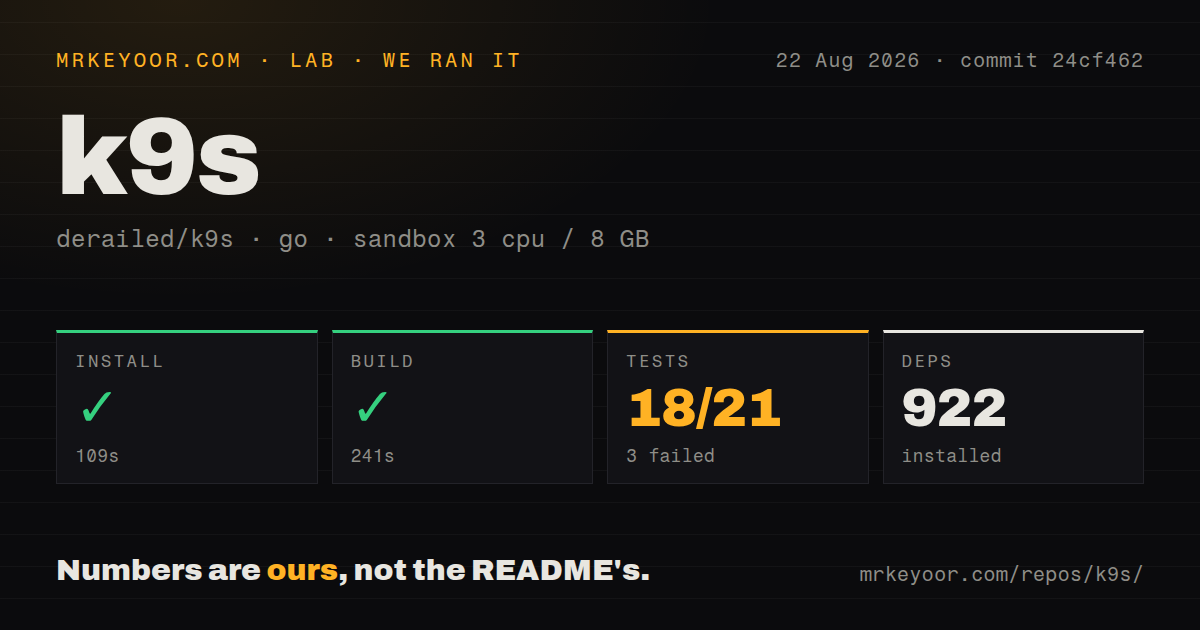
Our fresh Debian sandbox installed 922 Go packages in 109 seconds and completed the build in 241 seconds. The unprivileged container had 3 CPUs, 8 GB of RAM, no secrets, and commit 24cf462. The repository did not need a live kubeconfig for these source checks. That successful compile supports the basic contributor path described in the README.
The test result was incomplete. After 97 seconds, Go reported 18 passing packages and 3 failures out of 21, returning exit code 1. The supplied log tail only lists successful packages including internal/render, internal/ui, internal/view, and internal/watch, then ends with FAIL. It contains no failed package name, assertion, or environmental error. We can report the failed suite, but assigning a reason would be guesswork.
Binary installation is easy; cluster fit takes testing
K9s publishes archives and packages for Linux, macOS, Windows, FreeBSD, Homebrew, MacPorts, Snap, Arch, OpenSUSE, Ubuntu, Fedora, Winget, Scoop, Chocolatey, Webi, and pkgx. Source builds require Go 1.23 or newer according to the README. A container image is also available, though it needs the kubeconfig mounted inside and a fully interactive terminal.
The preflight notes call for 256-color terminal support and say K9s prefers Kubernetes 1.28 or newer. Local editing depends on EDITOR or KUBE_EDITOR. Cluster metrics require the metrics API, while resource coverage depends on discovery and the user's RBAC. These are reasonable dependencies for a Kubernetes client. They also mean a launch on one development cluster does not qualify behavior on every production context.
Service port forwarding has a current pod-lifetime caveat
Issue 4022 reports that using Shift+F from the Services view on K9s 0.50.18 targets the first selected pod instead of the Service resource. The reporter found that the session ends when that pod restarts and traffic stays pinned to one pod. The issue remained open on 2026-08-24. Anyone using K9s during rolling updates should verify this path or run an explicit kubectl service port-forward.
Another open report from 0.50.18 describes namespace changes failing with an empty-context error on macOS. Individual reports do not invalidate the whole interface, yet they show where interactive convenience can differ from the underlying kubectl command. Keep the equivalent command nearby for incident work. A TUI should shorten the path to Kubernetes, not become the only path your operators remember.
v0.51.0 is maintained beyond its release tag
K9s v0.51.0 was published on 2026-06-06 with fixes for read-only behavior, RBAC checks, metrics pagination, context switching, rendering, and resource navigation. GitHub recorded a newer push on 2026-08-25 and showed 98 open issues and pull requests. Recent issue closures and dependency updates confirm activity after the tagged release, so the June date is no reason to call the project stale.
K9s is best for operators who already know what Kubernetes will do when they press a key. Headlamp and Lens suit teams that prefer a visual desktop or web interface. Kubebox is a smaller terminal comparison. For experienced terminal users, K9s offers the richer daily workflow, provided the organization keeps RBAC tight and treats GitOps or versioned manifests as the lasting record of cluster changes.