
Should you add Graphify to your coding agent?
Start with an optional trial on one repository. Graphify's documented purpose is to let an assistant query relationships before opening files individually. Our sandbox established that commit 1cd9a36 installed and reached its test step, but that step failed. It did not establish whether the graph gives correct or useful answers on your codebase.
Graphify parses code locally with tree-sitter and builds a queryable knowledge graph. The README at the tested commit describes calls, imports, inheritance, and other cross-file links. Connections carry labels distinguishing relationships extracted from source from those inferred during resolution. Those labels help you decide which paths need closer source inspection; they are not our independent accuracy assessment.
The documented outputs are an HTML graph, a Markdown report, and a JSON graph. Queries, path tracing, and node explanations operate against that persisted graph. The project explicitly avoids embeddings and a vector store. Evaluate it for relationship tracing rather than assuming it provides semantic similarity retrieval.
What our sandbox actually recorded
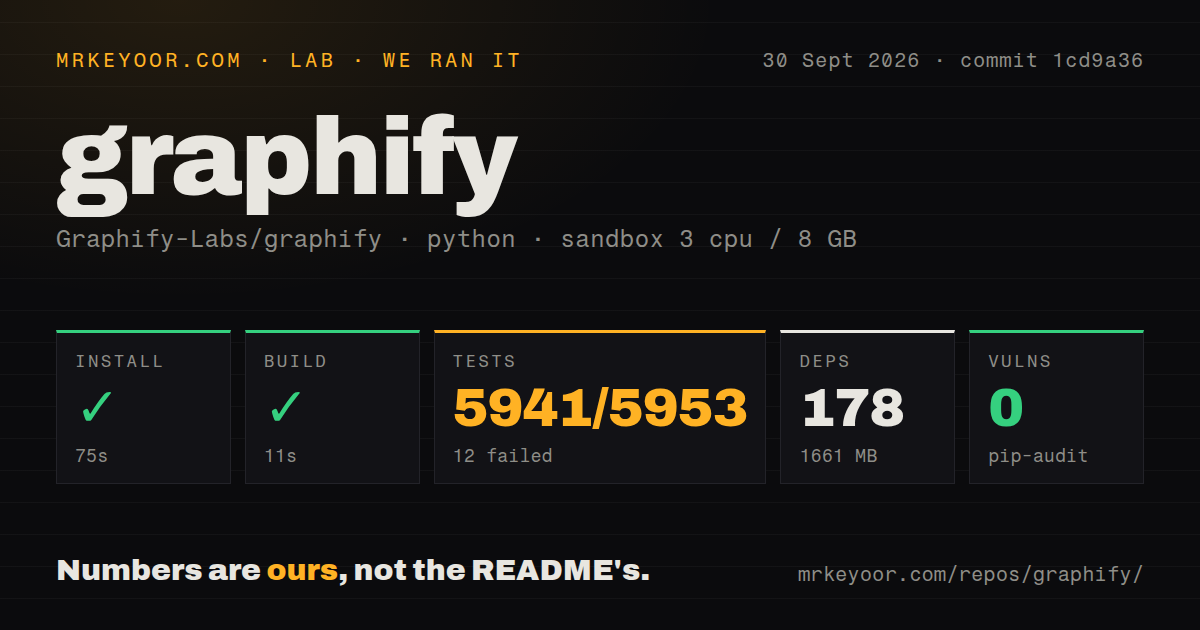
Our run took place on September 30, 2026 at commit 1cd9a36. The matching sandbox record identifies a Python 3.12 Debian Bookworm image with 3 CPUs and 8 GB of memory. Installation returned zero in 75 seconds and recorded 178 packages occupying 1,661 MB. The build command returned zero in 11 seconds; the test command exited 1 after 392 seconds.
The stored parser summaries report 5,941 passed, 12 failed, and 151 skipped. They do not establish exhaustive unique test coverage, and skipped tests are not failures. We have not rerun the checkout or reconciled a complete log. The raw pytest footer reports 363.00 seconds, while the harness records 392 seconds for the test step; these describe different timing boundaries and remain separate.
Our harness records each command's success flag, exit code, elapsed time, timeout status, and parsed test counts. The current MrKeyoor testing methodology explains that reporting approach and its limits. It provides provenance context, not evidence that this older run used every detail of today's procedure.
No recorded workload demonstrates graph extraction quality, interactive assistant behavior, hook behavior, or MCP deployment. A build command returning zero does not fill those gaps.
The failures need two separate explanations
The raw summary names tests/test_install_references.py::test_built_wheel_ships_the_full_skill_payload. Its assertion says the build module was missing and identifies it as a declared development dependency. That is evidence of an incomplete test environment for this check, not proof that the built wheel omitted files.
Other named failures occur in tests/test_skillgen.py. They include audit and round-trip checks attempting to read skill files or graphify/__main__.py from historical commit 47042beb05d1f6dd2186c0c499ae2840ce604ead. Git reports that the paths exist on disk but not in that historical revision. The excerpt does not establish why those historical reads failed.
Do not describe every failure as a skill-generation defect, or dismiss the command failure because many checks passed. Reproduce the environment with the documented development dependencies and investigate the historical reads before treating the integration as verified.
Decide what the installer may change
The pinned README distinguishes installing the package from registering assistant integration. Project registration can write skill files, and Codex integration writes guidance into AGENTS.md. Claude Code uses hooks to nudge graph queries before source searches and reads. At the tested revision, the README describes Codex's registered pre-tool hook as intentionally doing nothing; its persistent guidance comes from AGENTS.md.
Git hooks are another optional change. The documented workflow rebuilds on commits and branch switches, while pulls and merges still require an update. Review generated files and repository policy before enabling these changes across a team.
A later issue is useful context, but does not explain our test failures. Issue 3959 reports a read-hook path-matching problem on graphifyy 0.9.69. The maintainer says it was fixed in v0.9.74. Neither that report nor its resolution proves the behavior of our tested commit.
Local code parsing has a document boundary
The pinned README says source parsing uses tree-sitter locally without model calls. Documents, PDFs, and images use the assistant's model or a configured backend for semantic extraction. Choose that backend deliberately before indexing sensitive documents; local code parsing alone does not establish that every input stays on the machine.
The README also documents local query logging. Review that behavior alongside model routing. Shared HTTP MCP access introduces a service boundary: the documented default binds to loopback, and the instructions pair exposure beyond localhost with an API key. We did not deploy or test that service.
Pip-audit recorded zero advisories in our run. Scan coverage is unknown: the record provides no scannedPackages value. The zero is neither proof that all 178 installed packages were scanned nor a security assessment.
Choose alternatives by the job you need done
GitNexus provides a code knowledge graph through MCP tools, a CLI, and a web graph explorer. Its README makes it a relevant replacement to evaluate for code indexing. It also documents repository integration changes, an index-only option, and a PolyForm Noncommercial license with commercial licensing available. Compare actual language coverage and graph answers in your repository; we have no comparative run.
Aider is a terminal coding assistant that makes a map of your codebase. Its README describes editing, Git integration, and automatic linting and testing. Choose it for an assistant workflow. Graphify's pinned README lists an Aider integration, so choosing Aider does not necessarily remove the separate graph-index decision.
How to read the ratings
These are editorial judgments, not measured product performance. On this rubric, 1 means the supplied evidence shows substantial obstacles, 3 means useful documented capability with unresolved practical limits, and 5 means the dimension's stated evidence criterion is met. Scores 2 and 4 fall between those anchors. Each dimension has a different criterion.
Setup ease is 3/5: installation and build commands succeeded, but the footprint and unresolved test environment require attention. Documentation is 5/5 for breadth across prerequisites, package naming, assistant setup, privacy, backends, and shared serving; we did not execute every documented path. Community is 5/5 for visible participation and response evidence: the supplied release notes credit multiple contributors, and issue 3959 contains a maintainer response and linked fix. This rating does not measure adoption, queue health, or support speed generally. Maturity is 3/5: the documented integrations are broad, but our failed test command and untested deployment leave readiness unresolved.