Folly is infrastructure code shaped by Meta's needs
Folly is not a single-purpose library with one obvious entry point. It is a collection of mostly independent C++ components created for practical problems inside Meta, then shared publicly. Its stated role is to complement the standard library and Boost, adding a component when an equivalent is missing or does not meet the required performance profile. That origin gives Folly real credibility, but it also explains why some designs are specialized and why adopting it can pull a project toward Meta's engineering assumptions.
The current README describes Folly as a C++20 library and calls large-scale performance a unifying theme. It names unusual low-level components such as PackedSyncPtr.h and SmallLocks.h, while warning that performance concerns can produce idiosyncratic designs. This is useful candor. You are getting tools built for demanding systems, not a promise that every API will feel familiar to an ordinary application team.
The library is broad, flat, and deliberately interconnected
Most public symbols live in the folly namespace, and the source tree uses the familiar folly/folly installation layout. The top-level structure is intentionally flat, so discovering capabilities means browsing headers or the documentation overview rather than choosing among a few neatly isolated packages. Components may depend on other Folly components without restriction, which weakens the idea that this is merely a bag of tiny, dependency-free helpers.
The repository snapshot we tested contained 3,112 files and about 724,600 lines of source, occupying 29.5 MB after checkout. Those figures put the integration decision in perspective: even if you use one header or facility, you are evaluating a substantial codebase and its build conventions. The experimental directory deserves special attention because the README explicitly says client code should avoid it due to update breakage.
What happened when we ran it
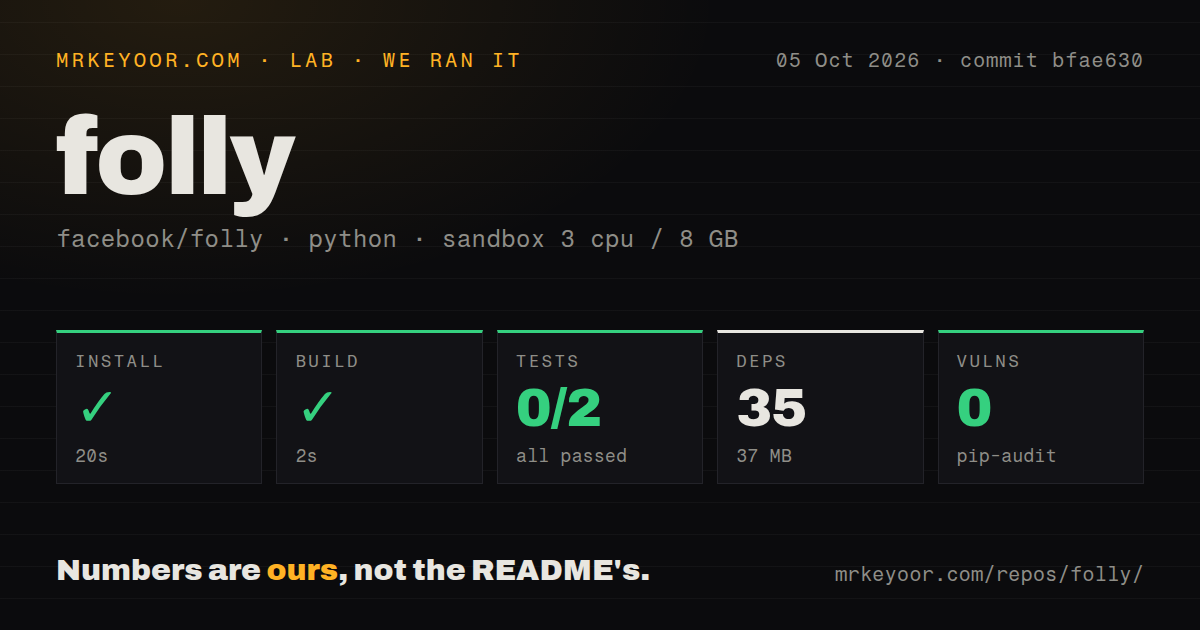
Our sandbox run targeted the project under ./folly/python/ in a fresh unprivileged Debian container with 3 CPUs and 8 GB of RAM. Installation succeeded in 29 seconds, installing 35 packages that occupied 37 MB, and the build completed successfully in 7 seconds. pip-audit reported 0 known vulnerabilities in those installed Python dependencies. We also found 7 CI workflow files, a tests directory, and no Dockerfile.
The test step did not pass. After 7 seconds, pytest reported 0 passed, 0 failed, and 2 collection or setup errors out of 2. The visible log shows imports in test_iobuf_ext.py and test_set_executor.py failing because Python could not find a module named folly; one trace reaches from folly.python.test import test_set_executor_cython. That is the limit of the evidence. We cannot claim whether a path setting, generated extension, packaging step, or another prerequisite would fix it.
This distinction matters because our successful install and build covered the detected Python project, not a verified build of the full C++ library. The README's primary setup path is getdeps.py, which downloads and builds dependencies before invoking CMake. It requires Python 3.6 or later and can install system dependencies recursively on Linux or macOS. Teams should budget for that native toolchain and dependency work rather than treating our 29-second install as an end-to-end Folly setup benchmark.
Its strengths are specificity, candor, and production provenance
Folly explains its boundaries better than many large infrastructure repositories. The README says it prefers removal when std or Boost makes a Folly component obsolete, recommends static linking because commits carry no ABI compatibility guarantee, and separates unstable experimental code. It also documents GCC, Clang, and MSVC, identifies Linux, iOS, macOS, and Windows targets, and narrows the strongest CMake support expectation to macOS and the latest Ubuntu LTS or newer.
The supplied test commands are concrete: getdeps.py builds tests by default, its test action runs them, and direct CMake users can enable tests with -DBUILD_TESTS=ON. Generated helpers such as run_cmake.py, plus commands for locating scratch build and install directories, make repeated native development less mysterious. The latest release, v2026.08.24.00, arrived 3 days before this review, which also makes a pinned release easier to choose than an arbitrary commit.
The rough edges are part of the adoption cost
There is no ABI stability from commit to commit, and the maintainers recommend static builds and temporary install locations. That is a meaningful operational constraint for teams distributing shared binaries or upgrading dependencies independently. The unrestricted internal dependencies between modules can also make apparently narrow adoption broader than expected, while the flat layout increases the research needed to understand which component is supported, experimental, or superseded elsewhere.
Community signals are strong but need balanced reading. The project has 30,507 stars, was pushed on 2026-08-27, and released v2026.08.24.00 on 2026-08-24, so it is plainly active. Its 463 open issues indicate both heavy real-world use and a sizable support surface; that count alone does not show how quickly maintainers respond. Seven CI workflow files are encouraging evidence of automation, but our 2 collection errors show that the Python slice still did not validate in our clean environment.
It fits best inside an experienced C++ platform
Folly makes the most sense in a stack where a platform team already owns native builds, pins dependency revisions, and can run targeted tests on supported compilers and operating systems. It is especially defensible when another Meta open-source dependency already brings it in, or when a specific Folly component solves a measured need that std and Boost do not. In that setting, static linking and a controlled CMake prefix are manageable engineering choices.
For a new application, begin with C++20's standard library and add a larger dependency only for a concrete capability. If Folly is the answer, adopt a pinned release such as v2026.08.24.00, stay outside experimental, and verify both the component tests and your application at every upgrade. Our run proves that installation and build can be quick for the Python subtree, but its 2 import-time test errors also show why a green build step is not enough evidence for production readiness.