DuckDB puts analytical SQL inside the process
DuckDB runs with the application that calls it instead of asking you to maintain a separate server. The CLI and clients for Python, R, Java, and WebAssembly all expose the same analytical engine. A query can place a CSV or Parquet filename directly in the FROM clause. For a notebook, local transformation, or embedded report, that removes an entire service from the path between a file and an answer.
Its SQL goes well beyond a file reader. The README names correlated subqueries, window functions, collations, arrays, structs, and maps. Python can query pandas objects without copying them into a remote database first. You may keep the work transient or persist it to a DuckDB file. Basic local use needs no listening port, database account, or daemon.
The tradeoff is architectural, not cosmetic. DuckDB is built for analytical queries that scan substantial parts of a dataset and for changes made in batches. It is a poor substitute for a transactional web database receiving many small edits from unrelated processes. Used beside that database for analysis, though, it can save a great deal of plumbing.
What happened when we ran it
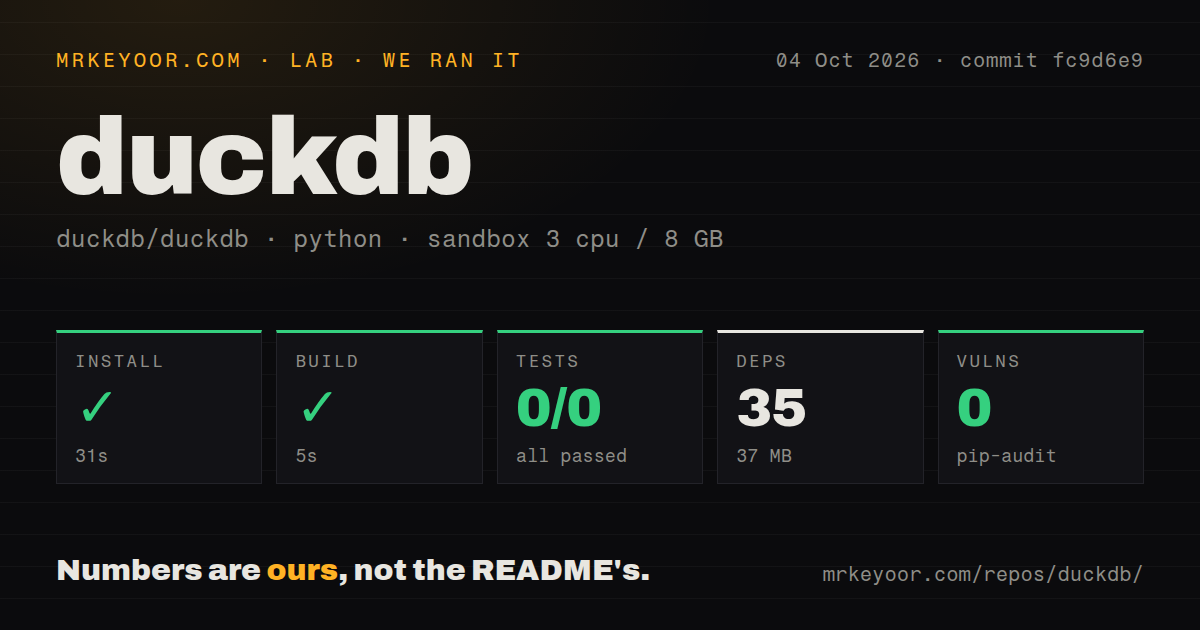
Our sandbox installed commit fc9d6e9's Python project under api_spec/ in 31 seconds. It added 35 packages and occupied 37 MB. The build completed successfully in another 5 seconds. The Debian container had 3 CPUs, 8 GB of RAM, Python 3.12, no secrets, and no elevated privileges. Pip-audit reported 0 known vulnerabilities in the installed Python dependencies.
The test step failed after 7 seconds with exit code 5. Pytest reported 0 passed and 0 failed out of 0, and the final line said no tests ran in 0.02s. That is a discovery failure, not a green empty suite. The log does not identify a cause, so blaming a missing package, configuration error, or repository defect would go beyond the evidence.
Scope matters here. Our harness selected api_spec/; it did not compile and test the full C++ database engine. The checkout contained 16,215 files, about 1,355,035 source lines, and used 257.8 MB before installation. It also had a tests directory and 27 CI workflow files, although our scan found no Dockerfile. The root README sends engine contributors to make unit and make allunit, neither of which was part of our run.
One process owns native-file writes
DuckDB's current concurrency guide permits one process to open a native database file in read-write mode. That process can use several writer threads, and appends do not conflict. Multiple processes may open the file in read-only mode. When two threads update or delete the same row, optimistic concurrency control can reject the second change, leaving retry behavior to the application.
This boundary is easy to miss because embedding feels frictionless. A Python worker, a web process, and a scheduled job cannot all assume they may write the same file independently. The docs now describe Quack for multiple-process writes, but label it beta as of DuckDB 1.5.2. For a stable shared-write design, the same page points readers toward DuckLake with a PostgreSQL catalog.
That does not make DuckDB fragile. It makes the ownership model explicit. If one application process owns writes and threads do the work, the design fits. If separate machines need accounts, authorization, backups, and concurrent writes behind a network endpoint, start with a server database rather than building those controls around an embedded file.
Extensions can download code on first use
DuckDB keeps part of its feature set in extensions. Parquet, JSON, time zones, HTTP and S3 access, spatial functions, and other capabilities use that mechanism. Installable extensions are downloaded, checked, and stored in a local directory. Several core extensions autoload, so a query that reaches an HTTPS resource can cause httpfs to be installed without a separate INSTALL statement.
That is friendly on a laptop and important in a sealed container. A production image may need extension binaries packaged before deployment, a writable extension directory, and cloud credentials for remote objects. Pinning only the language package leaves those runtime pieces outside the record. Test the exact DuckDB release, extension set, file formats, and endpoints you will run.
The repository itself has no root Dockerfile according to our scan, which is reasonable for an embeddable database but removes a canonical source-development container. The README's native build path calls for CMake, Python 3, and a C++17 compiler. Those requirements belong to engine contributors. Someone who only needs the released Python package or CLI should not treat our 257.8 MB source checkout as the normal installation experience.
October activity and v1.5.6 show active maintenance
GitHub showed 41,911 stars and 978 open issues and pull requests, not 978 confirmed bugs. The repository was pushed on October 4, 2026, and recently updated issues and pull requests were still moving on October 5. Release v1.5.6 shipped on September 28 with fixes across query planning, storage, Parquet, extensions, the C API, and concurrency. The release and issue dates support a high community score.
A large active queue also means upgrades deserve real regression queries. The v1.5.6 notes include fixes for wrong results, crashes, write-ahead-log recovery, time zones, and extension updates. That breadth is normal for a database used through many clients and file formats, but it argues against casual version bumps. Keep representative SQL and data files in your own tests.
DuckDB earns its place when the job is analytical and the process boundary is acceptable. Our run verified a 31-second Python install and a 5-second build inside api_spec/; it also exposed a test command that found nothing. Take both facts seriously: trying DuckDB is easy, while proving your chosen client, extensions, files, and concurrency pattern still belongs to you.