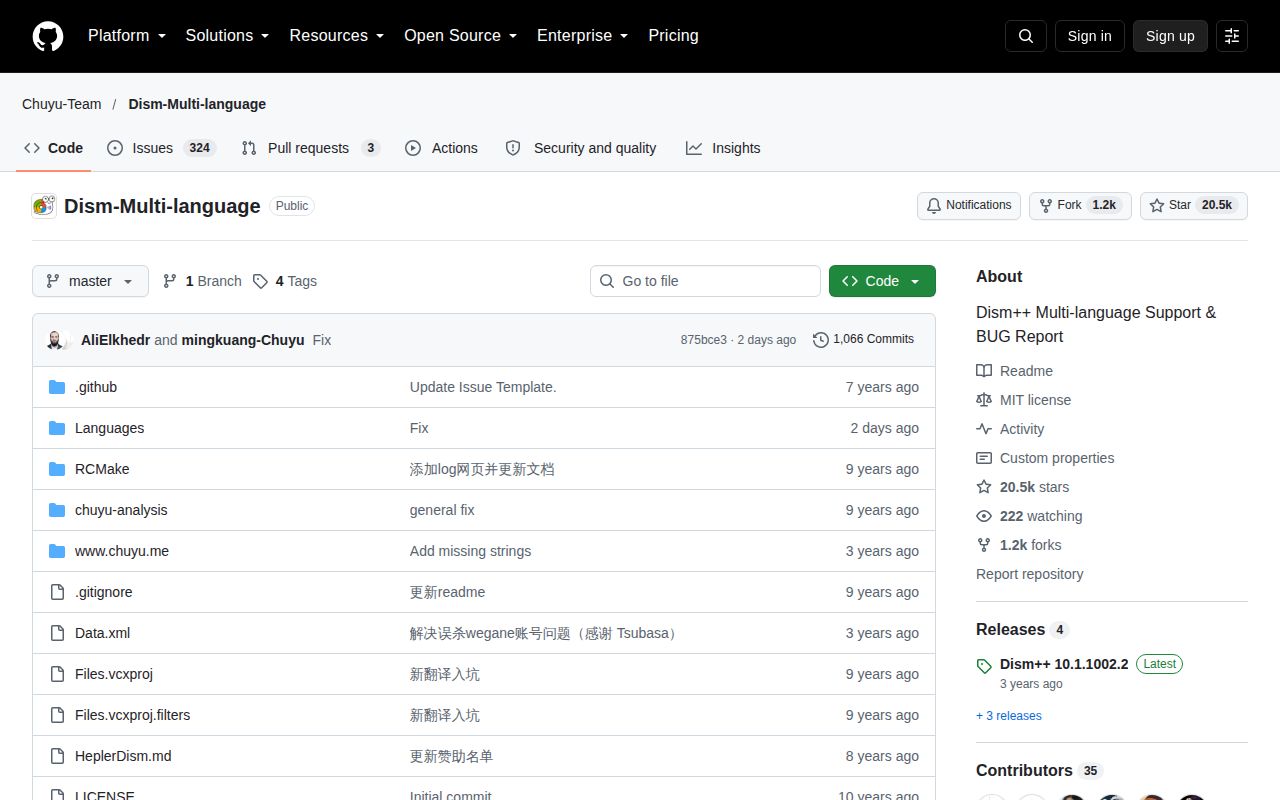
The repository gives you Dism++ resources, not its full application source
Cloning Dism-Multi-language gives you translations and cleanup rules for Dism++, rather than the full Windows servicing application. The README says development defaults to Simplified Chinese, while English text exists for both the application and website. That distinction changes the buying decision: this is useful if you want to improve a label, inspect a cleanup rule, or report a Windows problem. It won't satisfy a team that requires the complete executable to be reproducible from public source.
Our sandbox snapshot was commit 875bce3, taken on October 9, 2026. The lab classified the repository as HTML and found no Dockerfile or supported runnable ecosystem. That matches the README's description of a resource collection. Treating its GitHub popularity as evidence that a Linux clone becomes a working system utility would send you down the wrong path. The Windows application is a separate artifact to assess.
What happened when we ran it
We did not run Dism-Multi-language: our sandbox found no supported ecosystem for this HTML repository and no Dockerfile. We cloned commit 875bce3 into a fresh Debian container with 3 CPUs and 8 GB of RAM, without elevated privileges or secrets. No application execution result followed. There is no measured installation time, cleanup result, or Windows recovery outcome to report, and no failing command log from which to diagnose a runtime problem.
The missing execution result matters most if you want to use Dism++ on a machine you depend on. A Debian resource checkout cannot establish whether a Windows cleanup rule removes the right files or whether boot repair succeeds. Our testing method should be read alongside that boundary. This review judges the public resources and documented reports, with a conditional recommendation for the application rather than a claim that it passed our lab.
English resources exist, while detailed support often needs Chinese
The project README names Languages/en.xml and a separate English resource file for the website. Translators therefore have concrete files to work on, rather than a vague invitation to help. Data.xml contains cleanup and optimization rules. Keeping those resources visible lets a contributor examine wording and rules together, which matters when a translated label describes an action that deletes files or changes a Windows setting.
The 3-CPU Debian environment tells us nothing about how comfortable that workflow feels inside Windows. For an English-speaking operator, the practical friction is elsewhere: release notes and many detailed issue reports are Chinese. English resources make the interface accessible, but they don't guarantee equally detailed English troubleshooting. If your support team needs an English explanation for every servicing action, budget translation work before putting this in its standard recovery kit.
The latest release fixes rules and carries a differently named asset
Release v10.1.1002.2 was published on March 26, 2023. Its release notes describe a cleanup-rule correction and a NuGet package cache rule. The downloadable archive is named Dism++10.1.1002.1B.zip. Record both identifiers when documenting a deployed copy: the release tag and filename differ. The notes also say the author's attention was on a UI library and that this update was limited in scope.
For our October 9 snapshot, the lab supplied neither a runtime image nor an execution path. Downloading the Windows archive would be a different evaluation, and this repository's MIT label alone doesn't demonstrate that the complete application is present as public source. A contributor can use the published resource files on their stated terms. An organization that requires an auditable application build needs more evidence than this repository offers.
Current translations do not settle current Windows repair reports
The last push was October 9, 2026, and GitHub returned 20,549 stars with 327 open issues and PRs. Recent activity includes closed translation PRs for Arabic and Vietnamese. The Arabic PR describes XML errors that prevented that language from loading. Those changes are useful maintenance evidence, even with an older binary release. They establish work on resources, without establishing that every Windows servicing problem is getting a corresponding application fix.
Open issue 1201 reports boot repair returning error 193 when a Windows 11 host handles a Windows 10 LTSC installation. The reporter says a command using the target installation's bcdboot.exe succeeded. That is a specific user report, not a result from our 8 GB sandbox or a confirmed diagnosis. If mixed Windows versions are part of your recovery job, reproduce that exact task before depending on Dism++.
Choose a cleaner when cleaning is the whole job
BleachBit publishes its cleaner source and documents a preview-before-delete workflow. It is the more direct comparison when your requirement is removing unwanted files with inspectable code. Cleanmgr+ takes a different route, using Windows cleanup resources and custom scripts. Its README explicitly calls the application closed source, so it doesn't solve a full-source requirement. Neither alternative should be mistaken for a measured replacement for Dism++ boot repair.
With no supported execution path in our October 9 lab snapshot, I'd choose this repository for translation contributions and rule inspection. For Windows operations, start with the specific task and the issue reports that match it. If that task is boot repair, require a successful rehearsal on the Windows versions you use before you put the downloaded archive on a recovery USB drive.