Should you use Code2Prompt?
Choose it when your immediate task is to assemble selected source into an artifact you can inspect and give to an LLM. Code2Prompt packages codebase context into a single LLM prompt. The documented filters, templates and Git integration let you control what goes into that artifact. That makes it worth trying on a scoped task before standardizing a team workflow.
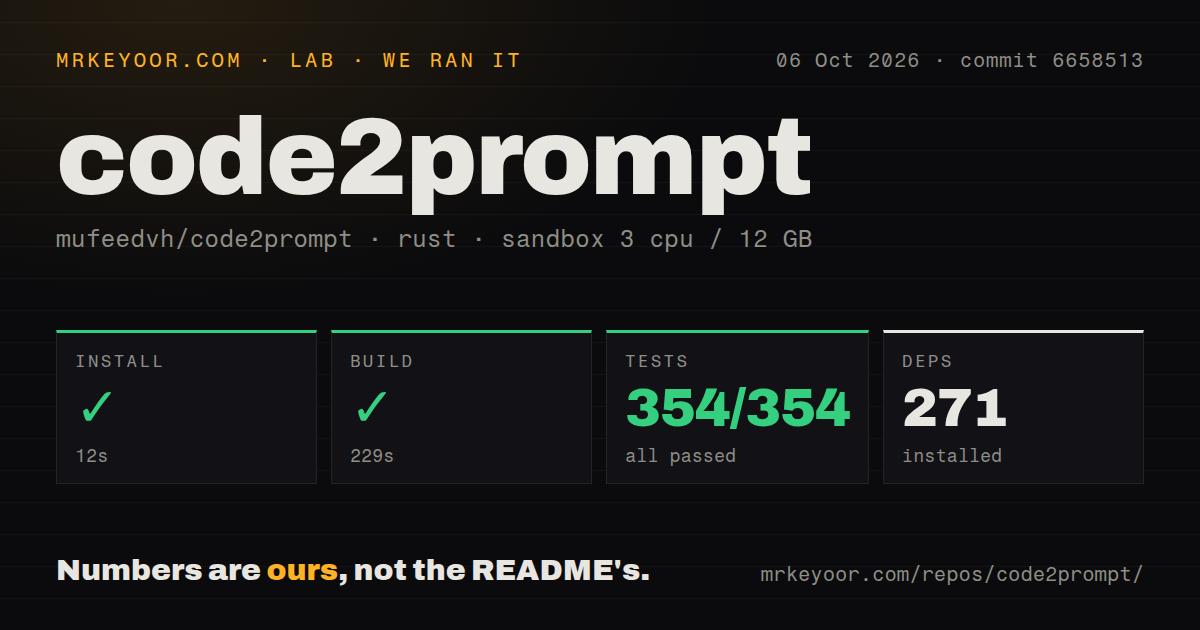
Our run on October 6, 2026 reviewed commit 6658513. The attached record supports successful install, build and test command outcomes in our sandbox. It does not establish how useful the exported context is to a model, how quickly a large repository is traversed, or whether an MCP deployment works.
What our sandbox recorded
The exact stored checkout was 66585136062c04275ddd5a01c5518a4d78c4aa76. The harness records each step's success flag, exit code, timeout status and elapsed time, alongside retained log tails. Installation, build and tests each returned exit code 0 without timing out. The attached rounded timings are 12 seconds, 229 seconds and 70 seconds respectively.
The build tail identifies code2prompt and code2prompt_core as v4.3.0. This identifies the source packages compiled in that run; it does not establish the latest published release. The recorded dependency count is 271, and the sandbox had 3 CPUs and 12 GB RAM.
The stored parser summaries report 354 passed, 0 failed and 354 total. The retained output repeats Cargo summary lines after a replay marker. Those aggregates may double-count suites, and unique, exhaustive counts have not been verified. The raw tail separately shows successful template, utility and documentation test results; summing that tail would not establish a replacement aggregate.
The MrKeyoor testing methodology explains how command outcomes and parsed counts reach a review. That page provides provenance context, not evidence that its current procedure was used unchanged for this older run. This correction uses the existing record and includes no new execution.
There is no recorded audit result or scanned-package coverage. Security scan coverage is unknown. Successful commands also do not establish a completed repository-export workload, clipboard operation, Python integration, model conversation or MCP client session.
Token estimates need room for the final payload
The README says Code2Prompt estimates prompt size using parallel per-file counts and estimated template overhead, including optional line numbers. Code2Prompt's token estimate does not re-tokenize the full rendered prompt and excludes the JSON output envelope. Treat it as a selection aid rather than a guarantee that the final payload fits a model's context window.
Start with the files needed for one question, inspect the generated artifact and check the final payload against the receiving model's limits. Include and exclude globs and .gitignore handling help narrow the selection. They do not determine whether a selected file is appropriate to disclose.
The optional entity map adds structural context. The supplied implementation and merged pull request describe functions, classes and methods with signatures and line ranges, rendered as an outline before file contents. It requires the entity-map Cargo feature. That is a documented capability, not a token-savings result from our sandbox.
Installation choices and agent integration
The source build took 229 seconds in our sandbox. For an initial trial, the documented binary or package routes are worth considering if you do not need to modify the Rust source. Their installation times were not measured here. The basic documented command is code2prompt .; output goes to stdout by default, with explicit options for a file or clipboard.
The README also documents an agent skill. Its installer adds the skill folder and template; the CLI is installed separately. Installing that skill therefore does not by itself install the executable. The README advertises an MCP server too, but the attached command record does not verify that service. If MCP is required, locate the exact server distribution and test initialization with your intended client before committing to it.
Which alternatives answer the same need?
Repomix documents remote Git repository packing and Tree-sitter compression. Consider it as a replacement for the packing step when either of those documented workflows is a requirement. Its compression extracts structural elements while removing implementation details, so inspect whether the result retains what your question needs. We did not run a comparative benchmark.
Gitingest accepts a Git repository URL or a local directory and provides a CLI and Python package. Consider it as a replacement for the digest-generation step when you want that URL-based workflow or its Python interface. Its documented output includes a summary, tree and content. We did not test its output against Code2Prompt's.
Both alternatives address context preparation. Neither comparison establishes that the resulting prompt produces better model answers.
How to read the ratings
These are editorial ratings for the dimensions described in their notes. The rubric is 1 for substantial documented obstacles, 2 for significant friction or gaps, 3 for usable evidence with material limits, 4 for a supported workflow or development practice with bounded gaps, and 5 for broad evidence across the relevant workflows. Unknown dimensions remain unassessed. A rating does not measure adoption, security or model-answer quality.
Setup ease reflects the successful source route and documented package choices, with source compilation as the main observed friction. Documentation covers the main context-preparation workflow, but this review lacks verified server setup evidence. Community reflects the supplied merged feature discussion and review, rather than stars or user numbers. Maturity reflects successful build and test command outcomes plus the reviewed feature implementation; replayed test summaries limit what the aggregate can establish.