VS Code where the compute lives
code-server puts a VS Code-style workbench in the browser while files, terminals, extensions, language servers, builds, and tests run on a remote machine. That arrangement is useful on a tablet, a locked-down laptop, or any device too small to carry the full development environment. It also gives one stable Linux workspace to developers who move between several clients.
The appeal is direct because the editor feels familiar. Settings and extensions live on the server, projects stay beside their toolchains, and the built-in proxy can expose development ports through the same host. The browser still changes a few daily habits. Some keyboard shortcuts are intercepted, webviews need a secure context, and connection behavior matters when terminal jobs outlive a tab.
This is a single-user server, not a team control plane. Coder's README points organizations that need managed multi-user infrastructure toward the separate coder/coder project. You can create several OS users and processes yourself, but then account isolation, resource policy, provisioning, cleanup, and auditing become your system-administration design.
Security is part of installation
The setup guide is admirably blunt: never put code-server directly on the internet without authentication and encryption, because its terminal can take over the machine. The default binds to localhost and uses password authentication. That is safe for initial testing, not remote access.
SSH port forwarding is the simplest recommendation when every client has SSH. Public browser access needs a domain, TLS, a reverse proxy such as Caddy or Nginx, and working WebSocket forwarding. External authentication can sit in front for stronger identity controls. Operators also need firewall rules, patching, backups, a non-root runtime user, and a decision about which project secrets are allowed on the host.
The browser IDE makes development services easier to reach, which expands the boundary. code-server has proxy routes for forwarded ports and options to disable those routes or file downloads. If users can launch arbitrary servers in the integrated terminal, review proxy behavior and network reachability rather than assuming the editor login covers every child service.
What happened when we ran it
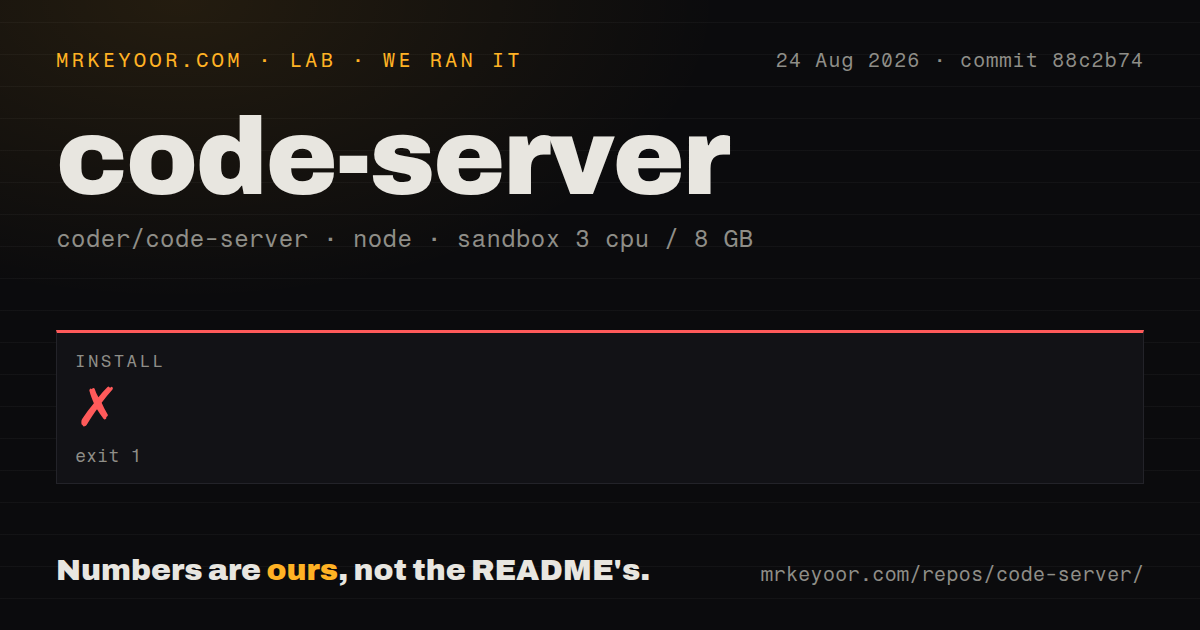
We cloned commit 88c2b74 into a fresh, unprivileged sandbox with 3 CPUs, 8 GB of RAM, no secrets, and the lab-node:22 image. The checkout was substantial: 18,177 files, roughly 3,762,018 source lines, and 253.5 MB. Npm installation ran for 447 seconds, then failed with exit code 1.
The failing tail came from node-gyp inside lib/vscode/node_modules/native-keymap. It reported Node v24.19.0, node-gyp v12.4.0, native-keymap v3.3.9, and ended with gyp ERR! not ok. The top-level failure was the ./ci/dev/postinstall.sh command. The supplied lines do not identify a missing package, compiler message, or exact native build error, so naming one would be guesswork.
The container label and the Node version printed by the log do not match, and the tail does not explain why. Our result is limited to what happened: source installation failed during the native-keymap step. The measurement block has no build or test outcome. Eight CI workflow files and a tests directory show upstream automation, but they cannot turn our incomplete local setup into a pass.
Published packages, the install script, and release archives are the better route for users. Source contributors face a much larger job. The contributor path requires Node 24, Git LFS, npm, nfpm, jq, GnuPG, quilt, rsync, unzip, Bats, and several Linux development libraries. It also says full builds and development-mode loading take a very long time.
Extension compatibility needs an inventory
code-server uses Open VSX because Microsoft's marketplace terms do not allow non-Microsoft VS Code products to use that marketplace. Many popular open extensions are present, and VSIX files can be installed manually. The gap is still material: the FAQ names Live Share and Microsoft remote extensions for SSH, containers, and WSL as unavailable closed-source examples.
Check every required extension before migration, including authentication helpers and language tooling. A matching name in Open VSX does not guarantee the same publisher, release timing, or web compatibility. Manual VSIX installation adds an update process that the operator must own. If official Microsoft marketplace access is mandatory, the FAQ points toward VS Code web as a better fit.
Browser state also differs from server state. An open report for current main says --reconnection-grace-time does not preserve a session when the browser tab closes, because a graceful shutdown disposes it immediately. The same report says opening a second connection can shorten a longer grace period. Anyone relying on an integrated terminal for unattended jobs should use tmux, screen, systemd, or another server-side supervisor rather than trusting the browser session.
Health and the choice
The repository was pushed on August 20, 2026. Version 4.133.0 was released on August 17 and updated the included Code base to 1.133.0. GitHub listed 151 open issues and pull requests combined, with recent reports and development discussion around extension hosts, reconnection, and chat-session state. Releases track upstream Code closely, which is important for security and extension compatibility.
Documentation is one of the project's best assets. Installation paths cover packages, standalone archives, npm, cloud images, and devcontainers. Separate guides explain secure exposure, proxies, HTTPS, extension galleries, settings storage, iPad behavior, and source contribution. The MIT license is simple for personal and commercial deployment.
For one developer, code-server balances familiarity, control, and deployment guidance well. Use a release artifact, keep persistent data backed up, verify extensions, and secure the route before adding real credentials. Move to Coder when workspace lifecycle and multiple users become the problem, or choose OpenVSCode Server when code-server's extra server features are unnecessary.