Taskmaster turns one PRD into agent-sized work
Taskmaster reads a requirements document and creates tasks with dependencies, subtasks, priorities, implementation notes, and test strategies. Agents can ask for the next available task, expand a complicated item, attach research, update status, and generate files for separate workstreams. The persistent task data gives a coding session somewhere to resume after chat context disappears. A plan can survive across editors and model providers instead of living in one conversation.
The same functions are exposed through a command-line interface and an MCP server. The README lists 36 MCP tools in the full mode, about 21,000 tokens of tool context; standard mode loads 15 for roughly 10,000 tokens, and core mode loads 7 for about 5,000. Selective loading is worth configuring because a task manager should not consume a large part of every agent request just by being present. New users are directed toward standard mode.
Claude Code can replace a separate model API key
Taskmaster defines main, research, and fallback model roles. Hosted options include Anthropic, OpenAI, Google, Perplexity, xAI, OpenRouter, and others listed in the README. Each selected provider needs its own credential. The research model is optional. Claude Code and Codex CLI are different paths: Taskmaster can call an installed CLI and use its existing authentication, avoiding a separate API key for that model route.
Claude Code installation is one claude mcp add command followed by model and project setup. A detailed PRD is strongly recommended, though individual tasks can be created from chat. This lowers the mechanical entry cost, but generated decomposition still needs judgment. A model can split work at the wrong boundary, miss a migration, or accept a vague test strategy. Taskmaster records the plan; it does not make the plan correct. Review task dependencies before letting an agent work through them unattended.
What happened when we ran it
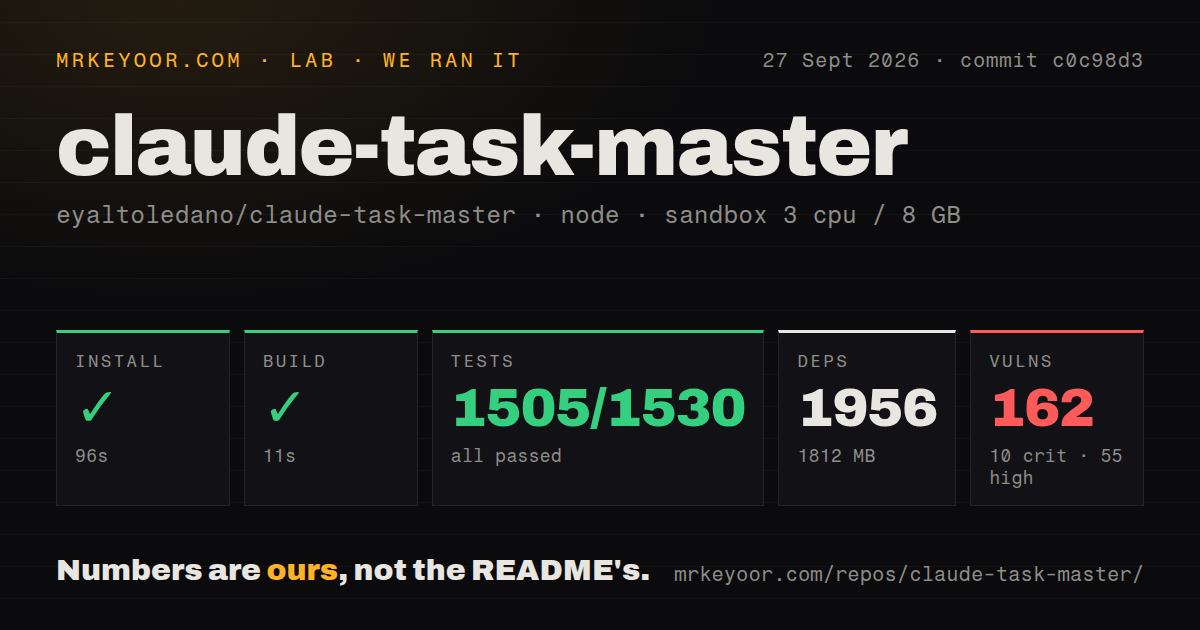
Our Node 22 sandbox installed 1,956 npm packages in 96 seconds. Dependencies occupied 1,812 MB, compared with a 13.4 MB repository checkout containing 1,254 files and about 203,862 source lines. The monorepo build completed successfully in 11 seconds. npm audit then reported 162 known vulnerabilities: 10 critical, 55 high, 69 moderate, and 28 low. Those counts cover the installed tree and do not prove each advisory is reachable at runtime.
The test command ran for 165 seconds and exited with code 1. Jest counted 1,505 passed tests, 25 skipped tests, and 0 failed test assertions out of 1,530. Three suites failed to run: tag-boundary, move-task-cross-tag, and clear-subtasks. The supplied log tail labels each as a test-environment setup failure, but it does not show a cause. We treat the run as failed without filling that gap ourselves.
The repository has 16 CI workflow files and a tests directory, but no Dockerfile. That makes the fresh-container result useful: the 11-second build was clean, while the full test command was not. Before deploying the MCP server, inspect which of the 162 advisories affect production packages, update what can be updated, and document any accepted exposure. A green build does not cancel dependency risk.
Release 0.43.1 has open workspace-boundary reports
Issue 1714 demonstrates an MCP tool accepting a supplied projectRoot outside the session root and writing task state there. Issue 1715 reports that an absolute or traversing prdPath can read a file outside the project and forward its content into downstream processing. Both reports target version 0.43.1 and were open when fetched. An agent-facing filesystem tool should enforce canonical path containment before reading configuration or writing tasks.
Task integrity has its own open defect. Issue 1708 says set-status converts numeric task IDs to strings and appends a literal parentId: "undefined" to legacy subtasks. It reproduces through both CLI and MCP paths on 0.43.x, according to the report. The suggested workaround is to avoid that command for legacy-format files. Since the task file is Taskmaster's source of truth, silent schema drift is more serious than a cosmetic output bug. Back up .taskmaster and review diffs.
The license adds another hard boundary. Its Commons Clause removes the right to sell the software as part of a product or service whose value substantially derives from Taskmaster. GitHub reports no standard SPDX license for the repository. Internal use may be straightforward, but a hosted task-management product, paid integration, or consulting package needs legal review. Calling it plain MIT would omit the restriction that matters most.
April code activity and September pull requests tell different stories
The latest GitHub release was 0.43.1 on March 31, 2026, and the repository's last push date was April 28. Issues and pull requests were still moving later, including an open task-expansion report updated in August and a provider pull request updated in September. That is contributor activity without a newer stable release. GitHub listed 212 issues and pull requests combined, so a pending fix should not be treated as shipped code.
Release 0.43.1 itself made a small but telling correction: task-master init stopped adding hamster and ham shell aliases and now removes existing aliases. That change reduces surprise during initialization. It does not settle the open workspace, task-file, or dependency findings, all of which affect a more consequential part of the trust decision.
Use it for supervised planning, not broad filesystem trust
Taskmaster solves a real continuity problem for agent-driven projects. Persistent tasks, dependency tracking, separate workstreams, provider choice, and smaller MCP tool sets are practical. Release 0.43.1 still asks too much trust from the filesystem and dependency tree. Use it in a contained project with reviewed diffs, narrow MCP permissions, backups, and a pinned version. Wait for confirmed fixes before exposing sensitive parent directories or treating its task file as an unattended automation ledger.