What our run establishes
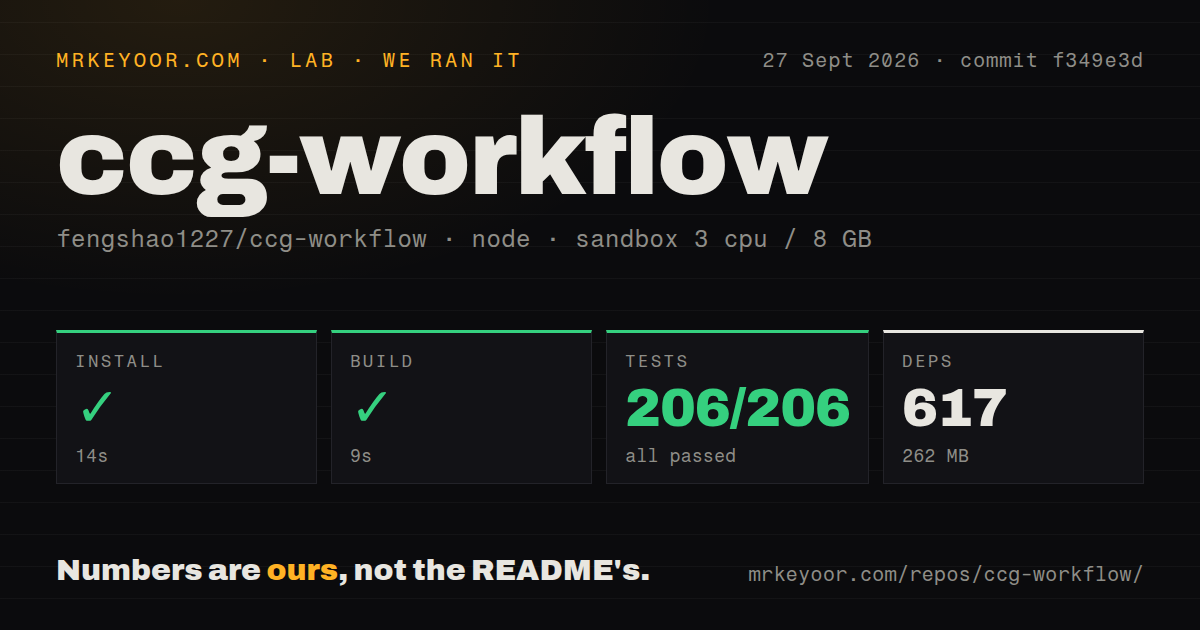
Our run on September 27, 2026, checked commit f349e3d, version 3.6.7, in our sandbox. The recorded environment had 3 CPUs, 8 GB of memory and the lab-node:22 image. This review uses that stored execution; we did not run the project again.
Our stored parser summaries report 206 passed tests, 0 failed and 0 skipped. The supplied Vitest footer also reports 206 passed tests across 13 files. These summaries do not establish exhaustive unique test coverage, and we have not reconciled a complete execution log.
The raw output includes installer, configuration, plugin-manifest and workflow-installation tests. That is useful evidence about the package's installation machinery. It does not demonstrate a working Claude-led coding session, successful external model calls, DeepSeek Harness activation or the quality of generated changes.
Our harness records command outcomes separately: success flags, exit codes, timeout flags, elapsed time and output tails, with parsed test counts stored alongside them. The MrKeyoor testing methodology explains this provenance and its limits. That page describes the methodology available now; it does not establish which methodology revision governed this September run.
No audit result is attached. Advisory totals and scan coverage are unknown, so this review makes no security assessment.
What the workflow adds
CCG Workflow is a workflow engine for Claude Code that delegates work through a Go binary bridge. The README at the tested commit describes Claude as the coordinator, with external models supplying analysis and review.
Its documented full-collaborate example creates a task directory, requests parallel model analysis and stops for approval of the plan before implementation. Medium and larger tasks retain requirements, an implementation plan, context and review material under .ccg/tasks/. The practical reason to consider CCG is that you can inspect this task history instead of carrying every decision between model sessions yourself.
Those are documented capabilities, not outcomes demonstrated by our run. In particular, the README's context-restoration promises should not be read as our verification that context can never be lost.
Choose the installation surface first
The tested README separates a full installation from a native Claude plugin. The full installation supplies multi-model commands, hooks and the binary bridge. The native plugin supplies skills without that orchestration. If skills are your only requirement, inspect the smaller option before installing the full workflow.
The full installation writes to user-level Claude configuration. Review the documented file tree and existing configuration before proceeding. Its dependency-install duration measures preparation of the repository in our sandbox, not the time needed to configure a workstation or authenticate model providers.
The checkout detector reported no Dockerfile and no top-level tests directory. The raw test paths nevertheless show tests under src/utils/__tests__/. A directory detector's negative result is not evidence that the repository lacks tests.
DeepSeek Harness needs its own compatibility check
Issue 165 is an open report of a dsh-ccg import or activation failure. Its environment entries contain example-prefixed values, so they do not establish the reporter's exact operating system, Node.js version or DSH version.
The current README documents newer DSH requirements and installation instructions. Those instructions are separate from our version 3.6.7 run, and we have not tested them. Neither passing installer tests nor one open report establishes whether your particular DSH build will activate the plugin. Check activation and a delegated task on your intended host before adopting this path.
Alternatives solve different parts of the problem
myclaude provides selectable workflow modules and multi-backend execution. Consider myclaude as a replacement candidate when choosing among development workflows is your main requirement. Its README also documents a wrapper and user-level Claude files, so modular selection does not imply an installation without configuration changes.
Trellis persists specs, tasks and project memory in the repository. Consider Trellis when shared engineering context across coding agents is the main requirement. It addresses context and workflow organization rather than establishing the same external-model routing role as CCG. That makes it a possible complement in purpose, but compatibility between their hooks and generated files is untested here.
How to read the ratings
These are editorial assessments, not benchmark results. For setup, documentation and maturity, 1 means major demonstrated obstacles, 2 means substantial gaps, 3 means a usable foundation with material limits, 4 means strong evidence within the stated scope with remaining validation, and 5 requires broader operational verification. An unknown dimension receives no score.
Setup ease is 4/5 for repository preparation: installation and build succeeded, but workstation configuration and provider access remain unverified. Documentation is 4/5 because the tested README explains architecture, installation choices, configuration and removal; this does not certify every instruction. Maturity is 4/5 for the installation and configuration tooling evidenced by the supplied tests, not for production orchestration reliability. Community is unassessed because the supplied evidence does not establish adoption or a representative pattern of support responses.