Portainer trades terminal control for a shared operating surface
Portainer Community Edition manages Docker, Swarm, Kubernetes, and Azure Container Instances through a browser interface and an API. It covers the routine objects that make container operations tedious: containers, images, networks, volumes, stacks, and cluster resources. The appeal is easy to understand. A teammate can inspect a failed workload or redeploy a Compose stack without remembering every command, and one Portainer instance can present several environments through a consistent interface.
That convenience has a security cost. A management console that can create containers, mount volumes, read registries, and alter clusters holds powerful credentials. Docker deployments commonly connect it to the engine or to Portainer agents, while Kubernetes deployments need control-plane permissions. Persistent data also contains configuration that matters during recovery. Treat Portainer as infrastructure, place it behind strong authentication and network controls, and back up its data volume. It is not merely another dashboard.
Community Edition omits controls some teams will need
The README draws a direct line between the open Community Edition and paid Business Edition. It names RBAC and vendor support as Business features and points readers to a comparison table. That split is reasonable, but it makes edition selection part of the technical evaluation. A small trusted team may be content with CE. A larger organization should map required identity, authorization, audit, and support controls before standardizing its workflows around the product.
Portainer also collects anonymous usage analytics unless the administrator disables it during first start. The README says the data excludes personally identifiable information and uses a Germany-hosted Matomo service. Operators in regulated environments should still record the setting in their deployment checklist. A one-time screen is easy to miss when a service is recreated, and privacy policy is an operational requirement rather than a UI preference.
What happened when we ran it
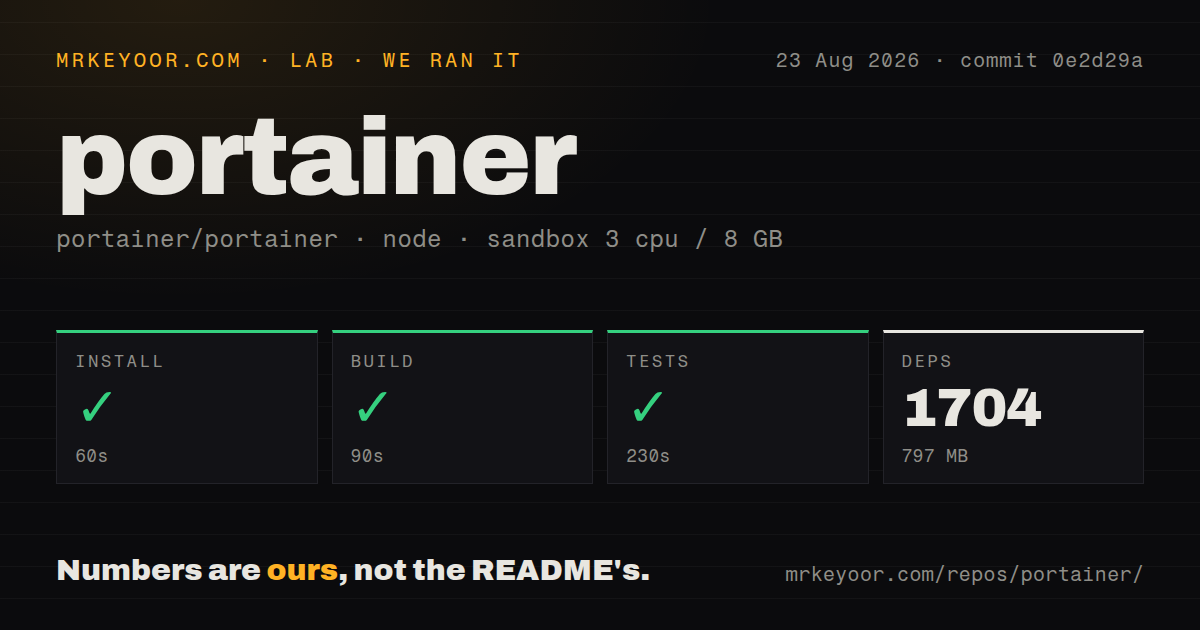
Our run at commit 0e2d29a installed 1,704 pnpm packages in 60 seconds and occupied 797 MB. The build succeeded in 90 seconds, then the tests succeeded in 230 seconds. On a fresh Debian container with 3 CPUs and 8 GB of RAM, that is a clean result and a substantial dependency tree. Contributors should budget several minutes and nearly a gigabyte before they can make a useful change.
The checkout contained 5,326 files and about 468,489 lines of source in 18.6 MB. We found no GitHub Actions workflows, Dockerfile, or tests directory in that commit. Those signals do not mean the project lacks releases or testing, since our invoked test command passed. They do mean a newcomer cannot infer the build and verification path from familiar top-level files. The README sends contributors to separate documentation and explains API client generation, including make generate-api, but says little about the full local loop.
This is a different experience from installing the published application. The production pitch is a single container, and that remains the sensible route for users. Building the repository is for contributors and organizations auditing or modifying the product. Do not confuse a straightforward container launch with a small codebase: the TypeScript and Go system has enough surface area that upgrades deserve staging.
Podman support has narrow, dated boundaries
Release 2.39.6 LTS, published on August 12, 2026, spells out three Podman limits. Auto-onboarding does not support Podman, socket attachment cannot cross from a Docker-hosted Portainer server to Podman or the reverse, and supported Podman is rootful version 5 on CentOS 9. Anyone choosing Portainer primarily for Podman should stop here and test that exact arrangement before migrating management workflows. Cockpit may fit a Podman-first Linux server better.
The same release also shows active maintenance. It added configurable SSRF protection modes and fixed a Swarm compose path traversal, then updated several dependencies for disclosed vulnerabilities. Bug fixes covered private registry pulls, Kubernetes ingress ports, Swarm stacks, agent compatibility, and client-disconnect panics. The last repository push was August 21, 2026, nine days after the release, so this is an actively maintained project rather than one living on old tags.
Deployment status can be more optimistic than reality
Recent issue activity gives competent operators reasons to hesitate. Issue 13139 reports a GitOps webhook returning HTTP 204 even though deployment failed. Issue 13213 describes a stack or service shown as successfully deployed after an image pull failed for lack of disk space. Issue 13248 reports a failed Git clone during pull-and-redeploy stopping containers and deleting the Compose file without rollback. Some reports still need confirmation, but each concerns the exact boundary where an operator relies on the UI to describe production state.
Registry handling is another area to exercise before rollout. Updated reports cover ignored custom-registry credentials, cached personal access tokens after a change, parsing failures when a registry URL includes a port, and authorization differences between API and Compose pulls. Release 2.39.6 fixed other private-registry failures, which shows maintainers are working in this area. It also shows that registry paths vary enough for one successful pull to prove little about another.
Portainer earns its place when it gives a team one understandable view of container systems and reduces risky ad hoc shell access. The interface does not remove the need for health checks, deployment verification, backups, or direct orchestrator knowledge. Start with a noncritical environment, test failed pulls and Git updates on purpose, and keep the underlying Docker or Kubernetes tools available for recovery.