Bore exposes one TCP port with one client command
Bore forwards a local TCP listener through a server that can accept connections from the internet. The common path is bore local 8000 --to bore.pub, which assigns a remote port and sends its traffic to localhost. That covers previewing an API, reaching SSH, testing a webhook receiver, or sharing any service that speaks TCP. There is no account dashboard, project object, or HTTP-specific routing layer to learn.
The narrow scope is the appeal. The checkout at commit 00a735a was 0.1 MB, with 24 files and about 822 lines of source by our count. A control connection on port 7835 asks the server for a tunnel port. Each incoming connection then gets a UUID, and the client opens a matching stream back to the server. Unaccepted connections are discarded after 10 seconds, which keeps abandoned handshakes from collecting forever.
Self-hosting needs one reachable server and a port range
A self-hosted Bore server starts with bore server and listens on all interfaces by default. Operators can set minimum and maximum public ports, separate the control binding from the tunnel binding, and add a shared secret. The client can request a particular remote port, although the request fails when that port is unavailable. This is enough for a personal VPS or a controlled development network.
Versioned binaries are published for macOS, Windows, and Linux, and Homebrew carries bore-cli. Cargo users can compile it themselves. The Docker image contains a statically linked binary in a minimal scratch image, but the README identifies AMD64 as its published architecture. A server also needs firewall rules for control port 7835 and the chosen tunnel range. Opening only 1 tunnel port does not remove the separate control connection.
What happened when we ran it
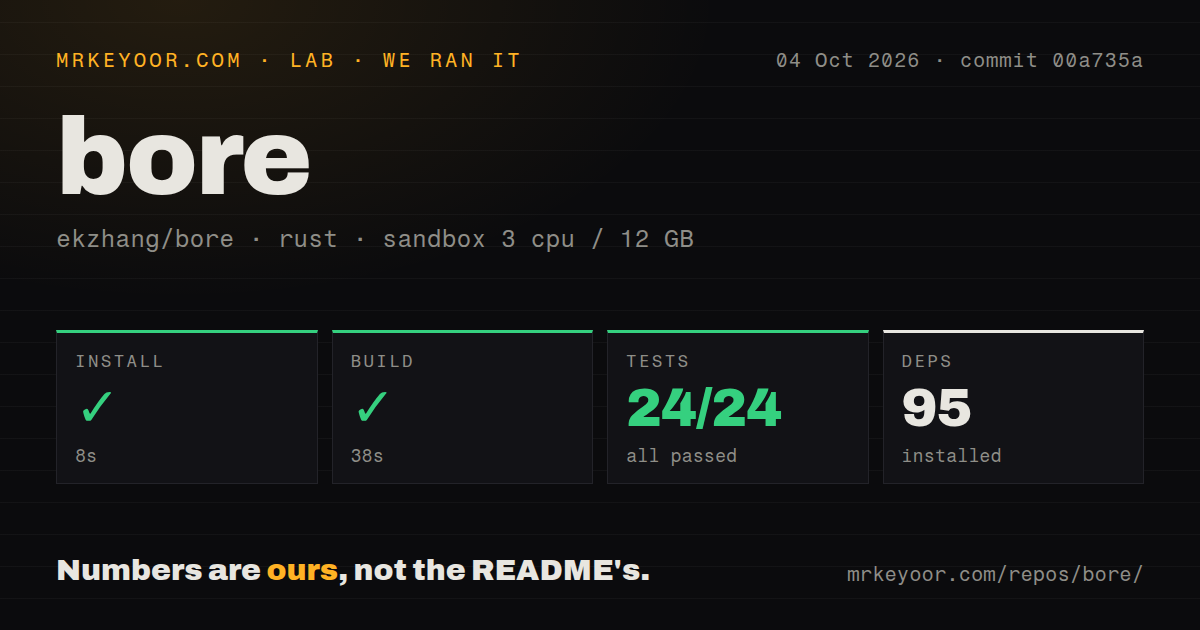
Our sandbox installed 95 Rust packages in 20 seconds. The build completed in 34 seconds, and cargo test finished in 21 seconds with 24 passed and 0 failed. Bore therefore cleared every available test in the supplied fresh Debian environment at commit 00a735a. The repository also had 4 CI workflow files, a Dockerfile, and a tests directory.
Those figures measure installation, compilation, and the project's test suite. They do not measure tunnel throughput, latency, public-server uptime, or behavior across a real network interruption. We did not invent those results from the README, and we are not turning a 21-second test run into a performance claim. Anyone choosing Bore for an always-on link should add a disconnect test on the exact operating system and supervisor that will run it.
The shared secret does not encrypt tunnel traffic
Bore can require a secret on a private server. Each TCP connection proves possession by answering a random HMAC challenge, which stops an unauthenticated client from opening tunnels through that server. The README then states the important limit: the secret covers the initial handshake, and later traffic is not encrypted by default. Plain HTTP, database protocols, and other cleartext payloads remain cleartext across the tunnel.
For sensitive data, put encryption inside the forwarded protocol or add a transport layer designed for it. SSH and HTTPS already carry their own protection when configured correctly. A raw admin panel on HTTP does not become safe because Bore used a secret before forwarding it. This distinction is the main reason Bore belongs in a developer toolbox more readily than at the edge of a production network.
Connection recovery still needs operator attention
Open issue 190, created in March 2026, asks for an option that exits when the remote connection breaks. Its report says the Bore process can remain alive after a network change, so systemd sees nothing to restart. Issue 147 describes a related Windows case where connectivity returned after more than 10 minutes but the client did not resume, and manual restart attempts sometimes met a port-in-use error.
There are proposed changes. Pull request 188 adds reconnection with backoff, while pull request 191 adds systemd socket activation. Neither belongs to the reviewed commit simply because a proposal exists. If a persistent tunnel must recover unattended, test process exit, port release, server restart, and network loss. A passing set of 24 repository tests is good evidence for the checked behavior, but it does not close those field reports.
The public server is convenient and carries an abuse risk
The README still uses bore.pub for the shortest demonstration, so a first trial needs no server account or cloud setup. Issue 150 records that the domain was suspended after phishing reports in December 2024. The maintainer wrote that users might need to self-host because continued support for the public instance could not be guaranteed. The issue was updated in February 2026, which makes it relevant to current deployment decisions.
GitHub showed 11,456 stars, 14 combined issues and pull requests, and a last push on February 4, 2026. The newest release, v0.6.0 from June 2025, fixed handling of half-closed TCP streams. Open issue and pull request activity continued through July 2026, so the release date alone does not suggest abandonment. Bore remains a sharp small tool. Its best use is an explicit, supervised tunnel, preferably through a server you control.