
Two processes turn MCP calls into Blender operations
Blender MCP has a simple shape. A Python MCP server speaks to the chosen AI client over standard input and output, while a Blender add-on opens a socket inside the application. The server converts tool calls into JSON commands, and the add-on inspects or changes the active scene. This keeps the model-facing protocol outside Blender without requiring artists to copy Python snippets between a chat window and the scripting console.
The tool surface covers scene and object inspection, creation and deletion, transforms, materials, colors, and arbitrary Python execution. Optional integrations search Poly Haven and Sketchfab or request generated 3D assets from Hyper3D Rodin and Hunyuan3D. The README names 6 client families across its setup examples, including Claude Desktop, Claude Code, Cursor, VS Code, OpenCode, and Antigravity. The current repository is ahujasid/blender-mcp.
A clean 20-test run does not exercise Blender
The distinction matters with only 25 files and about 11,975 lines of source. Much of the behavior sits at boundaries that a package suite cannot fully reproduce: Blender's Python API, a live scene, socket state, GUI-launched environment variables, and model-generated commands. Treat the passing tests as evidence for commit c69b901's testable Python paths. Add a scene fixture and a short acceptance script for the Blender version used by the studio.
What happened when we ran it
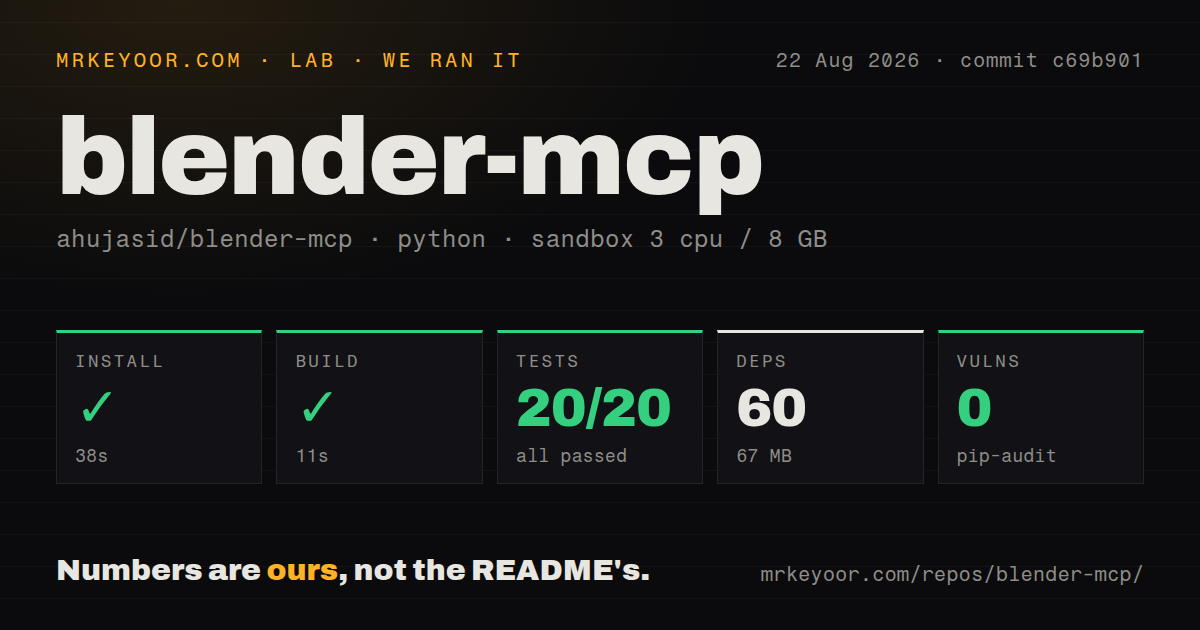
Our sandbox installed 60 packages in 38 seconds and used 67 MB on disk. The build passed in 11 seconds, then pytest passed 20 of 20 tests in another 20 seconds. Pip-audit found 0 known vulnerabilities in the installed environment. The unprivileged Debian container had 3 CPUs and 8 GB of RAM, and the checked-out repository occupied 1.1 MB.
The scan found a tests directory, no Dockerfile, and 0 CI workflow files. A local suite that passes is useful, but the absence of visible GitHub Actions means buyers cannot infer that the same 20 tests run automatically on every proposed change. There was also no latest GitHub release. The normal user path is the published uvx blender-mcp package, so pinning a known version or commit is safer than allowing every desktop restart to resolve whatever is newest.
Arbitrary Python makes supervision the security boundary
The README's sharpest warning concerns execute_blender_code. It lets the model run arbitrary Python inside Blender, and the documentation tells users to save their work before enabling that power. Python in a desktop creative application can change the scene and access whatever the Blender process can access. A prompt, imported asset description, or mistaken instruction therefore has consequences beyond moving one object. Use a copy of the project and review generated operations while learning the tool.
Network scope matters too. The add-on's socket defaults to localhost:9876, with BLENDER_HOST and BLENDER_PORT available for changes. A remote host value can make distributed setups possible, but the README does not present authentication or transport encryption for the simple JSON socket protocol. Keep it bound locally unless you have independently added and verified network controls. Only one MCP server should connect at a time, according to the setup notes.
Package and add-on versions must agree
Issue 311 reports a concrete protocol mismatch between an add-on taken from main and the PyPI 1.8.0 client available when the issue was filed. The add-on expected length-prefixed JSON frames, while the older client sent raw JSON. Every command then failed with invalid frame length in Blender and a connection-reset message at the client. Install the bundled add-on through the same package version as the server instead of mixing source and registry copies.
Issue 314 describes a different Windows state: the socket on port 9876 accepts a connection, but tool calls receive no response for about 4 minutes. The reporter also found Python 3.14 incompatible and used 3.11. The README now recommends pinning Python 3.11 when environment managers or new interpreters cause dependency trouble. A studio rollout should test cold starts, reconnects, timeouts, and one real scene edit on every supported operating system.
External assets add credentials and telemetry
Poly Haven can download models, textures, and HDRIs after the user enables its checkbox. Sketchfab needs an API key, Hyper3D needs its own key, and Hunyuan3D needs a SecretId, SecretKey, and API URL. Credentials can persist in Blender add-on preferences or arrive through environment variables. That puts secrets inside the same application hosting agent-directed Python, so use scoped credentials and disable services that are unnecessary.
Telemetry consent is checked by default. Users can turn it off in Blender preferences or set DISABLE_TELEMETRY=true in the MCP configuration. The README says collected data is not tied to a name or account, but may be used for research and to train AI models. Studios with contractual privacy rules should read the linked terms and disable collection before the first client starts.
August activity comes without GitHub releases
GitHub showed 26,336 stars, 18 combined issues and pull requests, and a last push on August 26, 2026. The queue included asset-source requests, local generation work, ComfyUI integration, and client compatibility changes. Issue 328 also tracks a Codex schema mismatch and missing annotations that would distinguish read-only tools from writes. Active work is a good sign, while the absent GitHub release trail makes pinning and change review more important.
Blender MCP is worth using when an artist remains in control of the file and the model handles bounded scene work. The 20 passing tests make the Python package a low-cost trial. Arbitrary code, default telemetry, socket state, and external credentials rule out casual unattended use. Save first, restrict the connection, disable unused integrations, and judge the result in Blender rather than in the chat transcript.