Backstage makes service ownership visible in one catalog
When a service breaks, knowing which team owns it can matter more than finding its repository. Backstage puts ownership and software metadata in a searchable catalog, then attaches documentation and tooling to those entries. Its README names Software Catalog, Software Templates, and TechDocs as the core features. That combination suits organizations where engineers already lose time navigating services maintained by other teams.
The scope has a local cost. Our checkout contained 12,215 files and roughly 1,023,094 source lines before Yarn installed anything. Backstage is a TypeScript framework you assemble into your own developer portal. You'll choose plugins and connect your existing tools. Apache-2.0 licensing permits that customization, but someone on your team still has to maintain the resulting application.
Catalog entries need owners who will maintain their metadata
The catalog documentation describes metadata files stored alongside source code and collected by the backend. A component entry can point engineers toward its owner and related resources. Software Templates help create projects using your organization's conventions. TechDocs brings documentation into the same portal. The useful change is that a developer can start with the service instead of guessing which dashboard contains the answer.
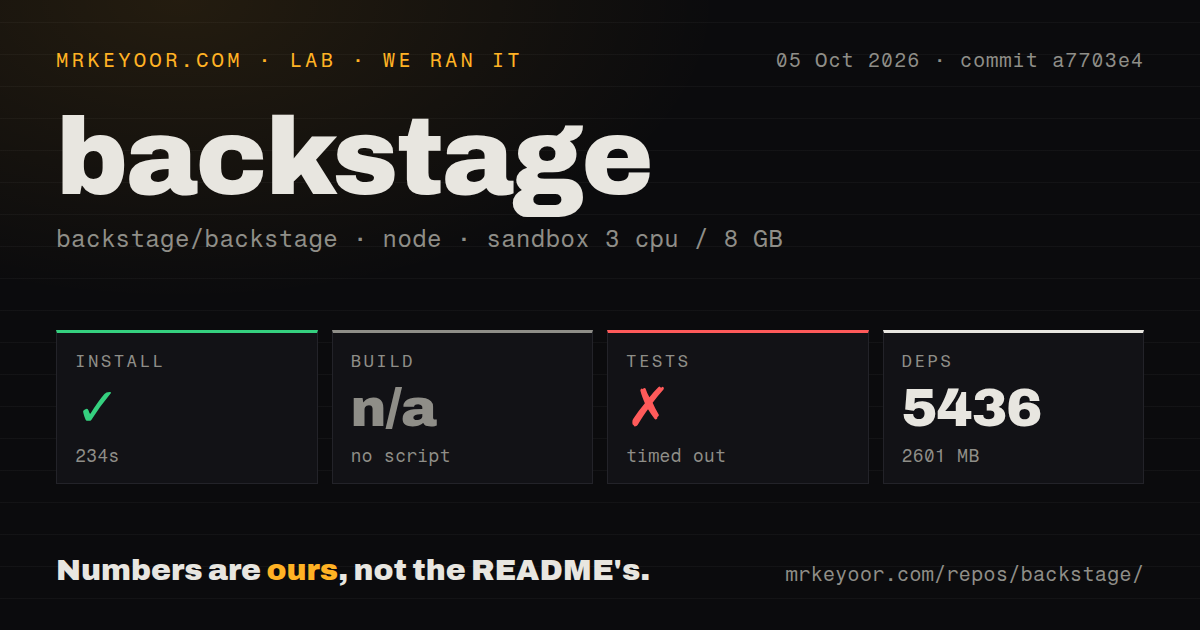
Our 286.6 MB checkout grew into an installed environment occupying 2,601 MB. That footprint makes sense for a framework with a broad plugin ecosystem, but breadth doesn't fix inaccurate catalog records. If teams won't keep ownership and metadata current, your portal will show outdated information in a nicer interface. I would settle who maintains each entry before choosing a theme or importing every repository.
What happened when we ran it
Our sandbox installed Backstage commit a7703e4 in 234 seconds, adding 5,436 packages and using 2,601 MB on disk. We ran it on October 5, 2026, in a fresh Debian container with 3 CPUs, 8 GB of RAM, and the lab-node:22 image. The container was unprivileged and had no secrets. Installation succeeded, so the basic dependency setup worked under those conditions.
The test step timed out after 900 seconds. Its final lines show React lazy initialization and component rendering, followed by scheduler calls and a jsdom window timer. That tail contains stack frames without the exception message that would explain them. It doesn't establish a missing system package, a broken plugin, or a particular failed assertion. We can say the command did not finish within our limit. We cannot supply a passing-test count.
The harness found no build script or target it could use, so it skipped that step. This is a gap in our measurement, not proof that Backstage cannot be built. The scan also recorded 49 CI workflow files, monorepo workspaces, no Dockerfile, and no tests directory. Those are detection results for this checkout. They shouldn't be stretched into claims that the project has no container guidance or no tests, especially when a test command did run.
Production requires a database and a configured identity provider
The Docker deployment guide assumes you have created a Backstage app, configured authentication, and connected PostgreSQL. It warns against carrying the default guest provider into a container deployment. Repository integrations also need the appropriate access credentials. This is where a platform team earns its place: database operations, identity mapping, and access to private source repositories become ongoing responsibilities.
Budgeting only our 234-second install would miss those responsibilities. The same deployment guide tells operators to match the Node version used for packaging and runtime because native modules can fail when those differ. It also documents creating a container image for a generated app. That path explains why our source-checkout scan finding no Dockerfile doesn't settle whether you can deploy a portal in containers.
A sign-in screen doesn't settle every access-control question
The authentication docs distinguish signing users in from delegating access to external resources. They also warn that the frontend bundle isn't protected by the normal sign-in setup, and that disabling the backend's default authentication policy changes protection. Before exposing a portal, verify what an unauthenticated request can retrieve and how a signed-in identity maps to catalog users. A working login button is only part of that check.
Our 900-second timeout gives no evidence about those security settings or production behavior. Treat the sandbox as a source-checkout trial, then run acceptance checks against your configured app. Open a private service entry with different identities, follow its documentation link, and verify that integrations reveal only intended resources. Those checks answer whether your portal works for your organization, which the upstream repository alone cannot decide.
October activity supports adoption, provided you can own the portal
GitHub reports a last push on October 12, 2026, with 467 open issues and PRs and 34,598 stars. Recent search-interface work and catalog changes show current maintenance alongside that backlog. The September 29 v1.55.3 release fixed TechDocs generation for documented MkDocs extension settings. The dates and concrete changes are better evidence of health than treating every open item as a bug.
Use Backstage when engineers need service ownership, templates, and docs in one place, and a platform team can maintain it. Our 5,436-package install is a reason to make that ownership explicit. Port is worth comparing if you want a commercial portal service. MkDocs is the narrower choice when your actual problem is publishing Markdown documentation. Start a Backstage trial with a real service whose owner is hard to find, then judge whether the next engineer finds that owner without asking in chat.