SQLite history is more useful than a line-numbered file
Atuin records each command with its working directory, host, session, timestamp, duration, and exit code. The search interface can limit results to the current session or directory, filter on metadata, and either execute a match or place it back on the command line for editing. That turns history into a work log rather than a bag of strings, especially when the same command means different things in different repositories.
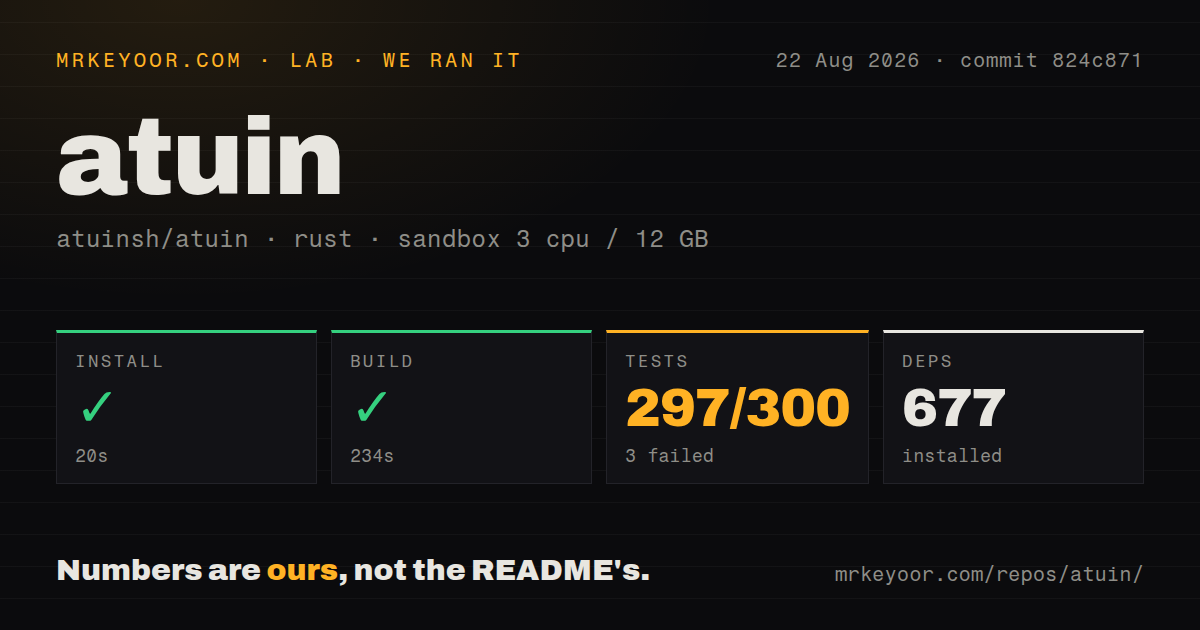
Our checkout at commit 824c871 contained 590 files, about 87,868 lines of source, and occupied 8.4 MB. The Rust workspace pulled 677 packages during the lab install and included 13 CI workflow files plus a Dockerfile. The repository contains a client, sync server, database code, shell integrations, daemon work, encryption, a TUI, and newer AI-related features. Its scope is now broader than a replacement for ctrl-r.
Local-only mode avoids accounts and network trust
Atuin can record and search history without registering or syncing. The old shell history file continues to be updated, which gives users a familiar fallback during evaluation. Existing history can be imported automatically or by naming the shell. This is the safest adoption path: install on one machine, check what metadata is captured, configure exclusions, and decide later whether cross-device history justifies an account or server.
The shell layer varies by environment. zsh and fish have direct initialization snippets. Bash works best with ble.sh, while the bundled bash-preexec fallback has documented gaps around subshell commands, function definitions, duration, exit status, and ignorespace. Nushell writes a generated init file because its source command requires a static path. A team with several shells should test each tier instead of distributing one startup fragment everywhere.
Encrypted sync makes the recovery key your job
When a user registers, Atuin creates an encryption key locally. The sync guide states that the service cannot recover it, and users must copy it to each additional machine during login. This is the correct consequence of end-to-end encryption, but it changes the backup plan. Save the key in a password manager before treating sync as the only copy of valuable history.
Synchronization defaults to once per hour and can also run manually or force a full pass. The public server stores encrypted history, while a self-hosted server uses the same client-side encryption model. Commands may still contain secrets before encryption, and every logged-in endpoint can decrypt with the key. Filter policies, device access, local disk permissions, and account removal remain part of the threat model.
What happened when we ran it
Our fresh Debian sandbox installed 677 Rust packages in 20 seconds and completed the build in 234 seconds. It used 3 CPUs, 12 GB of RAM, no secrets, and commit 824c871. This was a successful source build in an unprivileged container, although most users can skip that work by installing a release binary or package.
Cargo tests ran for 274 seconds and returned exit code 101. Across the suite, 297 tests passed and 3 failed out of 300. The three failures were change_password, multi_user_test, and registration in the Atuin server user tests. Their common tail shows a request connection reset by peer at api_client.rs:141. It does not identify which process reset the connection or the condition that triggered it.
The installer deserves inspection before execution
The Unix guide recommends piping the Atuin setup script into a shell. It installs under ~/.atuin/bin, edits shell integration, offers history import, and can set up sync. Manual paths exist through Cargo, Homebrew, MacPorts, mise, Nix, Pacman, XBPS, Termux, zinit, and WinGet. Users who care about startup files should choose a package and add the relevant init line themselves.
Issue 3976 adds a current concern. The reporter says installation added hooks for Codex and other agents without a confirmation prompt, and that removing those hooks required manual work. The general uninstall guide covers Atuin directories and shell startup lines, but it does not give a hook-specific removal command. Until that behavior changes or is clarified, review the installer diff and agent configuration after setup.
Self-hosting is small, though it is still a service
The standalone atuin-server binary needs a database URI. PostgreSQL 14 or newer is supported, as is SQLite 3 or newer for a smaller deployment. Server configuration controls the listen address, port 8888 by default, registration policy, path prefix, and database. TLS was removed from the server configuration, so public deployments need nginx, Caddy, Traefik, or another reverse proxy.
Docker documentation includes persistent database mounts and a daily PostgreSQL backup service. It also warns operators to pin tagged releases because updates do not always apply without intervention. SQLite reduces moving parts for one user, while PostgreSQL fits a group. Either way, test restoration, protect registration, and monitor storage. Encrypted payloads do not remove the need to preserve the database or keep the service patched.
A current release coexists with a local WAL report
Atuin 18.20.0 was released on 2026-08-25, the same date as the latest GitHub push. The repository showed 406 open issues and pull requests, with fixes and reports receiving responses throughout that day. Release 18.20.0 includes shell, sync, search, installer, compression, and database work, plus separate client and server artifacts with attestations. This is an active, established project rather than an abandoned dotfile experiment.
Issue 3989 reports that history.db-wal can grow without being truncated on a machine running many concurrent shells. The report includes measurements from one system and links to an open fix. Most users may never reproduce that workload, but anyone operating dozens of terminals should watch the Atuin data directory after upgrading. For ordinary use, the core proposition holds: richer local history is useful, and sync remains an optional second decision.