Gander opens office files, media, archives, and STL models
Gander is the app you send a mystery attachment to when you only want to look at it. It routes PDFs, Word documents, spreadsheets, slides, photos, video, audio, Markdown, code, ZIP files, and STL models to separate viewers inside one Android package. It also accepts files through the share sheet and the system's Open with flow, so it can sit behind mail, chat, a browser, or a file manager without becoming your file manager.
The published APK is about 5 MB because it ships no native libraries. Modern Office documents render through bundled JavaScript, media goes through Android's Media3 player, large photos use tiled decoding, and ZIP entries open directly from the archive. Text files load 5 MB at a time. This is broad viewing, not editing. You cannot correct a spreadsheet, annotate a PDF, or save a revised Word file back to storage.
Android's file picker enforces the privacy promise
Gander does not request Android's INTERNET permission or general storage permission. The Storage Access Framework hands it the individual file or folder a user selects. Office formats and PDFs render in a WebView whose requests are intercepted by WebViewAssetLoader, with viewer code bundled inside the app. That is a concrete privacy boundary: a document is never meant to leave the device because the application has no network permission to send it.
Version 2.0 added a second wall around document code. Viewer pages now use a Content Security Policy that permits only Gander's own code, and requests for resources the app does not serve are refused. The release notes say an embedded page script could run before this change, although the missing internet permission prevented it from sending data away. Macro-enabled Office files can be viewed, but their macros never run.
What happened when we ran it
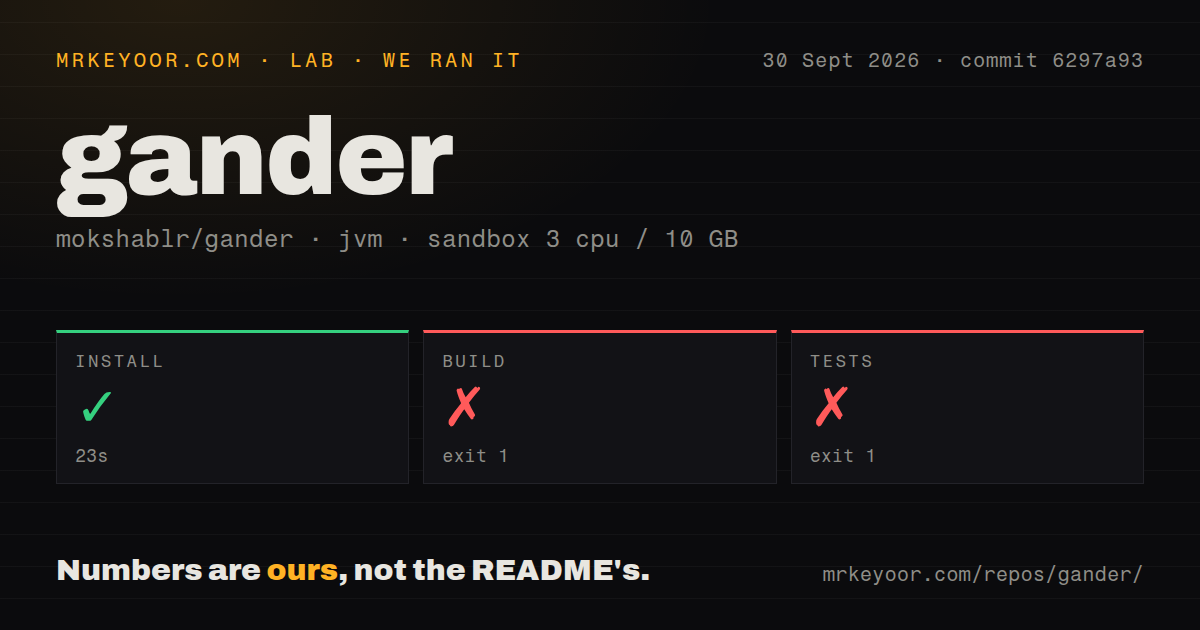
Our unprivileged JVM 21 sandbox completed Gander's install step in 23 seconds. The checkout at commit 6297a93 held 648 files, about 64,460 lines of source, and occupied 43.8 MB. That initial step succeeded. The repository also has 2 CI workflow files and a tests directory, while the absence of a Dockerfile is normal for an Android app intended to become an APK.
The build failed with exit 1 after 13 seconds. The test command failed with exit 1 after 14 seconds. Both log tails show Java's HTTPS connection classes followed by org.gradle.wrapper.Install.forceFetch. The supplied tail does not contain the root exception or name the remote artifact, so the supported finding is narrow: neither Gradle command got past the wrapper fetch in our sandbox. We cannot call this an Android compile error or a failing application test.
Those two failures also mean our run did not produce an APK, execute the project tests, or inspect real document rendering. The repository's current code may build in GitHub Actions or on a configured Android workstation, but that is separate evidence. A maintainer evaluating reproducibility should preserve the complete wrapper error, identify the requested distribution, and rerun with the same commit before changing project code.
Android 8 works, but PDFs need WebView 125
The installed app supports Android 8.0, API 26, and newer. Its WebView floor varies by format: PDFs need version 125, Markdown needs 92, and Word needs 80. Gander checks this when a file opens and reports an old WebView rather than presenting an unexplained render error. That is helpful for older phones, though a device that no longer receives WebView updates may meet the Android version requirement and still fail on PDFs.
Source builders need JDK 21 or newer plus Android SDK platform 36. The Gradle tasks create a debug APK or an unsigned release APK. Signing requires a local keystore, and an independently signed build cannot update the author's release because Android treats the signing identity as different. The README publishes the official certificate fingerprint and the v2.0 release publishes an APK hash, giving sideloaders two concrete values to verify.
Legacy PowerPoint and exact Office fidelity remain limits
Gander explicitly does not support binary .ppt; it asks users to resave those files as .pptx. Its own readers handle old .doc, .odt, and .rtf files, including tables and images, but Word 6 and Word 95 documents lose formatting. Windows metafile images become a box saying they cannot be drawn. Those are reasonable size and licensing choices, yet they matter in archives full of old corporate files.
Open issue 37 adds a current format warning. A reporter using version 2.0.21 on Android 11 Go with WebView 138 attached a UTF-8 CSV that displayed with incorrect characters. Issue 39 records another smaller usability problem: a long press removes a recent-file entry immediately, with no undo. Neither issue deletes the underlying file, but the CSV report is enough reason to test accented names and non-English data before relying on Gander for spreadsheet review.
Seven open issues sit beside a September 30 push
Gander was created on July 19, 2026, and release v2.0 followed on September 26. GitHub showed 1,111 stars, 7 open issues, 0 open pull requests, and a push on September 30. Several issues received same-day updates, so the small queue is active. One older F-Droid request remains open, while Google Play, GitHub releases, and Obtainium are the documented installation routes today.
Pick Gander when the files are mixed, the job is read-only, and you do not want a document uploaded merely to see what it contains. Its missing network permission is easier to reason about than a privacy toggle buried in settings. Keep a real office editor for files you must change, and keep a specialist reader for ebooks. For this app, restraint is the feature: it opens the file you chose, then has nowhere to send it.