Choose Docker before you choose a model
AnythingLLM reserves multi-user permissions and its embeddable website chat widget for the Docker edition. That decides the deployment route for a shared document assistant before you compare models. A desktop download suits personal use. A team knowledge service needs the server route, persistent storage, and someone responsible for access. The appeal is having document uploads, cited answers, and agent tools in an application you can configure without writing the whole interface.
Our 59.8 MB checkout contained 5,802 files and about 294,476 source lines. That is a substantial application to maintain if you fork it. The README separates the React frontend, Express server, and document collector, with additional submodules for embedding and the browser extension. I would start with the packaged application and reach for the source only when a required integration justifies owning that much code.
What happened when we ran it
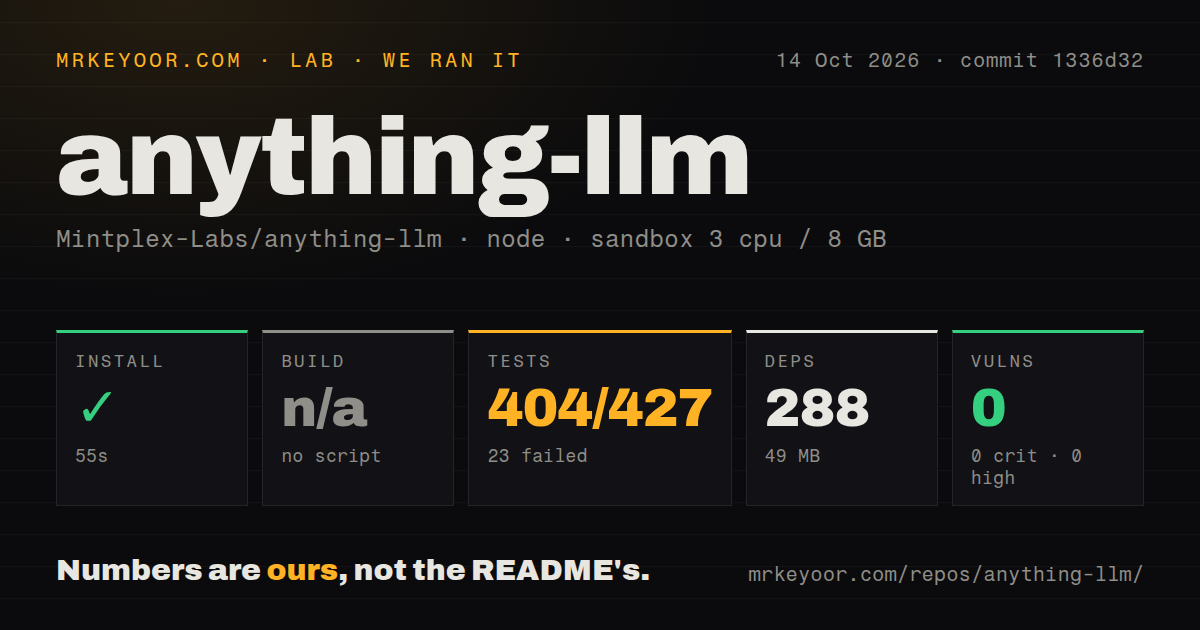
Our sandbox installed AnythingLLM commit 1336d32 in 55 seconds, adding 288 npm packages and using 49 MB on disk. We ran it on October 14, 2026, in a fresh Debian container with 3 CPUs, 8 GB of RAM, the lab-node:22 image, no secrets, and no elevated privileges. The harness found no build script or target, so it skipped that step. This does not establish a working production build.
Jest exited with code 1 after 12 seconds: 404 tests passed and 23 failed out of 427. The suite summary was worse than that individual-test count suggests: 64 suites failed and 15 passed out of 79. The log tail names model routing, document synchronization, temperature handling, and agent-provider helper files, each followed by a message that the suite failed to run. It does not include the underlying exception text.
Our run therefore establishes a successful dependency installation and an unsuccessful test command. It cannot tell us whether those suite failures came from configuration, unavailable services, or code defects. The npm audit reported 0 known vulnerabilities across all severity levels. The scan found 9 CI workflow files and reported no Dockerfile or tests directory, even though the failing paths contain server/__tests__. Treat those directory signals as harness observations, not a complete inventory of upstream deployment or testing assets.
The container needs storage and a reachable model
The Docker deployment guide uses a mounted storage directory and environment file. LanceDB and local embeddings are defaults, so an external vector database is optional. You still need a language model, either local or remote, and credentials for whichever hosted providers or connectors you enable. Decide where uploaded documents and the database live before adding real users. Container replacement should not replace your knowledge collection.
The 49 MB measured after npm installation says nothing about downloaded model weights or a populated document store. The optional built-in engine must be enabled, then retrieves its engine and model assets. GPU access depends on the host and container settings. The guide warns that an AMD or Intel GPU can be visible while inaccessible, leaving inference on CPU. A running web interface alone would not confirm that the intended acceleration works.
Local deployment still has outbound connections
The README's privacy section documents anonymous usage telemetry and an opt-out through DISABLE_TELEMETRY=true or the in-app Privacy setting. It also lists outbound traffic that remains: chosen model and database services, model downloads, and GitHub-hosted context information. Organizations that require disconnected operation should check those dependencies against their policy before uploading internal documents. Self-hosting the interface does not decide where every request goes.
The 288-package install in our sandbox used no secrets, so it did not exercise authenticated providers or private connectors. For a deployment trial, I would upload a document with a known answer, check the cited passage, and verify access from the actual user roles. MCP compatibility also means the application can connect agents to external tools. Enable only the tools whose permissions and effects you understand, especially when introducing scheduled jobs.
Bare-metal deployment has no core-team support
The bare-metal guide explicitly refuses support for that deployment route and puts security responsibility on the operator. It describes separate server and collector processes, database migrations, frontend assets, and proxy settings for streamed responses and agent connections. That is a concrete reason to walk away if your platform prohibits Docker and your team expects upstream deployment support. An available instruction page is not a support commitment.
Our 55-second npm installation is therefore a poor estimate of deployment effort. Even the Docker route has a networking detail worth checking: a service on the host's loopback address is not automatically reachable through the container's own localhost. The guide documents a host gateway mapping for Linux. Keep the model connection and persistent storage checks in your acceptance criteria rather than treating a dependency install as the finish line.
October fixes show maintenance beyond the release tag
The last push was October 16, 2026, following release v1.18.0 on October 13. GitHub reported 326 open issues and PRs, not 326 confirmed bugs. Recent activity includes the closed GitLab branch-name import defect, paired with a corrective pull request. That supports a judgment of active maintenance, while giving connector users a specific reason to check whether their deployed version includes a relevant fix.
AnythingLLM earns a trial when shared document chat and configurable agents would otherwise require your own application. Open WebUI is another candidate for a model-facing chat interface; LibreChat is worth comparing when provider switching and chat features dominate the requirement. For AnythingLLM, keep the initial rollout small and require the document, permission, and connector checks your users depend on. Our 23 failed tests leave that acceptance work with you.