websockets review
websockets 17.0.1 supplies WebSocket clients, servers, and a sans-I/O layer for Python. The current coroutine API lives in websockets.asyncio; separate threading and Trio implementations cover blocking code and Trio applications. It owns the opening and closing handshakes, text and binary frames, fragmentation, pings, compression, proxy and TLS setup, size limits, and queues. Patch 17.0.1 restores serve_forever compatibility with third-party event loops such as uvloop and fixes a Trio crash when receive-side backpressure starts. General HTTP routing remains outside its scope.
websockets 17.0.1 installed as one 1 MB package in 0.2 seconds and imported in 0.23 seconds with zero audit findings in our sandbox. Use it when the application owns WebSocket limits and delivery policy directly; use an ASGI framework when sockets are one route among ordinary HTTP endpoints.
We installed it
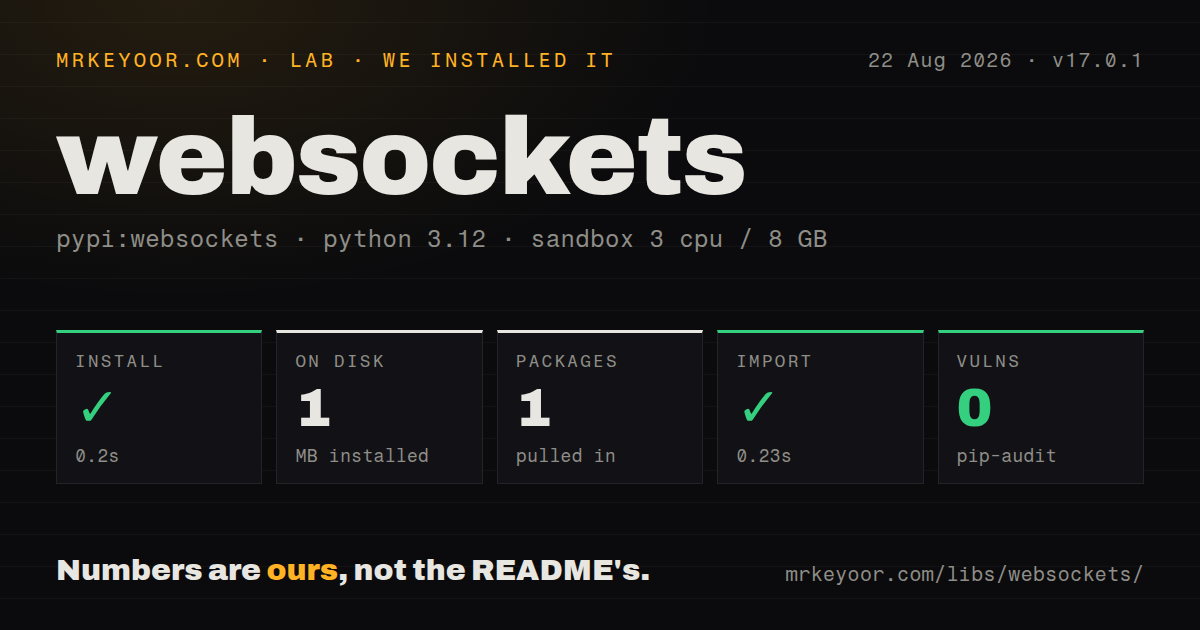
| Install | ✓ · 0.2s | 1 package on disk · 1 MB |
| Import | ✓ | import websockets in 0.23s · compiled extensions · py.typed · requires Python >=3.11 |
| Known vulns | 0 | (pip-audit) |
Answers from our run
Does websockets install cleanly?
Yes. In a fresh container with an empty cache, pip install websockets finished in 0.2s, leaving 1 package and 1 MB on disk. pip-audit reported no known vulnerabilities.
What does websockets need to run?
Python >=3.11, and a platform wheel with compiled extensions. In our run import websockets succeeded in 0.23s, and the package ships py.typed for type checkers.
websockets or aiohttp: which should you use?
aiohttp: Use it when one asyncio package must cover HTTP clients, HTTP servers, and WebSockets. websockets 17.0.1 installed as one 1 MB package in 0.2 seconds and imported in 0.23 seconds with zero audit findings in our sandbox.
When should you not use websockets?
Ordinary HTTP routes and WebSockets must share one application; an ASGI framework is the better boundary
Discussed on
- hnPornhub Bypasses Ad Blockers with WebSockets873 points
- hnServer-Sent Events: an alternative to WebSockets540 points
- hnWebSockets vs. Server-Sent-Events vs. Long-Polling vs. WebRTC vs. WebTransport518 points
- hnThe future of web software is HTML over WebSockets517 points
- hnStealing secrets from developers using WebSockets513 points
Use it if
- A focused Python endpoint needs direct control over WebSocket handshakes, queues, and backpressure
- An asyncio client should use the connection iterator for reconnect attempts
- A blocking worker needs the threading client without introducing an event loop
- Origins, subprotocols, message limits, pings, proxies, and close timing must be set explicitly
- Ordinary HTTP routes and WebSockets must share one application; an ASGI framework is the better boundary
- Messages require persistence, replay, acknowledgements, or consumer groups; WebSocket transport supplies none of those broker semantics
- The service has no policy for message size, queue depth, or peers that stop reading
- The code cannot migrate removed aliases or older handler signatures from legacy tutorials before upgrading to 17.x
- The package would run in browser JavaScript; websockets is a Python endpoint library
Setup reality
Our install of websockets 17.0.1 completed in 0.2 seconds on Python 3.12. One package occupied 1 MB, declared zero direct dependencies, and imported in 0.23 seconds. pip-audit found zero known vulnerabilities. The wheel requires Python >=3.11, includes compiled .so extensions, and ships py.typed. Its measured metadata did not expose a usable license value. Uncommon platforms may need to build the extension or accept a different performance path.
Current coroutine imports come from websockets.asyncio.client and websockets.asyncio.server. The blocking implementation is under websockets.sync, and 17.0 added websockets.trio. Old top-level and legacy examples can use removed aliases or different handler signatures. Keep each Connection within its own concurrency model and event loop. No credentials or config file are built in; proxy, TLS certificate, and authentication policy belong to the application.
Choose max_size, max_queue, write_limit, open_timeout, ping_interval, ping_timeout, and close_timeout from workload limits. A peer that stops reading can block sends. Apply business deadlines and disconnect slow consumers. broadcast does not wait for each recipient's backpressure, so one message sent to many lagging clients can raise memory use. Version 17.0.1 specifically fixes a Trio crash in this receive-backpressure path.
Browser-facing servers should validate Origin before accepting sensitive messages, then authenticate the connection. Reconnect iterators retry connections but do not guarantee application delivery; messages around a disconnect may be lost or repeated. Add IDs, acknowledgements, and resume positions when delivery matters. Shutdown should reject new work, close active sockets with an appropriate code, and cap the drain period.
Patterns
Serve messages with the current asyncio API echo-server
import asyncio
from websockets.asyncio.server import serve

async def echo(websocket):
    async for message in websocket:
        await websocket.send(message)

async def main():
    server = await serve(echo, "localhost", 8765)
    await server.serve_forever()

asyncio.run(main())
The loop ends after a normal close. Public deployment still needs authentication, bounded queues and messages, TLS, and shutdown handling.
Send one message from an asyncio client async-client
from websockets.asyncio.client import connect

async def hello():
    async with connect("ws://localhost:8765") as websocket:
        await websocket.send("Hello")
        reply = await websocket.recv()
        print(reply)
Leaving the async context runs the close handshake and releases the connection even when application code raises.
Connect from synchronous Python code sync-client
from websockets.sync.client import connect

with connect("ws://localhost:8765") as websocket:
    websocket.send("Hello world!")
    message = websocket.recv()
    print(message)
This interface blocks the calling thread. Its Connection object still has documented concurrency limits and should not be shared casually.
Iterate over reconnect attempts auto-reconnect-client
from websockets.asyncio.client import connect
from websockets.exceptions import ConnectionClosed

async def listen():
    async for websocket in connect("wss://example.com/feed"):
        try:
            async for message in websocket:
                handle(message)
        except ConnectionClosed:
            continue  # reconnects with exponential backoff
A new socket does not recover messages around the disconnect. Resume tokens or idempotent IDs must come from the application protocol.
Send the same payload to connected peers broadcast-to-clients
from websockets.asyncio.server import broadcast, serve

CONNECTIONS = set()

async def handler(websocket):
    CONNECTIONS.add(websocket)
    try:
        await websocket.wait_closed()
    finally:
        CONNECTIONS.remove(websocket)

def notify_all(message):
    broadcast(CONNECTIONS, message)
broadcast does not wait for each peer's send buffer. Bound group size and disconnect lagging connections before memory grows.
Return one HTTP health response http-health-check
from http import HTTPStatus
from websockets.asyncio.server import serve

def health_check(connection, request):
    if request.path == "/healthz":
        return connection.respond(HTTPStatus.OK, "OK\n")

async with serve(handler, "", 8765, process_request=health_check) as server:
    await server.serve_forever()
process_request can answer a health probe during handshake processing. It is not a router for a mixed HTTP application.
Log incomplete closing handshakes handle-disconnects
from websockets.exceptions import ConnectionClosedError

async def handler(websocket):
    try:
        async for message in websocket:
            await process(message)
    except ConnectionClosedError:
        log.warning("client dropped without closing handshake")
Normal closure ends async iteration without this exception. Put connection-set cleanup in finally for both paths.
Layer JSON messages over text frames send-receive-json
import json

async def handler(websocket):
    async for raw in websocket:
        event = json.loads(raw)
        await websocket.send(json.dumps({"ack": event["id"]}))
json.loads only parses syntax. Validate the resulting fields and set max_size before accepting untrusted frames.
Alternatives
| Package | Registry | Pick it when |
|---|---|---|
| aiohttp | PyPI | Use it when one asyncio package must cover HTTP clients, HTTP servers, and WebSockets. |
| wsproto | PyPI | Use it for a small sans-I/O protocol core embedded in a custom transport. |
| websocket-client | PyPI | Use it for an existing synchronous client application built around callbacks. |
More web backend guides
ws · urllib3 · requests · undici · anyio · express · the whole shelf →
How this guide is made: grounded in the library's documentation, release notes, changelog, and issue history, on a fixed rubric — not a hands-on install of every release. The 50 most-downloaded entries are additionally install-verified in clean containers. Corrections: contact the desk.