watchdog review
Our sandbox installed watchdog 6.0.0 in 0.2 seconds, and importing it took 0.03 seconds. It turns operating-system file notifications into Python events for creates, edits, moves, deletions, opens, and closes. Linux uses inotify, macOS uses FSEvents or kqueue, Windows uses ReadDirectoryChangesW, and PollingObserver compares directory snapshots where native events do not arrive. Handlers run from an observer thread, while the optional watchmedo command can launch or restart shell commands. Version 6.0.0 moved Linux inotify waiting to select.poll(), fixed a descriptor-close race, and removed the watchmedo log command's redundant --trace option.
watchdog remains a sensible cross-platform choice when you need detailed event objects and can test each target filesystem. Prefer watchfiles for a new async changed-path loop, and avoid watchdog when kqueue scale or unreleased symlink fixes are hard requirements.
We installed it
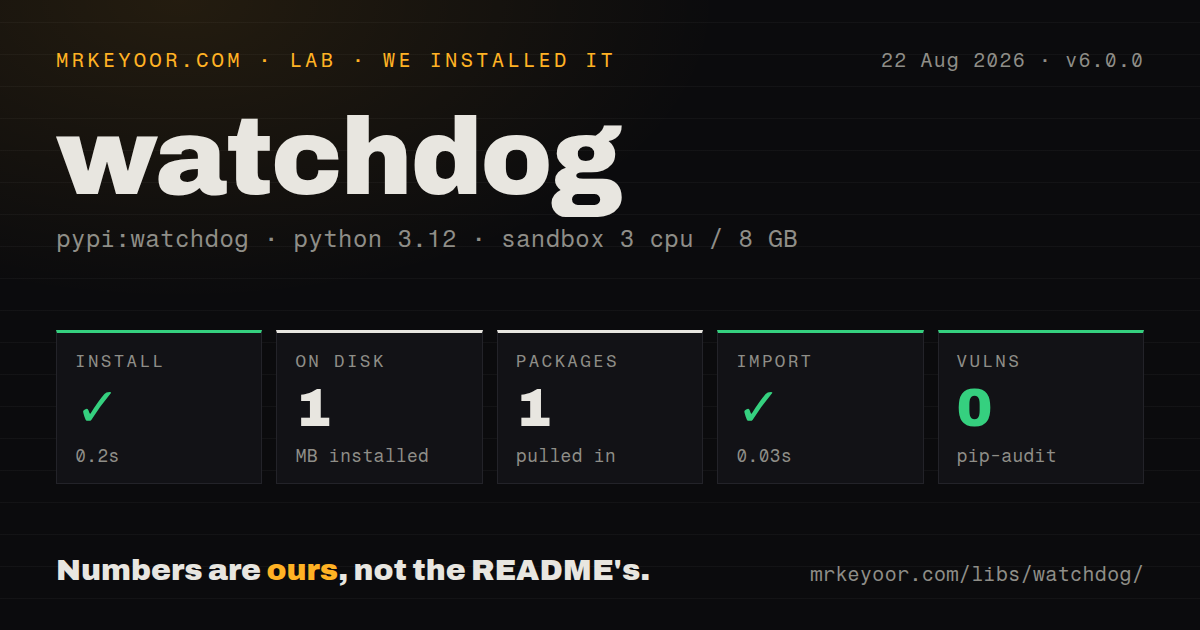
| Install | ✓ · 0.2s | 1 package on disk · 1 MB |
| Import | ✓ | import watchdog in 0.03s · pure Python · py.typed · requires Python >=3.9 |
| Known vulns | 0 | (pip-audit) |
Answers from our run
Does watchdog install cleanly?
Yes. In a fresh container with an empty cache, pip install watchdog finished in 0.2s, leaving 1 package and 1 MB on disk. pip-audit reported no known vulnerabilities.
What does watchdog need to run?
Python >=3.9, and nothing compiled: it is pure Python. In our run import watchdog succeeded in 0.03s, and the package ships py.typed for type checkers.
watchdog or watchfiles: which should you use?
watchfiles: Choose it for sync or async changed-path iteration backed by Rust when handler classes and watchdog event objects are unnecessary. watchdog remains a sensible cross-platform choice when you need detailed event objects and can test each target filesystem.
When should you not use watchdog?
Python 3.8 is still in support; watchdog 6.0.0 requires Python 3.9 or newer after the project dropped 3.8 in the previous major
Use it if
- One Python service must watch local directories on Linux, macOS, and Windows through the same Observer and event-handler API
- You need source and destination paths for moves, directory events, or Linux-only open and close notifications rather than a simple changed-path list
- A CIFS share cannot deliver native notifications and periodic directory snapshots through PollingObserver are acceptable
- A development command needs watchmedo auto-restart or shell-command behavior without writing an observer loop
- Python 3.8 is still in support; watchdog 6.0.0 requires Python 3.9 or newer after the project dropped 3.8 in the previous major
- A deep tree must use kqueue on BSD or macOS; the README says kqueue consumes file descriptors for watched files and recommends raising the process limit
- Your workflow depends on Vim's replace-file save behavior producing on_modified; the project warns that this editor pattern may skip that callback unless Vim is reconfigured
- You need audited behavior on free-threaded CPython with macOS FSEvents; the README says free-threaded builds work but that interface has not received a full thread-safety audit
- You need released symlink-following support or the fix for repeated directory names corrupting generated move paths; both remain under the unreleased 7.0.0-dev changelog
- You cannot absorb the next pattern-filter migration; the planned 7.0.0 switch from path.match() to path.full_match() requires patterns such as *.py to become **/*.py
Setup reality
Our fresh Python 3.12 sandbox installed watchdog 6.0.0 successfully in 0.2 seconds. It left 1 package occupying 1 MB, and the measurement recorded 1 direct dependency. pip-audit found 0 known vulnerabilities. The package requires Python 3.9 or newer, is pure Python, carries Apache-2.0 licensing, and ships py.typed for type checkers. A plain import worked in 0.03 seconds. No credentials, native compiler, or service process were needed for that check.
A plain install gives you the library. Install watchdog[watchmedo] when you need the command's YAML-based tricks, which brings PyYAML. Application code creates a handler, schedules it on an Observer, starts the observer thread, then calls stop() and join() during shutdown. Core arguments such as recursive are keyword-only. Handler failures occur on the dispatch thread, so catch and log exceptions where silent watcher death would leave the main process looking healthy.
Observer chooses a backend from the host platform. Local Linux paths use inotify, macOS selects FSEvents, Windows uses ReadDirectoryChangesW, and BSD uses kqueue. CIFS needs an explicit PollingObserver import, as the README shows. Polling repeatedly snapshots the tree and is documented as slow. On kqueue, the open-file limit must exceed the watched file count. Native event sets also differ: open and close callbacks from inotify should not be treated as portable signals.
Filesystem events describe what the backend saw, which may differ from the user's mental model of a save. Vim commonly writes a replacement file, so on_modified may never fire for the original path. Keep callbacks short and hand expensive work to a queue. PatternMatchingEventHandler in 6.0.0 uses path.match() semantics. Do not copy the unreleased 7.0.0 **/*.py migration into a 6.0.0-only config unless you have tested both forms against your directory layout.
Patterns
Print every event under a directory watch-directory-tree
import time
from watchdog.events import FileSystemEvent, FileSystemEventHandler
from watchdog.observers import Observer


class Handler(FileSystemEventHandler):
    def on_any_event(self, event: FileSystemEvent) -> None:
        print(event.event_type, event.src_path, event.is_directory)


observer = Observer()
observer.schedule(Handler(), './src', recursive=True)
observer.start()
try:
    while observer.is_alive():
        time.sleep(1)
finally:
    observer.stop()
    observer.join()
Pass recursive by keyword. stop() requests shutdown, while join() waits for the observer thread to finish.
Read both sides of a rename handle-file-moves
from watchdog.events import FileMovedEvent, FileSystemEventHandler


class MoveHandler(FileSystemEventHandler):
    def on_moved(self, event: FileMovedEvent) -> None:
        if not event.is_directory:
            print(f'{event.src_path} -> {event.dest_path}')
dest_path belongs to move events. Treat a move as its own operation instead of guessing from separate delete and create callbacks.
Watch Python files and ignore build output filter-path-patterns
from watchdog.events import PatternMatchingEventHandler

handler = PatternMatchingEventHandler(
    patterns=['*.py'],
    ignore_patterns=['*/build/*', '*/.venv/*'],
    ignore_directories=True,
    case_sensitive=True,
)
handler.on_modified = lambda event: print('changed', event.src_path)
These are 6.0.0 path.match() patterns. The unreleased 7.0.0 line plans full-match semantics, where recursive forms such as **/*.py become necessary.
Drop unwanted events before dispatch filter-event-classes
from watchdog.events import FileCreatedEvent, FileMovedEvent
from watchdog.observers import Observer

observer = Observer()
observer.schedule(
    handler,
    '/var/spool/inbox',
    recursive=False,
    event_filter=[FileCreatedEvent, FileMovedEvent],
)
event_filter limits what the emitter queues. It is useful when parent-directory modification noise is irrelevant.
Use snapshots for a CIFS share watch-cifs-by-polling
from watchdog.observers.polling import PollingObserver

observer = PollingObserver(timeout=2.0)
observer.schedule(handler, '/mnt/shared', recursive=True)
observer.start()
The README requires PollingObserver for CIFS. Each interval scans directory state, so test the cost against the actual tree size.
Schedule two roots on one observer watch-multiple-directories
from watchdog.observers import Observer

observer = Observer()
source_watch = observer.schedule(handler, './src', recursive=True)
template_watch = observer.schedule(handler, './templates', recursive=True)
observer.start()
Keep the returned watches if either root may need to be removed while the observer remains alive.
Unschedule one directory remove-active-watch
watch = observer.schedule(handler, './generated', recursive=True)
observer.start()

# Later, leave the observer running for its other paths.
observer.unschedule(watch)
unschedule() expects the ObservedWatch returned by schedule(), not the original path string.
Hand thread events to asyncio bridge-to-asyncio
import asyncio
from watchdog.events import FileSystemEvent, FileSystemEventHandler


class AsyncQueueHandler(FileSystemEventHandler):
    def __init__(self, loop: asyncio.AbstractEventLoop, queue: asyncio.Queue):
        self.loop = loop
        self.queue = queue

    def on_any_event(self, event: FileSystemEvent) -> None:
        self.loop.call_soon_threadsafe(self.queue.put_nowait, event)
Handlers run outside the asyncio thread. call_soon_threadsafe performs the supported handoff; bound or dropping queues need an explicit overload policy.
Find changes between two scans compare-directory-snapshots
from watchdog.utils.dirsnapshot import DirectorySnapshot, DirectorySnapshotDiff

before = DirectorySnapshot('/data/imports')
run_import_step()
after = DirectorySnapshot('/data/imports')

diff = DirectorySnapshotDiff(before, after)
print(diff.files_created)
print(diff.files_modified)
print(diff.files_moved)
This avoids a background observer when only the before-and-after difference matters. Moved files are returned as source and destination pairs.
Keep callback failures visible log-handler-errors
import logging
from watchdog.events import FileSystemEvent, FileSystemEventHandler

log = logging.getLogger(__name__)


class SafeHandler(FileSystemEventHandler):
    def on_any_event(self, event: FileSystemEvent) -> None:
        try:
            process_event(event)
        except Exception:
            log.exception('watchdog callback failed for %s', event.src_path)
An exception is raised on the dispatch thread rather than the main application path. Decide whether to log, retry, or signal process shutdown.
Invoke tests through watchmedo run-command-on-change
python -m pip install 'watchdog[watchmedo]'

watchmedo shell-command \
  --patterns='*.py' \
  --ignore-directories \
  --recursive \
  --command='pytest -q' \
  .
The watchmedo extra installs PyYAML for YAML tricks. shell-command reacts to events, so filters should exclude directories and generated paths that would retrigger the command.
Restart a server after Python changes restart-development-process
watchmedo auto-restart \
  --patterns='*.py' \
  --recursive \
  --debounce-interval=0.5 \
  -- python app.py
The debounce interval collapses a short event burst before restarting. Version 6.0.0 does not include the unreleased Windows process-group signaling fix listed for 7.0.0-dev.
Alternatives
| Package | Registry | Pick it when |
|---|---|---|
| watchfiles | PyPI | Choose it for sync or async changed-path iteration backed by Rust when handler classes and watchdog event objects are unnecessary |
| pyinotify | PyPI | Choose it only for an older Linux-only codebase already built directly around inotify concepts |
| inotify-simple | PyPI | Choose it for a thin Linux inotify wrapper when you will implement recursion, move pairing, and dispatch yourself |
More utils guides
lru-cache · type-fest · ajv · zod · p-limit · find-up · the whole shelf →
How this guide is made: grounded in the library's documentation, release notes, changelog, and issue history, on a fixed rubric — not a hands-on install of every release. The 50 most-downloaded entries are additionally install-verified in clean containers. Corrections: contact the desk.