@vue-macros/common review
@vue-macros/common 3.1.4 is build-time infrastructure shared by the Vue Macros monorepo. Macro and bundler-plugin authors use it to parse Vue single-file components, lazily obtain Babel ASTs for normal and setup scripts, recognize Vue virtual IDs, edit source with MagicString, test whether expressions can be hoisted, detect a project's Vue version, and read the resolved Vite Vue plugin API. It also re-exports `ast-kit` and `magic-string-ast`. Installing it does not enable any macro in an application; the root README tells app developers to install `vue-macros`. The 3.1.4 release notes list v-slot and Volar fixes but no direct change to these common helpers.
@vue-macros/common 3.1.4 installed in 4.9 seconds with no audit findings, but our full browser build was 302.9 KB gzipped and the install used 14 MB across 35 packages. It belongs in Vue compiler and bundler tooling; application developers should install `vue-macros`, and simple SFC parsers should begin with `@vue/compiler-sfc`.
We installed it
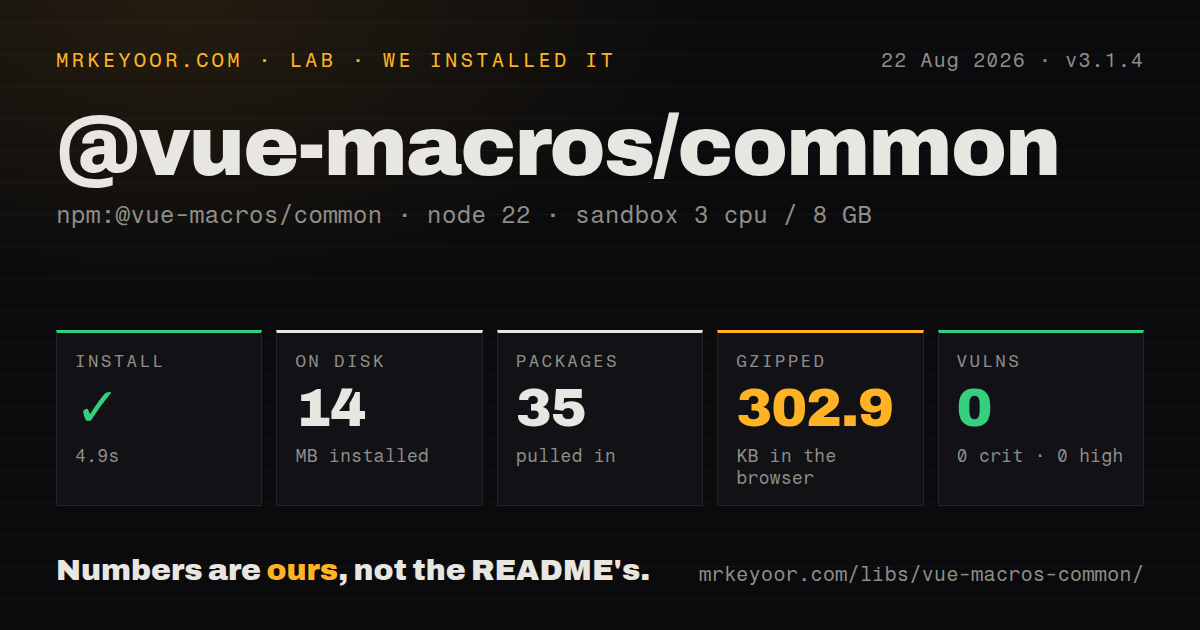
| Install | ✓ · 4.9s | 35 packages on disk · 14 MB |
| Import | ✓ | ESM import works · require() works · ESM package with exports map |
| Browser | 302.9 KB | gzipped (1029.4 KB minified), bundled with esbuild |
| Types | ✓ | TypeScript types bundled |
| Known vulns | 0 | 0 critical · 0 high · 0 moderate · 0 low (npm audit) |
Answers from our run
Does @vue-macros/common install cleanly?
Yes. In a fresh container with an empty cache, npm install @vue-macros/common finished in 5 seconds, leaving 35 packages and 14 MB on disk. npm audit reported no known vulnerabilities.
How much does @vue-macros/common add to a browser bundle?
302.9 KB gzipped (1029.4 KB minified) when the whole package is bundled for the browser with esbuild. Importing only part of it is usually smaller.
Does @vue-macros/common work with both ESM and CommonJS?
Yes. Both import '@vue-macros/common' and require('@vue-macros/common') worked in Node 22 in our run. The package is published as ESM with an exports map.
Does @vue-macros/common include TypeScript types?
Yes, type declarations ship inside the package, so no @types install is needed.
@vue-macros/common or vue-macros: which should you use?
vue-macros: Choose it in an application that wants the finished macro suite rather than APIs for authoring transforms. @vue-macros/common 3.1.4 installed in 4.9 seconds with no audit findings, but our full browser build was 302.9 KB gzipped and the install used 14 MB across 35 packages.
When should you not use @vue-macros/common?
You only want macros in a Vue application. The project README's install target is vue-macros, not this shared implementation package.
Use it if
- You maintain a Vue compile-time macro and want the same SFC parsing and AST conventions used inside Vue Macros.
- An unplugin or Vite transform must recognize `.vue`, `.setup.tsx`, and framework-specific virtual request IDs.
- A transform edits both `<script>` and `<script setup>` while preserving source positions and maps through MagicString.
- One tool supports Vue 2.7 and Vue 3 and needs to detect the installed version from a caller-supplied project root.
- You only want macros in a Vue application. The project README's install target is `vue-macros`, not this shared implementation package.
- The only task is parsing an SFC. `@vue/compiler-sfc` exposes the official parser with less Vue Macros-specific surface.
- Your tool runs below Node 20.19. Version 3.1.4 declares Node 20.19 or newer.
- This code could reach a browser runtime. Our full import bundled to 302.9 KB gzipped because compiler and AST tooling came with it.
- You need a small, independently documented public API. The package has no task guide of its own and exposes helpers, regexes, constants, and re-exports used by the monorepo.
- Vite Vue plugin variants must behave uniformly. `getVuePluginApi` searches specific plugin names and throws on a missing or versionless API, while its declaration permits a nullable result.
Setup reality
We installed @vue-macros/common 3.1.4 in 4.9 seconds in a fresh Node 22 Bookworm sandbox. It left 35 packages and 14 MB on disk. The package was 36 KB unpacked with 5 direct dependencies and 1 peer dependency, and npm audit found 0 known vulnerabilities. It is an ESM package with an exports map and bundled TypeScript declarations. Both require() and ESM import worked in our check. The package requires Node 20.19 or newer and uses the MIT license.
Vue is an optional peer covering Vue 2.7 and Vue 3. npm can therefore install this tooling without Vue, but helpers that inspect a target project still need Vue to resolve from the root you pass. The runtime dependencies include @vue/compiler-sfc, ast-kit, local-pkg, magic-string-ast, and unplugin-utils. There is no native build, credential, or required config file. The real setup job is keeping Node, Vue compiler, bundler plugin, and macro versions compatible.
parseSFC() reads the component structure immediately; getScriptAst() and getSetupAst() parse the JavaScript or TypeScript block only when called. Check the returned compiler errors and handle a missing block. Mismatched languages between <script> and <script setup> can throw directly. Filter helpers receive bundler IDs, often with query strings, so use their webpack or rspack mode where needed rather than assuming every request ends in .vue.
Our browser build reached 1,029.4 KB minified and 302.9 KB gzipped. Keep this package in Node-side build tooling. getVuePluginApi belongs after plugin resolution and expects the Vue plugin before yours; unsupported or versionless APIs throw. detectVueVersion can return the provided default with a console warning when resolution fails. Re-exporting two AST libraries is convenient but widens the upgrade surface. Version 3.1.4 was a monorepo patch with v-slot and Volar changes, and its release notes do not identify a new common-helper API.
Patterns
Parse an SFC and stop on compiler errors parse-vue-file
import { parseSFC } from '@vue-macros/common'

const sfc = parseSFC(sourceCode, '/src/UserCard.vue')
if (sfc.errors.length) {
  throw new AggregateError(sfc.errors, 'Invalid Vue SFC')
}

console.log(sfc.template?.content)
console.log(sfc.scriptSetup?.content)
`parseSFC` can return compiler errors without throwing them all. Inspect `errors` before changing any block.
Parse normal and setup scripts only when needed read-script-asts
import { parseSFC } from '@vue-macros/common'

const sfc = parseSFC(code, id)
const normalProgram = sfc.getScriptAst()
const setupProgram = sfc.getSetupAst()

for (const statement of setupProgram?.body ?? []) {
  inspectStatement(statement)
}
The 2 AST methods are lazy and return undefined when their block is absent. Both use the language declared by the SFC scripts.
Report mismatched script languages catch-mixed-script-lang
import { parseSFC } from '@vue-macros/common'

try {
  const sfc = parseSFC(code, id)
  transform(sfc)
} catch (error) {
  if (String(error.message).includes('same language type')) {
    report(id, 'Use the same lang on <script> and <script setup>')
  } else {
    throw error
  }
}
A language mismatch between the 2 script blocks throws directly, unlike ordinary SFC compiler errors returned on the parsed object.
Join both SFC scripts for module analysis combine-script-code
import { getFileCodeAndLang } from '@vue-macros/common'

const result = getFileCodeAndLang(source, filename)
const program = analyzeModule(result.code, result.lang)
console.log(program.body.length)
For `.vue` input, normal and setup content are joined with a semicolon. Plain TypeScript or JSX files keep their original source.
Resolve Vue from a chosen workspace root detect-vue-install
import { detectVueVersion } from '@vue-macros/common'

const vueVersion = detectVueVersion('/workspace/app', 3.5)
const isVue2 = vueVersion >= 2 && vueVersion < 3

console.log({ vueVersion, isVue2 })
Vue 2 is returned as 2, while Vue 3 retains a parsed major and minor. Failed resolution can warn and return the supplied default.
Include Vue and setup files while excluding tests filter-transform-input
import { createFilter } from '@vue-macros/common'

const shouldTransform = createFilter({
  include: [/\.vue$/, /\.setup\.[jt]sx?$/],
  exclude: [/node_modules/, /\.spec\.[jt]s$/],
})

if (shouldTransform(id)) {
  return transform(code, id)
}
Bundler IDs can carry query strings, so a simple end-anchored `.vue` pattern may miss virtual subrequests. Use the supplied framework patterns when available.
Generate webpack-aware Vue request patterns build-framework-filter
import {
  FilterFileType,
  getFilterPattern,
} from '@vue-macros/common'

const include = getFilterPattern([
  FilterFileType.VUE_SFC_WITH_SETUP,
  FilterFileType.SETUP_SFC,
], 'webpack')
Pass `webpack` or `rspack` for those tools' virtual request forms. Other modes receive the plain Vue and setup-file regexes.
Inspect Vue plugin options after Vite resolves plugins read-vite-vue-api
import { getVuePluginApi } from '@vue-macros/common'

export default {
  name: 'my-vue-transform',
  configResolved(config) {
    const vueApi = getVuePluginApi(config.plugins)
    console.log(vueApi.version, vueApi.options)
  },
}
Place the Vue plugin before yours. Runtime code throws if it cannot find `vite:vue` or `unplugin-vue` with a supported API version.
Allow selected static expression forms check-static-ast
import { babelParse, isStaticExpression } from '@vue-macros/common'

const ast = babelParse(
  'const options = { eager: true, names: ["a"] }',
  'ts'
)
const declaration = ast.body[0].declarations[0]
const canHoist = isStaticExpression(declaration.init, {
  object: true,
  array: true,
  unary: true,
})

console.log(canHoist)
Objects, arrays, functions, unary expressions, regexes, and object methods are opt-in. Identifiers are not treated as static by default.
Resolve static object properties by name index-static-object
import { babelParse, resolveObjectExpression } from '@vue-macros/common'

const ast = babelParse(
  'const options = { name: "Card", inheritAttrs: false }',
  'ts'
)
const objectNode = ast.body[0].declarations[0].init
const properties = resolveObjectExpression(objectNode)

console.log(properties?.name.type)
console.log(properties?.inheritAttrs.type)
Only call this after establishing that the input is static. A spread that is not another object expression makes resolution return undefined.
Block setup bindings in a hoisted macro argument reject-local-reference
import { checkInvalidScopeReference } from '@vue-macros/common'

checkInvalidScopeReference(
  macroCall.arguments[0],
  'defineOptions',
  [...setupBindingNames],
)
The helper throws `SyntaxError` on the first matching local identifier. Pass actual setup bindings rather than every imported or global name.
Insert one deduplicated runtime helper inject-helper-import
import { MagicString, importHelperFn } from '@vue-macros/common'

const output = new MagicString(code)
const refName = importHelperFn(output, 0, 'ref')
const sameRefName = importHelperFn(output, 0, 'ref')

console.log(refName, sameRefName)
console.log(output.toString())
Deduplication is scoped to one MagicString instance and the exact source, import, local name, and prefix combination. The default local prefix is `__MACROS_`.
Alternatives
| Package | Registry | Pick it when |
|---|---|---|
| vue-macros | npm | Choose it in an application that wants the finished macro suite rather than APIs for authoring transforms. |
| @vue/compiler-sfc | npm | Choose it for the official SFC parser and compiler without Vue Macros filters, constants, and re-exports. |
| unplugin | npm | Choose it for cross-bundler plugin hooks while supplying your own Vue parsing and transform conventions. |
| ast-kit | npm | Choose it when Babel AST parsing and traversal are the job and Vue SFC block handling is not. |
More web frontend guides
postcss · react · react-dom · tailwindcss · clsx · htmlparser2 · the whole shelf →
How this guide is made: grounded in the library's documentation, release notes, changelog, and issue history, on a fixed rubric — not a hands-on install of every release. The 50 most-downloaded entries are additionally install-verified in clean containers. Corrections: contact the desk.