vue-i18n review
Vue I18n 11.4.10 connects Vue 3 components to reactive locale messages, plural rules, fallback chains, and `Intl`-backed number and date formats. The current patch fixes devtools handling for AST message keys; 11.4.9 also repaired fallback-cache invalidation and Vue Vapor tree shaking. Our measured 11.4.8 browser build was 189.6 KB minified and 70.2 KB gzipped. New code should select Composition mode because legacy mode and `v-t` are deprecated for removal in version 12.
vue-i18n 11.4.8 took 7 seconds, 36 installed packages, and 22 MB in our sandbox; its browser bundle measured 189.6 KB minified before 11.4.10 shipped. Vue 3 teams get the deepest fit here, but new code should use Composition mode and production catalog compilation deliberately.
We installed it
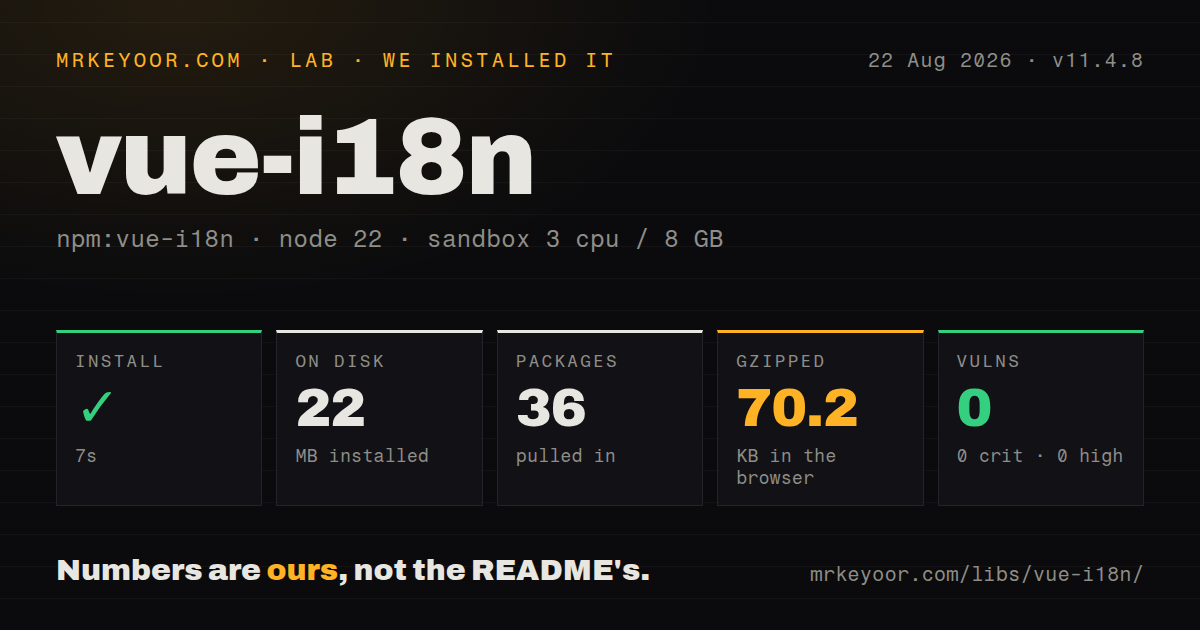
| Install | ✓ · 7s | 36 packages on disk · 22 MB |
| Import | ✓ | ESM import works · require() works · CommonJS package with exports map |
| Browser | 70.2 KB | gzipped (189.6 KB minified), bundled with esbuild |
| Types | ✓ | TypeScript types bundled |
| Known vulns | 0 | 0 critical · 0 high · 0 moderate · 0 low (npm audit) |
Answers from our run
Does vue-i18n install cleanly?
Yes. In a fresh container with an empty cache, npm install vue-i18n finished in 7 seconds, leaving 36 packages and 22 MB on disk. npm audit reported no known vulnerabilities.
How much does vue-i18n add to a browser bundle?
70.2 KB gzipped (189.6 KB minified) when the whole package is bundled for the browser with esbuild. Importing only part of it is usually smaller.
Does vue-i18n work with both ESM and CommonJS?
Yes. Both import 'vue-i18n' and require('vue-i18n') worked in Node 22 in our run. The package is published as CommonJS with an exports map.
Does vue-i18n include TypeScript types?
Yes, type declarations ship inside the package, so no @types install is needed.
vue-i18n or i18next-vue: which should you use?
i18next-vue: Use it when i18next already serves other frontends or backend code and Vue only needs a binding. vue-i18n 11.4.8 took 7 seconds, 36 installed packages, and 22 MB in our sandbox; its browser bundle measured 189.6 KB minified before 11.4.10 shipped.
When should you not use vue-i18n?
The app still runs Vue 2: Vue I18n 8 is the matching line and the project marks it end of life
Use it if
- A Vue 3 application needs translations to update reactively when its locale ref changes
- Plural selection, fallback locales, dates, numbers, and component interpolation should share one Vue-aware API
- Translation catalogs need both global scope and component-local messages or single-file `<i18n>` blocks
- TypeScript should check locale names and resource shape from a master message catalog
- The app still runs Vue 2: Vue I18n 8 is the matching line and the project marks it end of life
- Build and CI use Node 20 or earlier: version 11.4.10 declares Node 22 or newer
- One translation core must run unchanged across Vue, React, and backend services: this package is intentionally coupled to Vue
- New code plans to use legacy mode, `$tc`, or `v-t`: `$tc` is gone in 11 and the other two are scheduled to stop in 12
- Locale strings arrive at runtime while the build removes the compiler: the official plugin needs `runtimeOnly: false` for API-loaded messages
Setup reality
We installed vue-i18n 11.4.8 in a fresh sandbox before 11.4.10 was released. That run took 7 seconds and left 36 packages using 22 MB on disk. The measured package had 4 direct dependencies, one peer, bundled TypeScript declarations, and 0 known audit vulnerabilities. Its MIT tarball was 1,652 KB unpacked and required Node 22 or newer.
The measured build was CommonJS with an exports map, and both require() and ESM import worked in Node 22. esbuild produced 189.6 KB minified and 70.2 KB gzipped. Current 11.4.10 keeps the Node 22 engine and Vue 3 peer. Create one instance, pass legacy: false, install it with app.use(i18n), and call useI18n() at the top of <script setup>.
Locale files are not split automatically. Lazy loading usually combines dynamic imports, a fixed locale-to-loader map, setLocaleMessage(), and a router guard. Update the document lang attribute too. @intlify/unplugin-vue-i18n precompiles files matched by its include glob and normally emits a runtime-only build. A missed file can leave placeholders uncompiled in production. Keep the compiler with runtimeOnly: false when messages arrive from an API or database.
Single-file <i18n> blocks also rely on the build plugin. Date, number, and plural behavior comes from the host's Intl data, so restricted runtimes may need locale polyfills. For server rendering, create a separate i18n instance for every request. Reusing one global instance lets concurrent requests mutate the same locale. Version 11 still defaults to legacy mode, which makes an explicit legacy: false important before the version 12 migration.
Patterns
Start in Composition mode configure-composition-api
// src/i18n.js
import { createI18n } from 'vue-i18n'

export const i18n = createI18n({
  legacy: false,
  locale: 'en',
  fallbackLocale: 'en',
  messages: {
    en: { greeting: 'Hello, {name}!' },
    fr: { greeting: 'Bonjour, {name} !' },
  },
})

// src/main.js
createApp(App).use(i18n).mount('#app')
Version 11 defaults to legacy mode. Set `legacy: false` now because legacy mode is deprecated for version 12 removal.
Interpolate a named value translate-message
<script setup>
import { useI18n } from 'vue-i18n'
const { t } = useI18n()
</script>

<template>
  <h1>{{ t('greeting', { name: 'Ada' }) }}</h1>
</template>
Call `useI18n()` at the top of setup. Use component interpolation instead of `v-html` when translations contain UI elements.
Choose the correct plural form translate-plural
const messages = {
  en: { apples: 'no apples | one apple | {count} apples' },
}
const { t } = useI18n()
console.log(t('apples', 0))
console.log(t('apples', 1))
console.log(t('apples', 12))
Version 11 uses `t()` for pluralization and supplies `count` and `n`; the old `$tc` helper has been removed.
Bind the global locale to a selector switch-active-locale
<script setup>
import { watch } from 'vue'
import { useI18n } from 'vue-i18n'
const { locale } = useI18n({ useScope: 'global' })
watch(locale, (value) => { document.documentElement.lang = value })
</script>

<template>
  <select v-model="locale">
    <option value="en">English</option>
    <option value="fr">Français</option>
  </select>
</template>
Composition mode exposes `locale` as a ref. The HTML `lang` attribute must be updated separately for assistive technology.
Define regional fallbacks explicitly set-fallback-chain
const i18n = createI18n({
  legacy: false,
  locale: 'de-CH',
  fallbackLocale: {
    'de-CH': ['fr', 'it'],
    default: ['en'],
  },
  messages,
})
Regional codes also fall back implicitly, such as `de-CH` to `de`. Append `!` when that implicit step is unwanted.
Keep one catalog inside a component scope-local-messages
<script setup>
const { t } = useI18n({
  useScope: 'local',
  messages: {
    en: { title: 'Billing settings' },
    fr: { title: 'Paramètres de facturation' },
  },
})
</script>
<template><h2>{{ t('title') }}</h2></template>
Local messages inherit the global locale by default. Repeating large catalogs across components makes translator updates harder.
Apply a named currency format format-currency
const i18n = createI18n({
  legacy: false, locale: 'en-US',
  numberFormats: {
    'en-US': { money: { style: 'currency', currency: 'USD' } },
    'fr-FR': { money: { style: 'currency', currency: 'EUR' } },
  },
})
const { n } = useI18n()
console.log(n(1234.5, 'money'))
`n()` delegates to `Intl.NumberFormat`; available locale data and options depend on the runtime.
Apply a named date format format-date
const i18n = createI18n({
  legacy: false, locale: 'en-US',
  datetimeFormats: {
    'en-US': { short: { year: 'numeric', month: 'short', day: 'numeric' } },
  },
})
const { d } = useI18n()
console.log(d(new Date('2026-08-08T12:00:00Z'), 'short'))
The displayed date follows the user's time zone unless the format includes a fixed `timeZone`.
Place a RouterLink inside a sentence interpolate-component
<i18n-t keypath="terms.accept" tag="p">
  <template #link>
    <RouterLink to="/terms">{{ t('terms.link') }}</RouterLink>
  </template>
</i18n-t>
`i18n-t` gives translators a movable named slot without passing translated HTML through `v-html`.
Import a catalog on demand lazy-load-locale
const loaders = {
  fr: () => import('./locales/fr.json'),
  ja: () => import('./locales/ja.json'),
}
export async function setLocale(locale) {
  if (!i18n.global.availableLocales.includes(locale)) {
    const mod = await loaders[locale]()
    i18n.global.setLocaleMessage(locale, mod.default)
  }
  i18n.global.locale.value = locale
  document.documentElement.lang = locale
}
Use a fixed loader map instead of importing unchecked user input. Runtime-only builds need every catalog precompiled.
Compile locale files during Vite builds precompile-vite-locales
import VueI18nPlugin from '@intlify/unplugin-vue-i18n/vite'

export default defineConfig({
  plugins: [
    vue(),
    VueI18nPlugin({
      include: fileURLToPath(new URL('./src/locales/**', import.meta.url)),
      runtimeOnly: true,
    }),
  ],
})
The include glob must match every build-time catalog. Use `runtimeOnly: false` for message strings fetched at runtime.
Derive resource types from English type-locale-schema
import enUS from './locales/en-US.json'
import jaJP from './locales/ja-JP.json'

type MessageSchema = typeof enUS
type AppLocale = 'en-US' | 'ja-JP'

export const i18n = createI18n<[MessageSchema], AppLocale>({
  legacy: false,
  locale: 'en-US',
  messages: { 'en-US': enUS, 'ja-JP': jaJP },
})
This catches catalog-shape mistakes only when CI runs TypeScript after translators change JSON files.
Alternatives
| Package | Registry | Pick it when |
|---|---|---|
| i18next-vue | npm | Use it when i18next already serves other frontends or backend code and Vue only needs a binding |
| fluent-vue | npm | Use it when translators prefer Mozilla Fluent syntax and the product accepts that catalog format |
| petite-vue-i18n | npm | Use it with Petite Vue when the full Vue I18n component integration is unnecessary |
More web frontend guides
postcss · react · react-dom · tailwindcss · clsx · htmlparser2 · the whole shelf →
How this guide is made: grounded in the library's documentation, release notes, changelog, and issue history, on a fixed rubric — not a hands-on install of every release. The 50 most-downloaded entries are additionally install-verified in clean containers. Corrections: contact the desk.