usehooks-ts review
usehooks-ts 3.1.1 is a set of typed React hooks for browser-backed component behavior. Its catalog includes local and session storage, media and screen queries, window and element sizing, outside clicks, event listeners, clipboard access, timers, debouncing, dark mode, script loading, and small state helpers. It does not fetch application data or manage global state. The package publishes ESM and CommonJS entries, bundled declarations, and sideEffects:false metadata. Version 3.1.1 adds React 19 to the peer range; version 3.1.0 added remove functions to the localStorage and sessionStorage hooks.
usehooks-ts 3.1.1 installed in 0.8 seconds, used 1 MB across 3 packages, and measured 8.3 KB gzipped for the full namespace in our sandbox. Add it when several browser hooks earn their place and your bundler tree-shakes named imports; keep one-off hooks local and treat SSR defaults as API decisions.
We installed it
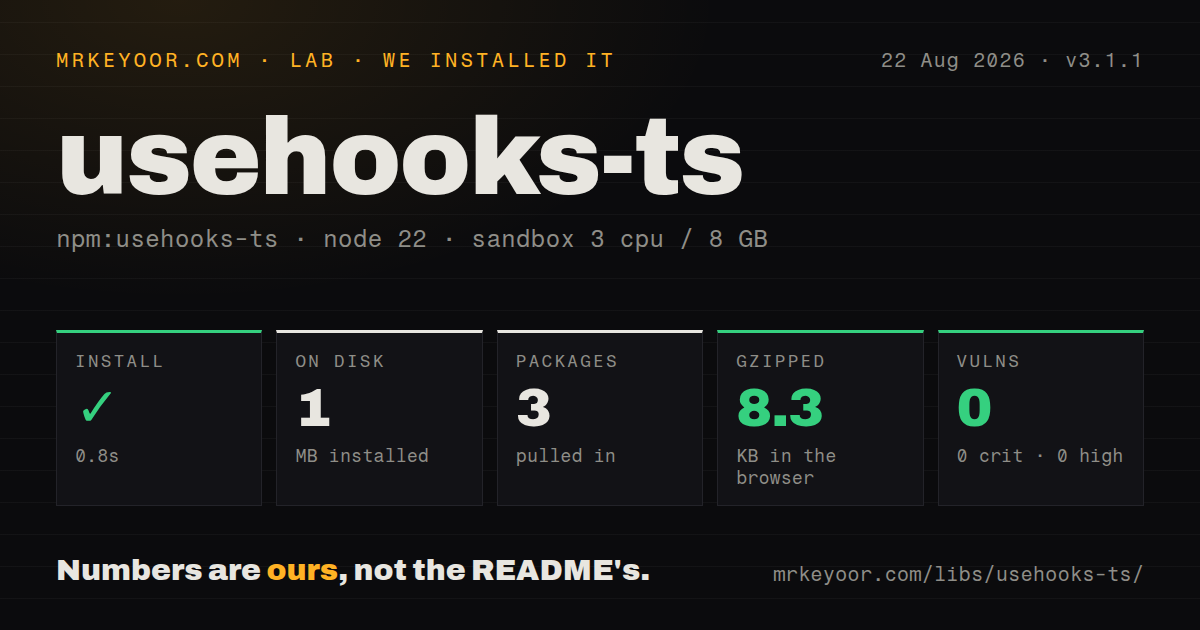
| Install | ✓ · 0.8s | 3 packages on disk · 1 MB |
| Import | ✓ | ESM import works · require() works · ESM package with exports map |
| Browser | 8.3 KB | gzipped (24 KB minified), bundled with esbuild |
| Types | ✓ | TypeScript types bundled |
| Known vulns | 0 | 0 critical · 0 high · 0 moderate · 0 low (npm audit) |
Answers from our run
Does usehooks-ts install cleanly?
Yes. In a fresh container with an empty cache, npm install usehooks-ts finished in 0.8s, leaving 3 packages and 1 MB on disk. npm audit reported no known vulnerabilities.
How much does usehooks-ts add to a browser bundle?
8.3 KB gzipped (24 KB minified) when the whole package is bundled for the browser with esbuild. Importing only part of it is usually smaller.
Does usehooks-ts work with both ESM and CommonJS?
Yes. Both import 'usehooks-ts' and require('usehooks-ts') worked in Node 22 in our run. The package is published as ESM with an exports map.
Does usehooks-ts include TypeScript types?
Yes, type declarations ship inside the package, so no @types install is needed.
usehooks-ts or react-use: which should you use?
react-use: Use it when a much larger catalog of sensors, lifecycle helpers, and async hooks is the requirement. usehooks-ts 3.1.1 installed in 0.8 seconds, used 1 MB across 3 packages, and measured 8.3 KB gzipped for the full namespace in our sandbox.
When should you not use usehooks-ts?
Only one five-line hook is needed. Local code is easier to audit than a collection whose API and release cycle you otherwise do not use.
Use it if
- Several components need the same tested storage, media, observer, timer, or DOM-listener patterns.
- React versions from 16.8 through 19 must share one hook package with explicit peer support.
- TypeScript signatures and dedicated examples are worth more than owning several short local hooks.
- The team will set each browser-reading hook's SSR fallback and hydration behavior deliberately.
- Only one five-line hook is needed. Local code is easier to audit than a collection whose API and release cycle you otherwise do not use.
- The component must remain a React Server Component. These hooks use state, effects, refs, and browser APIs, so the importer needs a client boundary.
- You expect request caching, forms, or application state. Version 3 removed deprecated useFetch and keeps this package focused on component and Web Platform utilities.
- A dependency-free debounce is required. lodash.debounce is the package's one direct dependency and backs its debounce hooks.
- The app cannot tolerate a 24 KB minified namespace import. Our measurement includes the whole export surface; verify that your bundler removes every unused hook before adopting it.
Setup reality
We installed usehooks-ts 3.1.1 in 0.8 seconds in a fresh Node 22 container. Three packages used 1 MB on disk, and npm audit found 0 known vulnerabilities. The package has one direct dependency and one React peer, with 264 KB unpacked. It requires Node 16.15 or newer, is ESM with an exports map, includes TypeScript declarations, and worked with require() and ESM import in our checks.
There are no credentials or configuration files. React is a peer and must already be installed; version 3.1.1 accepts React 16.8 through 19. In Next.js App Router, a component importing these hooks needs a client boundary. Web APIs such as localStorage, matchMedia, Clipboard, ResizeObserver, and IntersectionObserver are absent during server rendering and incomplete in jsdom, so SSR fallbacks and test mocks are part of setup.
Storage, media, window, screen, and dark-mode hooks can read the browser on their first client render. Set initializeWithValue:false when the server must render the same fallback, then expect the value to change after mount. Storage serialization is JSON by default. Date, Map, and Set need paired serializer and deserializer functions. Clipboard writes require a secure context and usually a user gesture; observer hooks need actual layout in browser tests.
Our import-all browser build was 24 KB minified and 8.3 KB gzipped. The package is marked sideEffects:false, so named imports should let a production bundler remove unused hooks; measure your output because a namespace import keeps more code. useDebounceCallback brings lodash.debounce behavior, including cancel and flush. Hooks register and clean up listeners, but your callback identity, SSR default, observer threshold, and interval delay still determine rerenders and hydration changes.
Patterns
Keep typed filters in local storage persist-local-state
import { useLocalStorage } from 'usehooks-ts';

const [filters, setFilters, removeFilters] = useLocalStorage(
  'product-filters',
  { query: '', inStock: false },
);
setFilters((current) => ({ ...current, inStock: true }));
JSON is the default encoding. The third tuple item removes the key and was added in version 3.1.
Match the server render before reading storage defer-storage-read
const [theme, setTheme] = useLocalStorage(
  'theme',
  'system',
  { initializeWithValue: false },
);
The initial server and client values remain system; the stored value arrives after mount and can change visible output once.
Restore a Date instead of a string serialize-date
const [lastSeen, setLastSeen] = useLocalStorage<Date>(
  'last-seen',
  new Date(0),
  {
    serializer: (value) => value.toISOString(),
    deserializer: (raw) => new Date(raw),
  },
);
Default JSON parsing does not recreate Date, Map, or Set instances. Serializer and deserializer must agree on the stored shape.
Read a responsive breakpoint after mount track-media-query
import { useMediaQuery } from 'usehooks-ts';

const narrow = useMediaQuery('(max-width: 48rem)', {
  defaultValue: false,
  initializeWithValue: false,
});
initializeWithValue:false avoids a server/client first-render mismatch, but the layout can update after matchMedia runs.
Close a panel on an outside press handle-outside-pointer
const panelRef = useRef<HTMLDivElement>(null);
useOnClickOutside(panelRef, () => setOpen(false), 'mousedown');

return <div ref={panelRef}>Panel content</div>;
mousedown is the default event. The hook can accept multiple refs and touch or focus event names.
Close on the Escape key listen-window-key
import { useEventListener } from 'usehooks-ts';

useEventListener('keydown', (event) => {
  if (event.key === 'Escape') setOpen(false);
});
Without a target ref, the listener attaches to window and is removed when the component unmounts.
Attach a listener to a ref target listen-element-focus
const buttonRef = useRef<HTMLButtonElement>(null);
useEventListener('focus', () => setFocused(true), buttonRef);

return <button ref={buttonRef}>Save</button>;
Pass the RefObject, not buttonRef.current, so the hook can follow the element after mount.
Delay search until typing pauses debounce-search
const search = useDebounceCallback(
  (query: string) => runSearch(query),
  300,
  { trailing: true, maxWait: 1_200 },
);

return <input onChange={(event) => search(event.target.value)} />;
The debounced function exposes cancel, flush, and isPending. Cancel it when stale work must not fire after navigation.
Render content after it approaches the viewport observe-intersection
const { ref, isIntersecting } = useIntersectionObserver({
  threshold: 0.25,
  rootMargin: '200px',
  freezeOnceVisible: true,
});

return <section ref={ref}>{isIntersecting ? <Results /> : null}</section>;
freezeOnceVisible stops updates after the first hit. jsdom tests need an IntersectionObserver mock.
Track a panel with ResizeObserver observe-size
const panelRef = useRef<HTMLDivElement>(null);
const { width = 0, height = 0 } = useResizeObserver({
  ref: panelRef,
  box: 'border-box',
});

return <div ref={panelRef}>{width} x {height}</div>;
ResizeObserver reports browser layout, which jsdom does not calculate. The onResize option can avoid a React render for every size change.
Pause an interval without changing hook order toggle-interval
useInterval(
  () => setSeconds((value) => value + 1),
  running ? 1_000 : null,
);
A null delay clears the timer. Functional state updates keep each tick independent of a captured seconds value.
Report a failed clipboard write copy-clipboard
const [copiedText, copy] = useCopyToClipboard();

async function copyLink() {
  const copied = await copy(location.href);
  if (!copied) setError('Copy failed');
}
Clipboard writes generally need HTTPS or localhost plus a user action. The hook resolves false when the browser write fails.
Alternatives
| Package | Registry | Pick it when |
|---|---|---|
| react-use | npm | Use it when a much larger catalog of sensors, lifecycle helpers, and async hooks is the requirement. |
| ahooks | npm | Use it for a broad application toolkit that includes request, polling, DOM, and state utilities. |
| @uidotdev/usehooks | npm | Use it for a smaller modern collection with tutorial-led examples. |
More web frontend guides
postcss · react · react-dom · tailwindcss · clsx · htmlparser2 · the whole shelf →
How this guide is made: grounded in the library's documentation, release notes, changelog, and issue history, on a fixed rubric — not a hands-on install of every release. The 50 most-downloaded entries are additionally install-verified in clean containers. Corrections: contact the desk.