tsconfig review
The npm package `tsconfig` 7.0.0 is a Node filesystem helper, not a shared TypeScript compiler preset. It searches upward for `tsconfig.json`, reads an explicit file, strips a BOM and comments, then returns raw JSON through synchronous or promise APIs. It does not run `tsc`, resolve `extends`, merge inherited settings, expand includes, or validate compiler options. Version 7 added TypeScript package discovery and npm `@types` usage in 2017; no newer npm release exists, so its claim to replicate TypeScript behavior should be read as a narrow file-resolution claim from that era.
`tsconfig` 7.0.0 installed in 1.3 seconds and used 1 MB in our sandbox, but its browser build failed and npm has not released it since 2017. Retain it for compatible legacy file discovery; new TypeScript tools should parse inherited configuration with a maintained reader or the compiler API.
We installed it
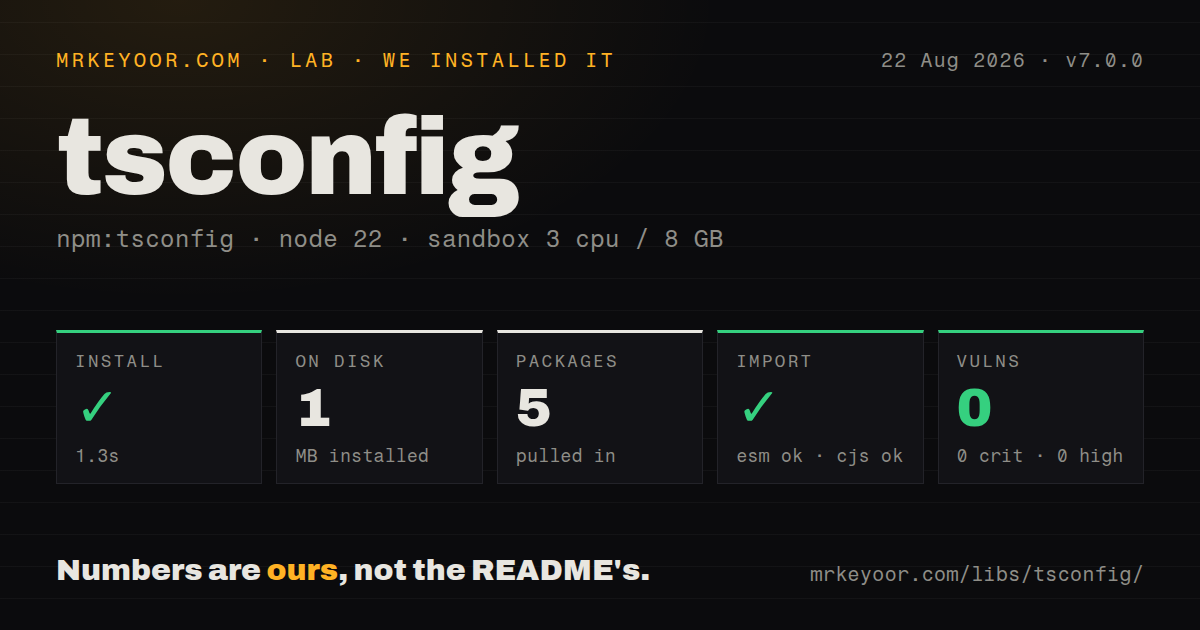
| Install | ✓ · 1.3s | 5 packages on disk · 1 MB |
| Import | ✓ | ESM import works · require() works · CommonJS package |
| Browser | n/a | could not be bundled for the browser (Node-only code, most likely) |
| Types | ✓ | TypeScript types bundled |
| Known vulns | 0 | 0 critical · 0 high · 0 moderate · 0 low (npm audit) |
Answers from our run
Does tsconfig install cleanly?
Yes. In a fresh container with an empty cache, npm install tsconfig finished in 1 seconds, leaving 5 packages and 1 MB on disk. npm audit reported no known vulnerabilities.
Can tsconfig run in a browser?
Not directly: esbuild could not bundle it for the browser in our run, which normally means it depends on Node built-ins. Use it on the server, or find a browser-targeted alternative.
Does tsconfig work with both ESM and CommonJS?
Yes. Both import 'tsconfig' and require('tsconfig') worked in Node 22 in our run. The package is published as CommonJS.
Does tsconfig include TypeScript types?
Yes, type declarations ship inside the package, so no @types install is needed.
tsconfig or get-tsconfig: which should you use?
get-tsconfig: Use it for maintained typed parsing, inherited configs, and path matching. tsconfig 7.0.0 installed in 1.3 seconds and used 1 MB in our sandbox, but its browser build failed and npm has not released it since 2017.
When should you not use tsconfig?
Compiler-accurate configuration is required; extends, project references, include expansion, defaults, and path resolution are untouched
Use it if
- An older Node tool already depends on its exact upward-search and missing-file behavior
- You need synchronous and asynchronous functions for locating one tsconfig.json
- Comments, a BOM, or an empty file should be accepted before your own validation runs
- Returning the selected path beside an unprocessed object is exactly what the caller expects
- Compiler-accurate configuration is required; `extends`, project references, include expansion, defaults, and path resolution are untouched
- Modern JSONC with trailing commas must parse; this package strips comments and then uses `JSON.parse`
- A new tool requires maintained TypeScript compatibility because version 7.0.0 was published in August 2017
- Static typing must catch option errors; the bundled declaration exposes parsed config as `any`
- Browser or edge code needs the result because this package imports Node filesystem and path modules
Setup reality
We installed tsconfig 7.0.0 in 1.3 seconds. The sandbox contained 5 packages and used 1 MB on disk; the package was 52 KB unpacked with 4 direct dependencies and 0 peers. npm audit found 0 known vulnerabilities. It is CommonJS without an exports map. require() and ESM import both worked, and TypeScript declarations are bundled.
There are no credentials, native builds, environment variables, or package-owned config files. Calling find() or load() with only a working directory walks toward the filesystem root and looks for the exact filename tsconfig.json. An explicit file is read directly; an explicit directory must contain that filename. Missing explicit paths throw or reject, while an implicit miss behaves differently.
When upward search finds nothing, load() returns a default object with empty files and compilerOptions and no path. Code that only checks config can therefore treat a missing project file as real configuration. Parsing removes comments and a leading BOM, and whitespace-only input becomes {}. Trailing commas still fail because the final step is standard JSON.parse.
Our esbuild browser build failed, which matches direct use of Node fs and path. The parser never follows extends, resolves references, applies compiler defaults, or checks option names. Its declarations return any for the configuration. Validate the object yourself, or use the installed TypeScript compiler API when tool output must match the compiler exactly.
Patterns
Load the nearest config and require a path load-nearest
const { load } = require('tsconfig')

const result = await load(process.cwd())
if (!result.path) throw new Error('No tsconfig.json found')
console.log(result.path, result.config.compilerOptions)
An implicit miss returns a default config rather than rejecting, so the missing `path` is the reliable check.
Read the nearest config during startup load-nearest-sync
const { loadSync } = require('tsconfig')

const { path, config } = loadSync(__dirname)
if (path) console.log(config.compilerOptions || {})
This form blocks for filesystem traversal; keep it in startup or short CLI code, away from request handlers.
Locate without parsing find-path
const { find } = require('tsconfig')

const path = await find('/workspace/packages/widget/src')
if (path) console.log(`Using ${path}`)
Search walks upward for the exact name `tsconfig.json` and resolves to undefined at the filesystem root.
Resolve a build config relative to cwd resolve-explicit
const { resolve } = require('tsconfig')

const path = await resolve(process.cwd(), 'configs/tsconfig.build.json')
Unlike an implicit search miss, a nonexistent explicit target rejects with TypeError.
Parse one explicitly named file load-alternate
const { load } = require('tsconfig')

const { path, config } = await load(process.cwd(), 'tsconfig.build.json')
console.log(path, config.compilerOptions)
Only that file is returned. An `extends` reference stays unresolved and unmerged.
Read a known tsconfig path read-known-file
const { readFile } = require('tsconfig')

const config = await readFile('/workspace/app/tsconfig.json')
console.log(config.include || [])
Filesystem failures and JSON syntax errors reject; comments and a leading BOM are removed first.
Parse commented in-memory JSON parse-comments
const { parse } = require('tsconfig')

const config = parse(`{
  // accepted
  "compilerOptions": { "strict": true }
}`, 'tsconfig.json')
Comments work, but a trailing comma still reaches `JSON.parse` and throws.
Guard the untyped result validate-config
const { config } = await load(process.cwd())
const options = config && typeof config.compilerOptions === 'object'
  ? config.compilerOptions
  : {}
if (options.strict !== undefined && typeof options.strict !== 'boolean') {
  throw new TypeError('compilerOptions.strict must be boolean')
}
Bundled declarations type config as `any`; the package checks neither option names nor their value types.
Alternatives
| Package | Registry | Pick it when |
|---|---|---|
| get-tsconfig | npm | Use it for maintained typed parsing, inherited configs, and path matching. |
| tsconfck | npm | Use it in build tools that need caching, extends chains, references, and ESM support. |
| typescript | npm | Use the compiler API when the answer must match the project's installed TypeScript version. |
| cosmiconfig | npm | Use it for general tool-configuration discovery that is not supposed to interpret TypeScript settings. |
More utils guides
lru-cache · type-fest · ajv · zod · p-limit · find-up · the whole shelf →
How this guide is made: grounded in the library's documentation, release notes, changelog, and issue history, on a fixed rubric — not a hands-on install of every release. The 50 most-downloaded entries are additionally install-verified in clean containers. Corrections: contact the desk.