@svgr/core review
@svgr/core 8.1.0 is the Node API for generating React component source from an SVG string. transform() passes source through an ordered plugin list and returns JavaScript or TypeScript text; it does not render SVG at application runtime. Version 8 core ships with no default plugins, so a caller must install and select @svgr/plugin-jsx, then optionally add SVGO or Prettier. The 8.1.0 release corrects configuration precedence, CLI defaults, and a React Native import, and adds svgo.config.cjs support. Our browser build failed because this 69-package toolchain is for build-time Node work.
@svgr/core 8.1.0 took 5.8 seconds and 20 MB across 69 packages in our sandbox, and its browser build failed as expected for a Node generator. Install it only when you need a custom code-generation pipeline; use a CLI or bundler wrapper for ordinary SVG conversion.
We installed it
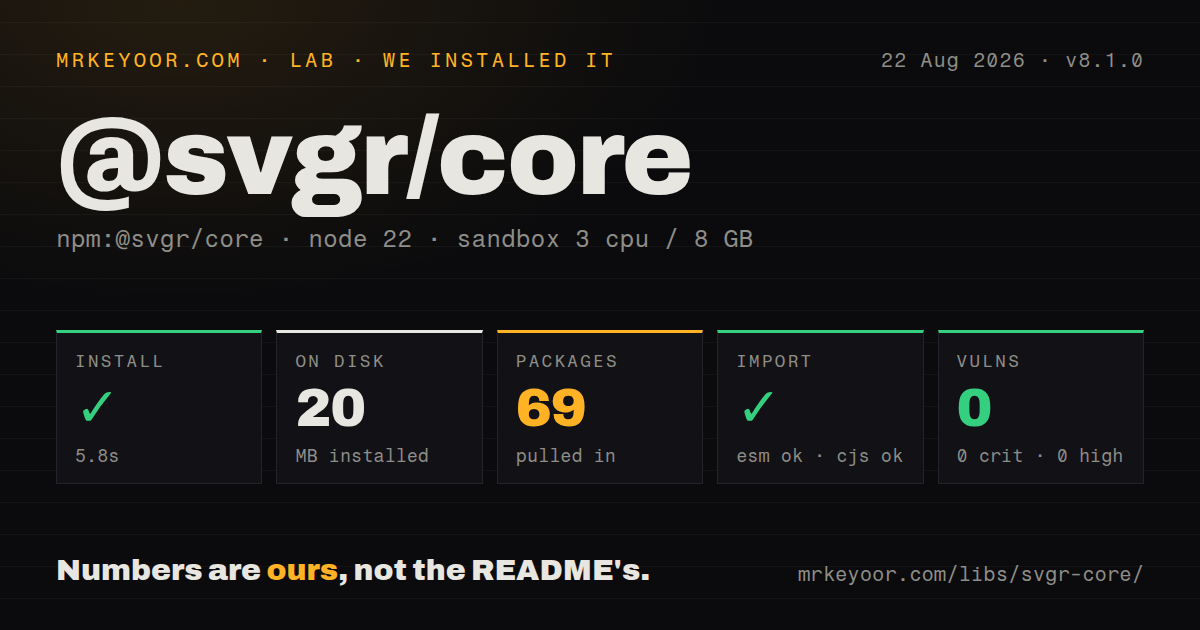
| Install | ✓ · 5.8s | 69 packages on disk · 20 MB |
| Import | ✓ | ESM import works · require() works · CommonJS package with exports map |
| Browser | n/a | could not be bundled for the browser (Node-only code, most likely) |
| Types | ✓ | TypeScript types bundled |
| Known vulns | 0 | 0 critical · 0 high · 0 moderate · 0 low (npm audit) |
Answers from our run
Does @svgr/core install cleanly?
Yes. In a fresh container with an empty cache, npm install @svgr/core finished in 6 seconds, leaving 69 packages and 20 MB on disk. npm audit reported no known vulnerabilities.
Can @svgr/core run in a browser?
Not directly: esbuild could not bundle it for the browser in our run, which normally means it depends on Node built-ins. Use it on the server, or find a browser-targeted alternative.
Does @svgr/core work with both ESM and CommonJS?
Yes. Both import '@svgr/core' and require('@svgr/core') worked in Node 22 in our run. The package is published as CommonJS with an exports map.
Does @svgr/core include TypeScript types?
Yes, type declarations ship inside the package, so no @types install is needed.
@svgr/core or @svgr/cli: which should you use?
@svgr/cli: Choose it for file and directory conversion from a script without writing the transform and output loop yourself. @svgr/core 8.1.0 took 5.8 seconds and 20 MB across 69 packages in our sandbox, and its browser build failed as expected for a Node generator.
When should you not use @svgr/core?
Application code only imports SVG files through Vite or webpack; vite-plugin-svgr or @svgr/webpack already owns that integration point
Use it if
- A design-system build script needs programmatic SVG-to-React generation outside a webpack or Vite loader
- Generated icons require a custom Babel template, TypeScript output, ref forwarding, memo wrappers, or controlled exports
- The repository commits generated components so SVG source changes and output diffs can be reviewed
- One batch policy must normalize dimensions, currentColor, internal IDs, and accessible title behavior across many icons
- Application code only imports SVG files through Vite or webpack; vite-plugin-svgr or @svgr/webpack already owns that integration point
- You expect transform(svg) by itself to produce JSX; the core README says version 8 has zero default plugins
- Your build-policy requires a recently published release; npm 8.1.0 dates to August 2023 despite later repository activity
- Transformation must execute in a browser or edge isolate; our esbuild browser attempt failed on Node-oriented configuration and plugin code
- The task only optimizes SVG markup and never produces React source; using SVGO directly avoids the Babel and React generation stages
Setup reality
We installed @svgr/core 8.1.0 in a fresh Node 22 sandbox in 5.8 seconds. It left 69 packages and 20 MB on disk. The core package declares five direct dependencies, no peer dependencies, and is 48 KB unpacked under MIT. npm audit reported zero known vulnerabilities. Bundled TypeScript declarations were present. CommonJS require() and ESM import both worked through the exports map. Our esbuild browser build failed on Node-only paths, which confirms this belongs in a generator or build process.
The first-run surprise is an empty plugin pipeline. Install @svgr/plugin-jsx and pass it in plugins or transform() will not turn the SVG into a React component. Add @svgr/plugin-svgo before JSX when optimization is wanted, and @svgr/plugin-prettier afterward when generated formatting belongs in SVGR. That means a useful setup exceeds the measured core install. Pin every plugin and snapshot output for gradients, masks, clip paths, titles, viewBox behavior, and React Native variants.
No credentials are required. With runtimeConfig enabled and state.filePath supplied, SVGR searches for .svgrrc files, config modules, or package settings and combines them with call options. Version 8.1.0 fixes command-line configuration precedence, which shows that source location can affect output. Set runtimeConfig: false when a reproducible generator must ignore the directory tree. The caller still owns component naming, extension selection, destination paths, and safe writes.
transform() is asynchronous; transform.sync() is available but cannot load asynchronous configuration or plugins. An uploaded SVG is active markup, so sanitize or reject external references and dangerous content before turning it into committed or served code. Preserve viewBox for scalable icons, prefix internal IDs to prevent collisions, and decide between title-based names and aria-hidden output. A 20 MB code generator should stay out of production browser dependencies and ordinary request paths.
Patterns
Run an explicit plugin pipeline transform-svg-to-jsx
import { transform } from '@svgr/core'
import { readFile, writeFile } from 'node:fs/promises'

const svg = await readFile('icons/check.svg', 'utf8')
const code = await transform(svg, {
  plugins: ['@svgr/plugin-svgo', '@svgr/plugin-jsx', '@svgr/plugin-prettier'],
}, { componentName: 'CheckIcon' })
await writeFile('src/icons/CheckIcon.jsx', code)
Version 8 core has no default plugins. The list runs in order, so SVG optimization precedes JSX conversion and formatting comes last.
Ignore repository configuration make-deterministic-transform
const code = await transform(svg, {
  plugins: ['@svgr/plugin-jsx'],
  runtimeConfig: false,
}, {
  componentName: 'Logo',
  filePath: 'assets/logo.svg',
})
runtimeConfig: false prevents .svgrrc and parent package settings from changing output based on file location.
Generate source synchronously run-synchronous-transform
import { transform } from '@svgr/core'

const code = transform.sync(svg, {
  plugins: ['@svgr/plugin-jsx'],
  runtimeConfig: false,
}, { componentName: 'CloseIcon' })
transform.sync() cannot consume asynchronous config or plugin setup; use the promise API unless the caller truly requires sync work.
Generate a typed ref component emit-typescript-component
const code = await transform(svg, {
  plugins: ['@svgr/plugin-jsx'],
  typescript: true,
  ref: true,
  memo: true,
}, { componentName: 'SearchIcon' })
Write TypeScript output to a .tsx file, and verify the ref and memo wrappers before publishing the export contract.
Map designer colors to currentColor convert-fill-to-currentcolor
const code = await transform(svg, {
  plugins: ['@svgr/plugin-svgo', '@svgr/plugin-jsx'],
  icon: true,
  replaceAttrValues: {
    '#063855': 'currentColor',
    '#000000': 'currentColor',
  },
})
Replacement matches literal values. Normalize SVG color spellings or enumerate each source form that the icon pipeline accepts.
Keep scaling and isolate internal IDs preserve-viewbox-and-ids
const code = await transform(svg, {
  plugins: ['@svgr/plugin-svgo', '@svgr/plugin-jsx'],
  svgoConfig: {
    plugins: [
      { name: 'preset-default', params: { overrides: { removeViewBox: false } } },
      'prefixIds',
    ],
  },
})
viewBox enables CSS scaling, while prefixIds prevents gradients, masks, and clip paths from colliding between icons on one page.
Expose title and description props add-accessible-title
const code = await transform(svg, {
  plugins: ['@svgr/plugin-jsx'],
  titleProp: true,
  descProp: true,
}, { componentName: 'StatusGraphic' })
Callers must supply meaningful title text for named graphics; decorative icons should instead use aria-hidden.
Generate hidden decorative output mark-icon-decorative
const code = await transform(svg, {
  plugins: ['@svgr/plugin-jsx'],
  icon: true,
  svgProps: {
    focusable: 'false',
    'aria-hidden': 'true',
  },
})
aria-hidden removes the graphic from the accessibility tree, so do not use this policy for an icon that carries the only label.
Emit a named component export choose-named-export
const code = await transform(svg, {
  plugins: ['@svgr/plugin-jsx'],
  exportType: 'named',
  namedExport: 'ReactComponent',
}, { componentName: 'Logo' })
Named and default exports create different consumer imports; settle the package convention before generating a public icon set.
Use the automatic JSX runtime select-jsx-runtime
const code = await transform(svg, {
  plugins: ['@svgr/plugin-jsx'],
  jsxRuntime: 'automatic',
})
The consuming compiler must already support the automatic runtime; generated source cannot enable that setting itself.
Wrap output with a Babel template supply-custom-template
const template = (variables, { tpl }) => tpl`
${variables.imports};
${variables.interfaces};
const ${variables.componentName} = (${variables.props}) => ${variables.jsx};
${variables.exports};
`

const code = await transform(svg, {
  plugins: ['@svgr/plugin-jsx'],
  template,
})
Template variables contain Babel AST nodes. Use the supplied tpl helper and snapshot-test changes that can rewrite every generated file.
Convert an SVG directory batch-generate-tsx-icons
import { transform } from '@svgr/core'
import { readdir, readFile, writeFile } from 'node:fs/promises'
import path from 'node:path'

for (const file of (await readdir('svg')).filter(name => name.endsWith('.svg'))) {
  const svg = await readFile(path.join('svg', file), 'utf8')
  const componentName = toPascalCase(path.basename(file, '.svg'))
  const code = await transform(svg, {
    plugins: ['@svgr/plugin-svgo', '@svgr/plugin-jsx'],
    typescript: true,
    icon: true,
    runtimeConfig: false,
  }, { componentName, filePath: path.join('svg', file) })
  await writeFile(path.join('src/icons', `${componentName}.tsx`), code)
}
Create the destination first, reject unsafe filenames, and keep naming plus config deterministic so a clean run produces no unrelated diff.
Alternatives
| Package | Registry | Pick it when |
|---|---|---|
| @svgr/cli | npm | Choose it for file and directory conversion from a script without writing the transform and output loop yourself |
| @svgr/webpack | npm | Choose it when webpack should turn imported SVG files into React components during bundling |
| vite-plugin-svgr | npm | Choose it when a Vite application wants SVG component imports with SVGR options inside the build config |
More web frontend guides
postcss · react · react-dom · tailwindcss · clsx · htmlparser2 · the whole shelf →
How this guide is made: grounded in the library's documentation, release notes, changelog, and issue history, on a fixed rubric — not a hands-on install of every release. The 50 most-downloaded entries are additionally install-verified in clean containers. Corrections: contact the desk.