string-natural-compare review
string-natural-compare 3.0.1 is a comparator for sorting labels whose digit runs should behave as numbers, placing `img2` before `img10`. It compares arbitrarily long integer text without converting it to JavaScript `Number`, accepts an optional case-insensitive mode, and can follow a caller-supplied character alphabet. It rejects non-string operands. This is machine-oriented alphanumeric ordering, not locale collation, semantic-version precedence, or object traversal. The current package has not changed since January 2020. Our full browser import measured 0.9 KB gzipped and both CommonJS and ESM loading worked, but the package includes no TypeScript types or exports map.
string-natural-compare 3.0.1 installed in 0.3 seconds and bundled to 0.9 KB gzipped in our sandbox, but it has no bundled types and no release since 2020. Use it for deterministic identifier sorting or huge digit runs; start user-facing lists with `Intl.Collator({numeric: true})`.
We installed it
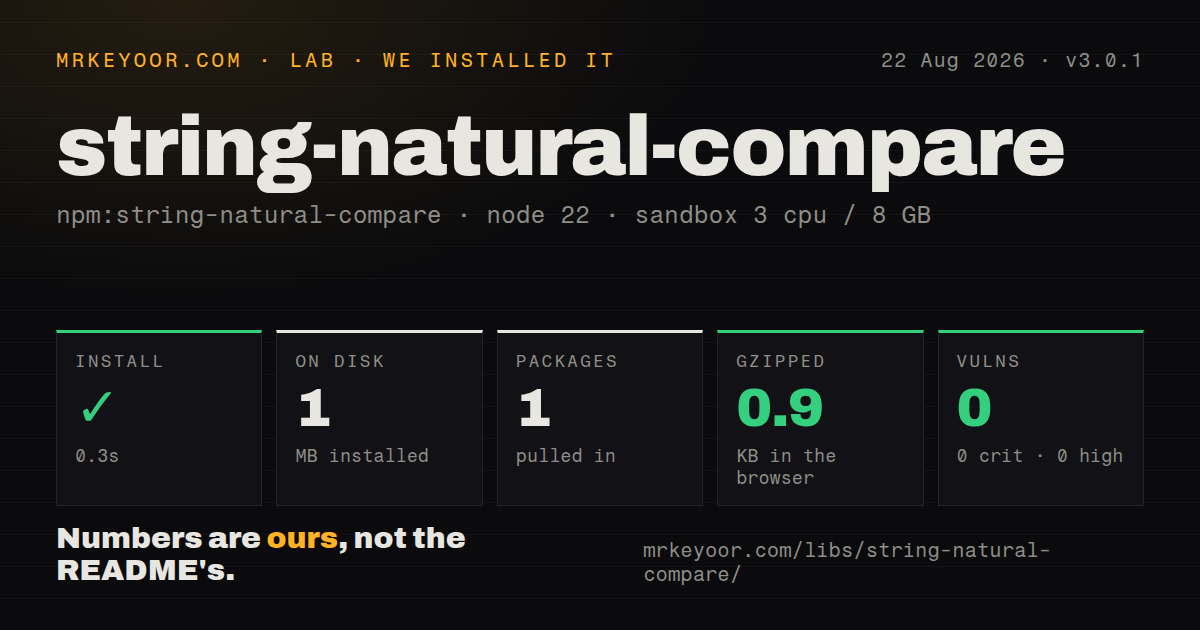

| Install | ✓ · 0.3s | 1 package on disk · 1 MB |
| Import | ✓ | ESM import works · require() works · CommonJS package |
| Browser | 0.9 KB | gzipped (1.7 KB minified), bundled with esbuild |
| Types | — | no TypeScript types found |
| Known vulns | 0 | 0 critical · 0 high · 0 moderate · 0 low (npm audit) |
Answers from our run
Does string-natural-compare install cleanly?
Yes. In a fresh container with an empty cache, npm install string-natural-compare finished in 0.3s, leaving 1 package and 1 MB on disk. npm audit reported no known vulnerabilities.
How much does string-natural-compare add to a browser bundle?
0.9 KB gzipped (1.7 KB minified) when the whole package is bundled for the browser with esbuild. Importing only part of it is usually smaller.
Does string-natural-compare work with both ESM and CommonJS?
Yes. Both import 'string-natural-compare' and require('string-natural-compare') worked in Node 22 in our run. The package is published as CommonJS.
Does string-natural-compare include TypeScript types?
No type declarations were found in our install, so TypeScript users need their own declarations.
string-natural-compare or natural-compare-lite: which should you use?
natural-compare-lite: Choose it for another small browser-oriented natural comparator. string-natural-compare 3.0.1 installed in 0.3 seconds and bundled to 0.9 KB gzipped in our sandbox, but it has no bundled types and no release since 2020.
When should you not use string-natural-compare?
People expect language-aware order for accents, punctuation, or scripts; Intl.Collator handles locale collation and numeric sorting
Use it if
- Filenames, seat codes, part labels, or room numbers contain digit runs that must sort by numeric magnitude
- Identifiers may contain integers beyond JavaScript's safe numeric range
- A fixed custom character order must produce the same result across machines
- A dependency-free CommonJS comparator fits the project's packaging and typing policy
- People expect language-aware order for accents, punctuation, or scripts; `Intl.Collator` handles locale collation and numeric sorting
- The project requires first-party TypeScript declarations or explicit package exports; version 3.0.1 has neither
- Inputs can be null, numbers, or objects; the comparator throws unless both arguments are strings
- Values are semantic versions; natural digit order does not implement prerelease or build-metadata rules
- Custom alphabets come from unbounded user input; the source caches alphabet maps, and the README says digits in an alphabet cause undefined behavior
Setup reality
Our string-natural-compare 3.0.1 install completed in 0.3 seconds in a fresh Node 22 container. It left 1 package using 1 MB, and npm audit found 0 known vulnerabilities. The package itself was 24 KB unpacked and declared 0 direct dependencies plus 0 peers. It is CommonJS without an exports map; require() and ESM import both worked in our checks. No TypeScript types were found. A full esbuild browser import measured 1.7 KB minified and 0.9 KB gzipped.
There are no credentials, native builds, or config files. The native interface is require('string-natural-compare'); ESM consumers rely on runtime CommonJS interop and should confirm their bundler's default-import behavior. Strict TypeScript projects need a local declaration or a separately vetted type package. Version 3.0.1 remains the latest publication from January 2020, so do not expect package exports or types to arrive through routine upgrades.
Both comparator operands must already be strings. Normalize object properties and decide where null belongs before sorting. Array.sort mutates its input; use toSorted() or copy the array when source order matters. Case-insensitive comparisons can return 0 for differently cased text, leaving their relative order to the runtime's stable sort. For large object arrays, precompute lowercase or composite keys instead of rebuilding them during every comparator call.
Digit runs use characters 0 through 9 and are compared without numeric conversion, which preserves ordering for very long integers. Other characters follow the library's deterministic character rules or the supplied alphabet, not the reader's locale. Reuse a small fixed set of alphabet strings because each compiled map is cached. Never place digits in the alphabet; the README explicitly calls that behavior undefined.
Patterns
Order numbered filenames sort-filenames
const compare = require('string-natural-compare');
const files = ['img10.png', 'img2.png', 'img1.png'];
files.sort(compare);
The 3 results become `img1.png`, `img2.png`, `img10.png`; `sort()` mutates the original array.
Keep the source array intact sort-without-mutation
const sorted = files.toSorted(compare);`toSorted()` returns a copy on current runtimes; older engines can use `[...files].sort(compare)`.
Compare without letter case ignore-case
const options = {caseInsensitive: true};
const sorted = labels.toSorted((a, b) => compare(a, b, options));
Two strings that differ only by case can compare as 0, preserving their input order under stable sort.
Sort records by room code sort-object-property
const sorted = rooms.toSorted((a, b) => compare(a.room, b.room));Both `room` values must be strings; a missing property causes a TypeError.
Break street ties with room numbers sort-two-fields
rooms.sort((a, b) => compare(a.street, b.street, {caseInsensitive: true}) || compare(a.room, b.room));A 0 result on the first field sends the comparison to the second field.
Cache expensive object keys precompute-sort-key
const keyed = cars.map(value => ({value, key: `${value.make} ${value.model}`.toLowerCase()}));
keyed.sort((a, b) => compare(a.key, b.key));
Precomputation performs 1 lowercase conversion per item instead of repeating it across comparator calls.
Order integers beyond Number precision sort-huge-integers
const ids = ['1165874568735487968325787328996865', '265812277985321589735871687040841'];
ids.sort(compare);
The comparator reads digit-run length and characters, so neither value is rounded through `Number`.
Reverse the comparator sort-descending
const descending = versions.toSorted((a, b) => compare(b, a));Reversing argument order does not turn natural sorting into semantic-version precedence.
Define a missing-value policy place-null-last
function compareNullable(a, b) {
  if (a == null) return b == null ? 0 : 1;
  if (b == null) return -1;
  return compare(String(a), String(b));
}
The wrapper keeps null last instead of converting it silently to the 4-letter string `null`.
Provide a fixed alphabet use-custom-alphabet
const alphabet = 'АБВГДЕЁЖЗИЙКЛМНОПРСТУФХЦЧШЩЪЫЬЭЮЯабвгдеёжзийклмнопрстуфхцчшщъыьэюя';
letters.sort((a, b) => compare(a, b, {alphabet}));
Do not include any of the 10 ASCII digits; the README labels that combination undefined.
Add the missing TypeScript shape declare-types-locally
declare module 'string-natural-compare' {
  interface Options { caseInsensitive?: boolean; alphabet?: string }
  function compare(a: string, b: string, options?: Options): number;
  export = compare;
}
Version 3.0.1 ships no declarations, so keep this local shim aligned with its 2 documented options.
Prefer locale-aware numeric order use-intl-collator
const collator = new Intl.Collator(undefined, {numeric: true, sensitivity: 'base'});
const sorted = labels.toSorted(collator.compare);
Locale data can change ordering across languages; that is usually correct for labels shown to people.
Alternatives
| Package | Registry | Pick it when |
|---|---|---|
| natural-compare-lite | npm | Choose it for another small browser-oriented natural comparator. |
| natural-orderby | npm | Choose it to sort objects through iteratees, multiple keys, and direction controls. |
| natsort | npm | Choose it for configurable natural sorting with additional parsing modes. |
More utils guides
lru-cache · type-fest · ajv · zod · p-limit · find-up · the whole shelf →
How this guide is made: grounded in the library's documentation, release notes, changelog, and issue history, on a fixed rubric — not a hands-on install of every release. The 50 most-downloaded entries are additionally install-verified in clean containers. Corrections: contact the desk.