natsort review
natsort 8.4.0 builds comparison keys that put `file2` before `file10`, while Python's plain string order puts `file10` first. It provides `natsorted()`, reusable key generators, signed-real sorting, locale-aware text order, filesystem-style path order, and index helpers for parallel sequences. It does not understand version specifications. The 8.4.0 release fixes Windows `os_sorted()` behavior when spaces sit next to a file extension. Our Python 3.12 install took 0.2 seconds and used 1 MB.
natsort 8.4.0 installed in 0.2 seconds as one 1 MB package, imported in 0.13 seconds, and had 0 audit findings in our sandbox. Install it for user-visible natural order with varied inputs; use a formal version parser or a small explicit key when the domain already defines the grammar.
We installed it
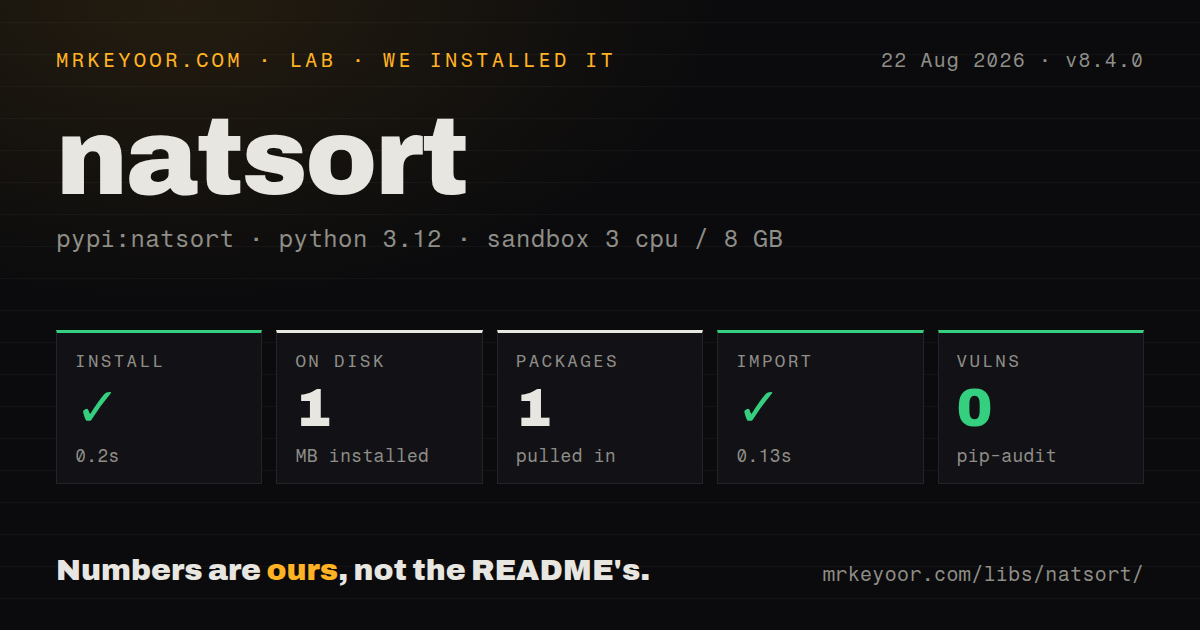
| Install | ✓ · 0.2s | 1 package on disk · 1 MB |
| Import | ✓ | import natsort in 0.13s · pure Python · py.typed · requires Python >=3.7 |
| Known vulns | 0 | (pip-audit) |
Answers from our run
Does natsort install cleanly?
Yes. In a fresh container with an empty cache, pip install natsort finished in 0.2s, leaving 1 package and 1 MB on disk. pip-audit reported no known vulnerabilities.
What does natsort need to run?
Python >=3.7, and nothing compiled: it is pure Python. In our run import natsort succeeded in 0.13s, and the package ships py.typed for type checkers.
natsort or packaging: which should you use?
packaging: Use packaging.version.Version when PEP 440 package-version precedence is the actual rule. natsort 8.4.0 installed in 0.2 seconds as one 1 MB package, imported in 0.13 seconds, and had 0 audit findings in our sandbox.
When should you not use natsort?
You sort PEP 440 or Semantic Versioning values. The README says natsort does not comprehend version numbers; use a parser that enforces the specification.
Use it if
- Users see numbered filenames, labels, measurements, or identifiers and ordinary lexicographic order looks wrong.
- You need signed floats, exponents, case rules, paths, or locale behavior behind one tested key generator.
- Several related sequences must follow the same natural order through `index_natsorted()` and `order_by_index()`.
- A reusable key should work with `list.sort()`, `sorted()`, `min()`, `max()`, or another Python ordering API.
- You sort PEP 440 or Semantic Versioning values. The README says natsort does not comprehend version numbers; use a parser that enforces the specification.
- Your input has a fixed shape such as `item-<integer>`. A short tuple or regex key makes the intended order easier to audit.
- You need the same locale order on every machine without controlling ICU and installed locales. `humansorted()` can vary with platform configuration.
- You process arbitrary bytes. The project says bytes are not officially supported and offers `as_utf8` only for values that can be decoded that way.
- Your objects rely on custom rich comparison methods. The FAQ warns that custom classes are unlikely to sort correctly without an explicit field key.
Setup reality
We installed natsort 8.4.0 in a fresh Python 3.12 Bookworm sandbox. pip completed in 0.2 seconds and left one package using 1 MB on disk. Our inspection counted 2 declared direct dependency entries. The wheel is pure Python, requires Python 3.7 or newer, ships py.typed, and uses MIT. import natsort worked in 0.13 seconds, and pip-audit reported 0 known vulnerabilities.
The base package works without optional accelerators. The fast extra installs fastnumbers for numeric conversion. The icu extra installs PyICU for locale-sensitive behavior, and PyICU may need system ICU headers when a matching wheel is unavailable. Without PyICU, locale paths fall back to Python's process-wide locale and the locales installed on that host.
Choose the algorithm before sorting. natsorted() treats embedded unsigned numbers, realsorted() recognizes signs and exponents, humansorted() applies locale rules, and os_sorted() aims at the current operating system's file-browser order. Version 8.4.0 specifically repairs a Windows path case involving spaces beside extensions. The same input can intentionally produce different orders under these functions.
natsorted() returns a new list and leaves its input alone. For in-place or repeated work, build a key with natsort_keygen() and pass it to list.sort(). Inspect that key when results surprise you. Leading zeros, NaN, None, case, accents, paths, and mixed numeric types have product-specific expectations, so lock representative examples into tests.
Patterns
Put embedded integers in human order sort-numbered-strings
from natsort import natsorted

names = ["file10.txt", "file2.txt", "file1.txt"]
ordered = natsorted(names)
# ["file1.txt", "file2.txt", "file10.txt"]
`natsorted()` returns a new list, just like `sorted()`. The original `names` sequence is unchanged.
Reverse the complete natural key sort-descending
from natsort import natsorted

ordered = natsorted(["v2", "v10", "v1"], reverse=True)
`reverse=True` reverses the generated comparison key; it does not apply a formal newest-version rule.
Recognize signs, decimals, and exponents sort-signed-reals
from natsort import realsorted

values = ["x5.10", "x-3", "x5.2", "x1e2"]
ordered = realsorted(values)
`realsorted()` enables signed floating-point parsing. Plain `natsorted()` intentionally treats signs differently.
Compare letters without case differences ignore-case
from natsort import natsorted, ns

ordered = natsorted(
    ["rack10", "Rack2", "rack1"],
    alg=ns.IGNORECASE,
)
Python's sort stays stable, so entries whose normalized keys compare equal retain their input order.
Combine numeric and text rules combine-flags
from natsort import natsorted, ns

ordered = natsorted(
    values,
    alg=ns.REAL | ns.IGNORECASE,
)
The `ns` members are bit flags. Each flag changes token generation, so test the exact combination against real inputs.
Apply an explicit process locale locale-order
import locale
from natsort import humansorted

locale.setlocale(locale.LC_ALL, "de_DE.UTF-8")
ordered = humansorted(["z10", "ä2", "a1"])
The named locale must exist on the host. Results can also differ depending on whether the PyICU extra is installed.
Approximate the host file browser file-browser-order
from pathlib import Path
from natsort import os_sorted

entries = os_sorted(Path("/srv/uploads").iterdir())
`os_sorted()` follows operating-system conventions, so the same names need not have identical order on Windows, macOS, and Linux.
Natural-sort records by one value sort-object-field
from natsort import natsorted

rows = [{"name": "rack10"}, {"name": "rack2"}]
ordered = natsorted(rows, key=lambda row: row["name"])
Return a supported scalar from the custom key rather than relying on a class's unusual rich comparison behavior.
Reuse a generated key for list.sort sort-in-place
from natsort import natsort_keygen, ns

natural_key = natsort_keygen(alg=ns.IGNORECASE)
names.sort(key=natural_key)
Generating the key once avoids rebuilding its parser for repeated sorts and lets you inspect `natural_key(value)` while debugging.
Apply one order to parallel data parallel-sequences
from natsort import index_natsorted, order_by_index

labels = ["sample10", "sample2", "sample1"]
values = [0.8, 0.4, 0.2]
order = index_natsorted(labels)

labels = order_by_index(labels, order)
values = order_by_index(values, order)
Do not mutate either sequence between creating and applying the index; doing so pairs values with the wrong labels.
Order numbers and numeric strings together mixed-values
from natsort import natsorted

ordered = natsorted([4.5, "10", 2, "item3"])
The library supports common mixed values, but the placement of nonnumeric text should be asserted in your own test cases.
Decode supported byte strings through a key utf8-bytes
from natsort import as_utf8, natsorted

ordered = natsorted([b"a40", b"a6"], key=as_utf8)
The project does not officially support bytes. `as_utf8` is suitable only when each byte string is valid UTF-8.
Alternatives
| Package | Registry | Pick it when |
|---|---|---|
| packaging | PyPI | Use `packaging.version.Version` when PEP 440 package-version precedence is the actual rule. |
| semantic-version | PyPI | Use it to parse, validate, compare, and match Semantic Versioning values and ranges. |
| looseversion | PyPI | Use it when replacing the removed distutils LooseVersion behavior is more important than general natural sorting. |
More utils guides
lru-cache · type-fest · ajv · zod · p-limit · find-up · the whole shelf →
How this guide is made: grounded in the library's documentation, release notes, changelog, and issue history, on a fixed rubric — not a hands-on install of every release. The 50 most-downloaded entries are additionally install-verified in clean containers. Corrections: contact the desk.