streamlit review
Streamlit 1.62.0 runs a Python file from top to bottom and turns its output into a web data application. Browser widget events travel over a WebSocket and usually rerun the script, which redraws tables, charts, forms, chat blocks, and layout containers. st.session_state retains values for one user; cache_data memoizes serializable results and cache_resource shares long-lived objects. Release 1.62 removes st.cache and implicit global figures in st.pyplot. It also adds typed selection state, public typing exports, validated text-input types, and wrap controls for several layout and input elements. Our fresh install occupied 344 MB across 37 packages.
Streamlit 1.62.0 installed 37 packages and used 344 MB in our sandbox, although the 2.3-second install and 0 audit findings were clean. It is an efficient route from Python analysis to an internal app when reruns and WebSockets fit; public products with exact UI, embedding, or heavy concurrency needs should use another architecture.
We installed it
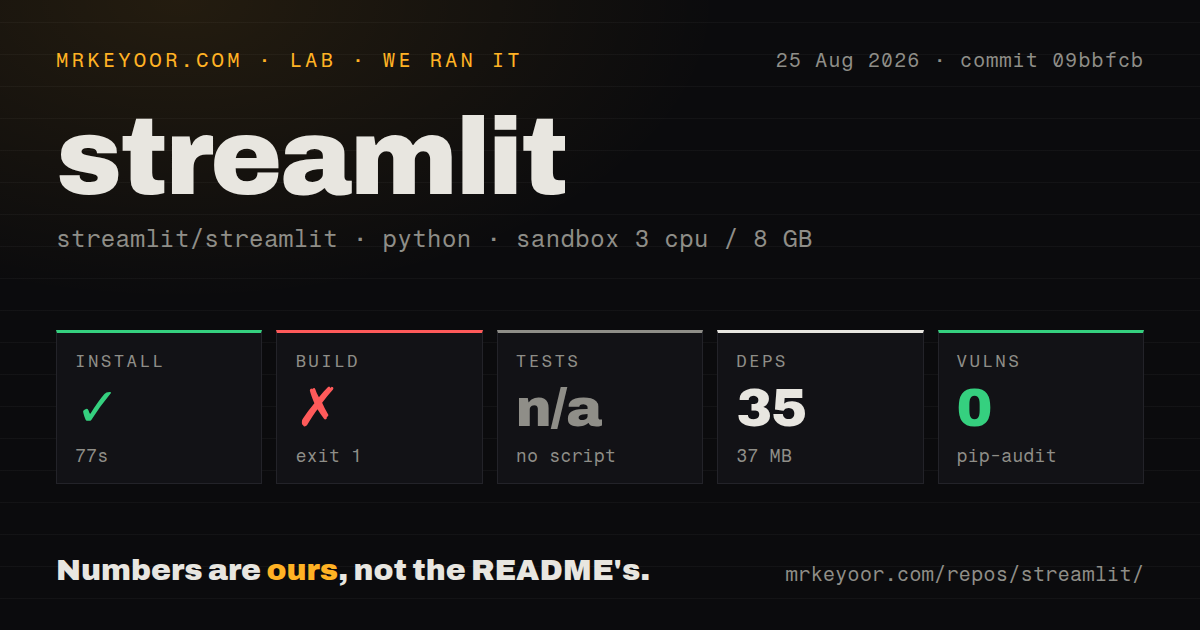
| Install | ✓ · 2.3s | 37 packages on disk · 344 MB |
| Import | ✓ | import streamlit in 0.97s · pure Python · py.typed · requires Python >=3.10 |
| Known vulns | 0 | (pip-audit) |
Answers from our run
Does streamlit install cleanly?
Yes. In a fresh container with an empty cache, pip install streamlit finished in 2 seconds, leaving 37 packages and 344 MB on disk. pip-audit reported no known vulnerabilities.
What does streamlit need to run?
Python >=3.10, and nothing compiled: it is pure Python. In our run import streamlit succeeded in 0.97s, and the package ships py.typed for type checkers.
streamlit or gradio: which should you use?
gradio: Choose it for model demos and media workflows built around Python functions and Hugging Face Spaces. Streamlit 1.62.0 installed 37 packages and used 344 MB in our sandbox, although the 2.3-second install and 0 audit findings were clean.
When should you not use streamlit?
High concurrency and consistently low interaction latency are product requirements. Every connected user has session state and many events execute Python again.
Use it if
- A Python data team needs an internal dashboard, exploratory interface, report, or model demo without maintaining a separate frontend.
- The first version needs file upload, tables, charts, forms, or chat components and can follow Streamlit's page model.
- The application tolerates reruns after widget events and expensive operations can be isolated with the correct cache decorator.
- You can deploy a dedicated Streamlit process behind a WebSocket-aware proxy or use Community Cloud for a GitHub-hosted demo.
- High concurrency and consistently low interaction latency are product requirements. Every connected user has session state and many events execute Python again.
- The UI must follow an exact design system, embed as ordinary components inside an existing frontend, or expose conventional application routes.
- A small container image is mandatory. Our installation pulled 37 packages and consumed 344 MB before application dependencies.
- You need to mount the app as normal WSGI or ASGI routes in an existing server. Streamlit owns its server process and WebSocket protocol.
- Outside contributors must be able to submit core feature fixes. The project README says pull requests from non-maintainers are currently paused.
Setup reality
We installed Streamlit 1.62.0 into a clean Python 3.12 Bookworm sandbox in 2.3 seconds. The environment ended with 37 packages and 344 MB on disk; Streamlit declares 35 direct dependencies. It is pure Python, requires Python 3.10 or later, and includes py.typed. import streamlit succeeded in 0.97 seconds. pip-audit found 0 known vulnerabilities. The footprint includes pandas, PyArrow, chart libraries, image support, the application server, and WebSocket handling.
Start applications with streamlit run instead of mounting them in a WSGI process. Each browser session keeps a WebSocket, so reverse proxies need upgrade headers and suitable idle timeouts. Settings come from .streamlit/config.toml, environment variables, or command flags. Put local secrets in .streamlit/secrets.toml and exclude it from Git. Review the bind address, CORS, XSRF protection, authentication, and upload size before exposing the server.
A widget change commonly executes the file again from its first line. Stable unique keys keep widgets and st.session_state connected across reruns. cache_data stores serializable results and gives callers copies; cache_resource can hand the same object to several sessions, so database clients and models must handle concurrent access. Forms group edits into 1 rerun, and fragments can refresh a smaller region. Hidden tab contents still execute, which surprises dashboards with expensive queries in every tab.
Version 1.62 removes st.cache, so classify cached values as data or shared resources before upgrading. st.pyplot now requires an explicit Figure, and savefig keyword arguments are deprecated. New browser validation for email, URL, phone, and search fields does not replace server checks. Production needs process supervision, memory limits, and a load balancer that understands WebSockets. More than 1 replica also needs session affinity and external storage for durable data.
Patterns
Turn a slider into a small app create-app
# app.py
import streamlit as st

x = st.slider('Select a value', 0, 100, 25)
st.write(x, 'squared is', x * x)

# streamlit run app.py
Moving the slider executes the script again. Guard or cache side effects that must not repeat after every widget event.
Cache a DataFrame for 1 hour cache-data
import pandas as pd
import streamlit as st

@st.cache_data(ttl=3600)
def load_data(url: str) -> pd.DataFrame:
    return pd.read_csv(url)

df = load_data(DATA_URL)
st.dataframe(df)
cache_data keys results from code and arguments and returns copies to callers. Streamlit 1.62 no longer includes st.cache.
Reuse one database client cache-resource
import streamlit as st

@st.cache_resource
def get_connection():
    return create_connection(st.secrets['DATABASE_URL'])

connection = get_connection()
Several sessions may receive the same resource object. Both the client and its use must be safe for concurrent access.
Retain a counter through reruns persist-session-state
import streamlit as st

if 'count' not in st.session_state:
    st.session_state.count = 0
if st.button('Increment'):
    st.session_state.count += 1
st.write('Count:', st.session_state.count)
Session state belongs to 1 connected browser session. It does not replace shared or durable database storage.
Submit a group of fields once batch-form-inputs
with st.form('signup'):
    name = st.text_input('Name')
    age = st.number_input('Age', min_value=0)
    submitted = st.form_submit_button('Save')

if submitted:
    save_user(name, age)
Form widgets wait for submission instead of rerunning on each edit. Validate the received values again before writing them.
Request an email input control validate-text-input
email = st.text_input(
    'Email',
    type='email',
    placeholder='name@example.com',
)
if email:
    st.write('Submitted:', email)
Version 1.62 adds email, URL, phone, and search input types in the browser. Server code must still validate the string.
Display an uploaded CSV upload-csv
import pandas as pd
import streamlit as st

upload = st.file_uploader('Choose a CSV', type=['csv'])
if upload is not None:
    frame = pd.read_csv(upload)
    st.dataframe(frame)
Check the None state and configure server.maxUploadSize. File extensions do not prove that the content is safe or cheap to parse.
Replay chat history and stream a reply build-chat
if 'messages' not in st.session_state:
    st.session_state.messages = []
for message in st.session_state.messages:
    with st.chat_message(message['role']):
        st.markdown(message['content'])
if prompt := st.chat_input('Message'):
    st.session_state.messages.append({'role': 'user', 'content': prompt})
    with st.chat_message('assistant'):
        answer = st.write_stream(generate_reply(prompt))
Every rerun must draw prior messages again. Append the finished assistant answer if it should remain in session history.
Register application pages in code navigate-pages
import streamlit as st

pages = st.navigation([
    st.Page('pages_src/home.py', title='Home'),
    st.Page('pages_src/report.py', title='Report'),
])
pages.run()
Initialize shared session values in the entry file before pages.run so every page sees the same setup.
Refresh one table every 10 seconds rerun-fragment
import streamlit as st

@st.fragment(run_every='10s')
def live_prices():
    st.dataframe(fetch_prices())

st.title('Dashboard')
live_prices()
A fragment reruns its own body instead of the whole file. Calls cached inside it still obey the cache decorator's TTL.
Render an explicit Matplotlib figure plot-explicit-figure
import matplotlib.pyplot as plt
import streamlit as st

fig, ax = plt.subplots()
ax.plot([1, 2, 3], [2, 4, 3])
st.pyplot(fig)
plt.close(fig)
Streamlit 1.62 removed implicit global-figure rendering. Pass fig and close it when reruns could otherwise accumulate figures.
Read a secret from Streamlit configuration load-secret
# .streamlit/secrets.toml
# API_TOKEN = 'replace-me'

import streamlit as st
token = st.secrets['API_TOKEN']
Exclude secrets.toml from Git and configure the same key in the hosting service. Fail clearly if API_TOKEN is missing.
Alternatives
| Package | Registry | Pick it when |
|---|---|---|
| gradio | PyPI | Choose it for model demos and media workflows built around Python functions and Hugging Face Spaces. |
| dash | PyPI | Choose it for analytics applications that benefit from explicit callbacks and more detailed layout control. |
| panel | PyPI | Choose it for notebook-oriented reactive applications spanning several Python plotting libraries. |
More data guides
numpy · pandas · fsspec · pyarrow · lxml · sqlalchemy · the whole shelf →
How this guide is made: grounded in the library's documentation, release notes, changelog, and issue history, on a fixed rubric — not a hands-on install of every release. The 50 most-downloaded entries are additionally install-verified in clean containers. Corrections: contact the desk.