soundfile review
SoundFile 0.14.0 crossed the native boundary successfully in Python 3.12: `import _soundfile` took 0.02 seconds. SoundFile turns audio files and seekable byte streams into NumPy arrays, or writes arrays back through libsndfile. It can inspect headers, slice by frame, and yield overlapping blocks. Resampling, capture, playback, and feature extraction sit outside its API. The loaded libsndfile build decides which containers and codecs work. Release 0.14.0 added function annotations and Windows ARM64 wheels, fixed a race during simultaneous file opens, and raised the minimum Python version to 3.10.
In our sandbox, SoundFile 0.14.0 installed in 0.5 seconds, used 63 MB across 5 packages, imported `_soundfile` in 0.02 seconds, and returned 0 pip-audit findings. It fits NumPy audio pipelines that can test their deployed libsndfile. Broader media ingestion belongs on an FFmpeg-backed path.
We installed it
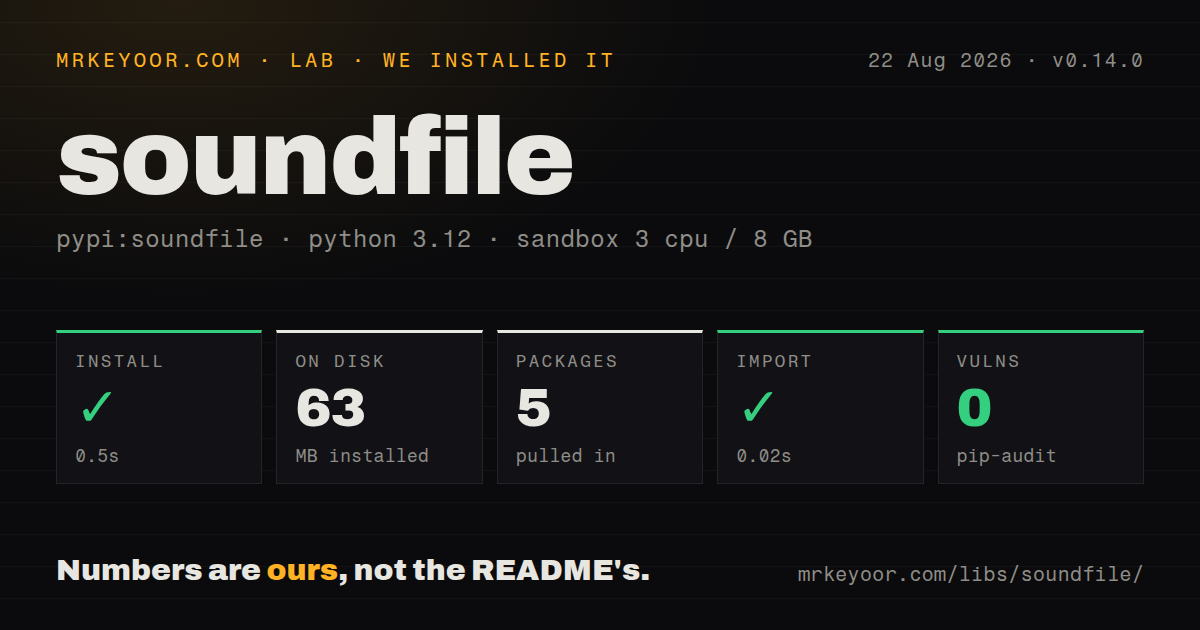
| Install | ✓ · 0.5s | 5 packages on disk · 63 MB |
| Import | ✓ | import _soundfile in 0.02s · compiled extensions · requires Python >=3.10 |
| Known vulns | 0 | (pip-audit) |
Answers from our run
Does soundfile install cleanly?
Yes. In a fresh container with an empty cache, pip install soundfile finished in 0.5s, leaving 5 packages and 63 MB on disk. pip-audit reported no known vulnerabilities.
What does soundfile need to run?
Python >=3.10, and a platform wheel with compiled extensions. In our run import _soundfile succeeded in 0.02s.
soundfile or scipy: which should you use?
scipy: SciPy 1.18.1 is the WAV-only pick when that package is already installed for the surrounding signal work. In our sandbox, SoundFile 0.14.0 installed in 0.5 seconds, used 63 MB across 5 packages, imported _soundfile in 0.02 seconds, and returned 0 pip-audit findings.
When should you not use soundfile?
Your runtime is pinned to Python 3.9 or earlier. Version 0.14.0 no longer supports those interpreters.
Use it if
- SoundFile 0.14.0 fits a NumPy pipeline that needs direct reads and writes for formats exposed by libsndfile, without an audio analysis layer.
- Large recordings should arrive in fixed or overlapping frame blocks rather than one decoded array.
- Audio may come from a path, file descriptor, `BytesIO`, or another seekable binary object.
- You can run a codec smoke test against the same wheel or libsndfile build used in production.
- Your runtime is pinned to Python 3.9 or earlier. Version 0.14.0 no longer supports those interpreters.
- Inputs include video containers or codecs outside the deployed libsndfile build. There is no FFmpeg fallback.
- You must install from source on a machine where the system libsndfile package cannot be added.
- Worker threads must share an open handle or write one destination together. The README says those patterns can produce garbage or crash.
- OGG output cannot be accepted without a deployment smoke test. The current README still warns that some libsndfile versions can create an empty file.
Setup reality
We installed SoundFile 0.14.0 in 0.5 seconds and ended with 5 packages taking 63 MB, including 3 direct dependencies. Our measurement setup was an unprivileged Python 3.12 Bookworm container with 3 CPUs, 8 GB of RAM, and no cache. The files included compiled .so code but no py.typed, although this release added annotations. import _soundfile worked in 0.02 seconds. Pip-audit found 0 known vulnerabilities. Python 3.10 is the minimum, and the wrapper uses the BSD 3-Clause license.
There are no credentials or config files. Wheels for common Windows, macOS, and Linux targets include libsndfile. Version 0.14.0 added Windows ARM64. A source install expects libsndfile on the host. Wheels prefer their packaged copy, so two machines running SoundFile 0.14.0 can expose different codecs if one built from source. Query __libsndfile_version__, available_formats(), and available_subtypes() when your application promises a particular format.
A plain read returns float64, and mono loses the channel axis unless always_2d=True. Choose float32, int32, or int16 explicitly when that shape and precision contract matters. The file subtype, rather than the NumPy dtype, sets stored precision on write. RAW input has no header. You must supply its sample rate, channel count, subtype, and byte order. A wrong description may still yield believable values.
Full-file reads allocate the decoded samples. blocks() keeps long jobs bounded, though its generator must be closed when a loop exits early. The 0.14.0 open-race fix applies to distinct handles. Sharing a reader or writer remains unsafe, as does concurrent writing to one file. Test OGG creation with the deployed libsndfile because the project still documents an empty-output failure on some versions.
Patterns
Read float32 audio without collapsing mono read-float32-array
import soundfile as sf

samples, hz = sf.read(
    'take.flac',
    dtype='float32',
    always_2d=True,
)
print(samples.shape, hz)
With `always_2d=True`, a mono file has shape `(frames, 1)`. The default read returns mono as a 1D array.
Save an array as 24-bit WAV write-pcm-wav
import soundfile as sf

sf.write(
    'mixdown.wav',
    samples,
    hz,
    format='WAV',
    subtype='PCM_24',
)
`sf.write()` truncates an existing path. `PCM_24` controls the file precision; the dtype of `samples` does not choose that subtype.
Inspect an upload before allocating audio inspect-file-header
import soundfile as sf

header = sf.info('incoming.wav')
print(
    header.frames,
    header.samplerate,
    header.channels,
    header.format,
    header.subtype,
)
`sf.info()` returns frame, rate, channel, format, and subtype metadata without producing the decoded NumPy array.
Pull ten seconds from the middle read-frame-range
import soundfile as sf

source = 'meeting.flac'
hz = sf.info(source).samplerate
excerpt, _ = sf.read(
    source,
    start=45 * hz,
    stop=55 * hz,
    dtype='float32',
    always_2d=True,
)
`start` and `stop` are frame offsets. One frame contains one sample per channel, so these bounds keep channels aligned.
Scan a recording in overlapping windows stream-overlapping-blocks
from contextlib import closing
import soundfile as sf

chunks = sf.blocks(
    'field-recording.wav',
    blocksize=8_192,
    overlap=2_048,
    dtype='float32',
    always_2d=True,
)
with closing(chunks) as stream:
    for window in stream:
        analyze(window)
Each 8,192-frame window repeats 2,048 frames from its neighbor. `closing()` releases the file even when `analyze()` stops iteration early.
Decode RAW only after describing its bytes read-raw-pcm
import soundfile as sf

samples, hz = sf.read(
    'device-capture.raw',
    format='RAW',
    samplerate=48_000,
    channels=2,
    subtype='PCM_16',
    endian='LITTLE',
    dtype='int16',
    always_2d=True,
)
RAW has no header for its 48 kHz rate, 2 channels, PCM subtype, or byte order. SoundFile cannot correct a wrong description.
Build a WAV response in memory write-bytesio
from io import BytesIO
import soundfile as sf

buffer = BytesIO()
sf.write(
    buffer,
    samples,
    hz,
    format='WAV',
    subtype='PCM_16',
)
buffer.seek(0)
body = buffer.read()
`BytesIO` supplies no filename extension, so `format='WAV'` is required. `seek(0)` moves past the write position before reading the response body.
Fail startup when a promised codec is absent check-native-codecs
import soundfile as sf

required = {
    ('FLAC', 'PCM_24'),
    ('MP3', 'MPEG_LAYER_III'),
}
missing = sorted(
    pair for pair in required if not sf.check_format(*pair)
)
if missing:
    raise RuntimeError(f'libsndfile {sf.__libsndfile_version__} lacks {missing}')
`check_format()` asks the loaded libsndfile directly. Wheel and source installs of SoundFile 0.14.0 may answer differently.
Log the libsndfile failure details handle-decode-error
import logging
import soundfile as sf

log = logging.getLogger('audio-import')
try:
    samples, hz = sf.read('candidate.dat')
except sf.LibsndfileError as exc:
    log.error(
        'decode rejected by libsndfile',
        extra={'sndfile_code': exc.code, 'sndfile_error': exc.error_string},
    )
    raise
`LibsndfileError.code` and `.error_string` preserve the native failure. Bad Python arguments use `ValueError` or `TypeError` instead.
Fill an existing NumPy buffer reuse-output-array
import numpy as np
import soundfile as sf

header = sf.info('stereo.wav')
out = np.empty((4_096, header.channels), dtype=np.float32)
valid, hz = sf.read('stereo.wav', out=out)
process(valid, hz)
Passing `out` makes its shape and dtype authoritative. SoundFile silently ignores separate `dtype` and `always_2d` arguments in this mode.
Request variable-rate MP3 output write-compressed-mp3
import soundfile as sf

if not sf.check_format('MP3', 'MPEG_LAYER_III'):
    raise RuntimeError('this libsndfile cannot encode MP3')

sf.write(
    'review-copy.mp3',
    samples,
    hz,
    format='MP3',
    subtype='MPEG_LAYER_III',
    compression_level=0.75,
    bitrate_mode='VARIABLE',
)
Compression is a float from 0.0 to 1.0; bitrate mode is `CONSTANT`, `AVERAGE`, or `VARIABLE`. The guard checks this host before writing.
Give each worker its own file handle read-in-worker-threads
from concurrent.futures import ThreadPoolExecutor
import soundfile as sf

def load_one(path):
    with sf.SoundFile(path, mode='r') as reader:
        return reader.read(dtype='float32', always_2d=True)

with ThreadPoolExecutor(max_workers=4) as workers:
    arrays = list(workers.map(load_one, audio_paths))
The 4 workers open 4 independent readers. The project permits that pattern and warns against sharing any reader or writer between threads.
Alternatives
| Package | Registry | Pick it when |
|---|---|---|
| scipy | PyPI | SciPy 1.18.1 is the WAV-only pick when that package is already installed for the surrounding signal work. |
| pydub | PyPI | Pick Pydub for slicing, fades, and format conversion when running an FFmpeg or libav subprocess is acceptable. |
| librosa | PyPI | Pick Librosa when decoding is followed by resampling or audio and music feature extraction. |
More utils guides
lru-cache · type-fest · ajv · zod · p-limit · find-up · the whole shelf →
How this guide is made: grounded in the library's documentation, release notes, changelog, and issue history, on a fixed rubric — not a hands-on install of every release. The 50 most-downloaded entries are additionally install-verified in clean containers. Corrections: contact the desk.