sortablejs review
SortableJS 1.15.7 attaches to a DOM container and lets pointer or touch users reorder its children, move them across named groups, or clone them into another list. It supplies drag handles, animated movement, auto-scroll, filtering, swap rules, and optional MultiDrag behavior. The current release fixes a possible browser freeze and an input-state bug triggered when a different sortable is destroyed. SortableJS moves elements during the gesture; your code must update the real array, save the order, and provide keyboard access.
SortableJS 1.15.7 installed in 0.8 seconds with no dependencies or audit findings, but our browser import still cost 15.2 KB gzipped and included no TypeScript declarations. Use it for proven pointer and touch list movement; do not install it expecting state synchronization, persistence, or accessible keyboard sorting to arrive with the package.
We installed it
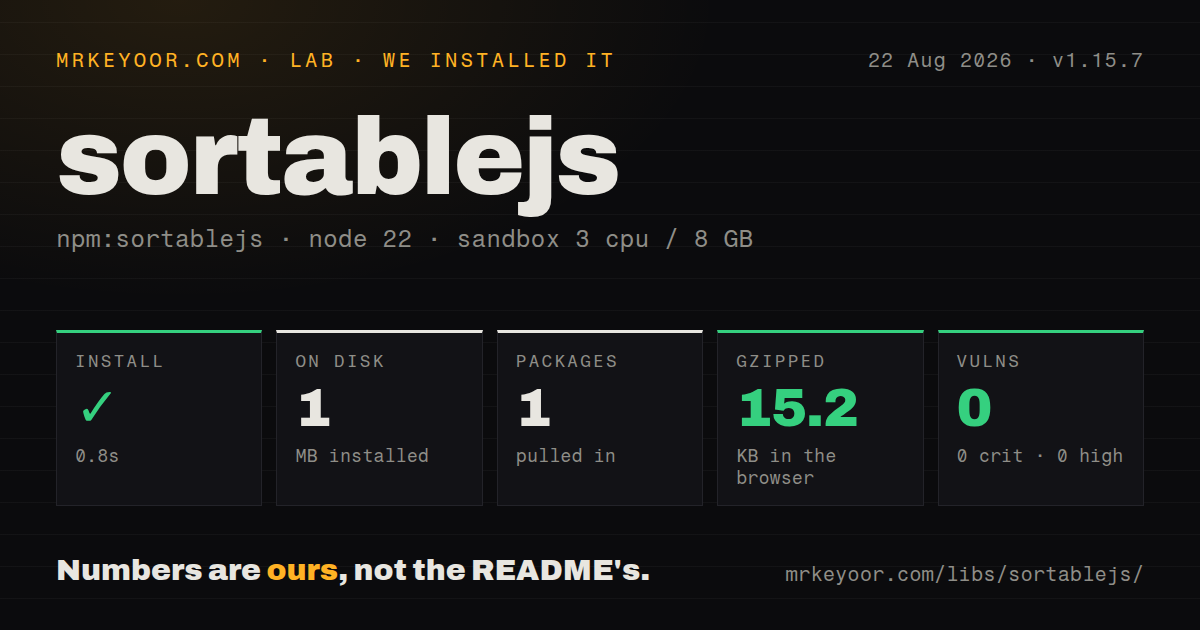
| Install | ✓ · 0.8s | 1 package on disk · 1 MB |
| Import | ✓ | ESM import works · require() works · CommonJS package |
| Browser | 15.2 KB | gzipped (45.4 KB minified), bundled with esbuild |
| Types | — | no TypeScript types found |
| Known vulns | 0 | 0 critical · 0 high · 0 moderate · 0 low (npm audit) |
Answers from our run
Does sortablejs install cleanly?
Yes. In a fresh container with an empty cache, npm install sortablejs finished in 0.8s, leaving 1 package and 1 MB on disk. npm audit reported no known vulnerabilities.
How much does sortablejs add to a browser bundle?
15.2 KB gzipped (45.4 KB minified) when the whole package is bundled for the browser with esbuild. Importing only part of it is usually smaller.
Does sortablejs work with both ESM and CommonJS?
Yes. Both import 'sortablejs' and require('sortablejs') worked in Node 22 in our run. The package is published as CommonJS.
Does sortablejs include TypeScript types?
No type declarations were found in our install, so TypeScript users need their own declarations.
sortablejs or @dnd-kit/core: which should you use?
@dnd-kit/core: Choose it in React when custom sensors and keyboard interaction need to be designed around application state. SortableJS 1.15.7 installed in 0.8 seconds with no dependencies or audit findings, but our browser import still cost 15.2 KB gzipped and included no TypeScript declarations.
When should you not use sortablejs?
Keyboard sorting and screen-reader announcements must work out of the box: the README documents drag and touch controls but no keyboard or ARIA interaction model
Use it if
- A plain JavaScript page needs pointer and touch reordering without a framework dependency
- Cards must move or clone between columns with explicit `pull` and `put` rules
- The interaction needs drag handles, auto-scroll, empty-list drops, or MultiDrag selection
- An existing frontend already uses SortableJS wrappers and depends on its 1.x event payloads
- Keyboard sorting and screen-reader announcements must work out of the box: the README documents drag and touch controls but no keyboard or ARIA interaction model
- React or Vue state must be the sole owner of order: the core library mutates DOM children, so state reconciliation or a framework wrapper is required
- Bundled TypeScript declarations are mandatory: 1.15.7 contains none and points TypeScript users to `@types/sortablejs`
- A 15.2 KB gzipped browser cost is too much for one reorderable list: our complete package import measured 45.4 KB minified
- You need a small, quickly triaged issue surface: GitHub currently reports 524 open issues and pull requests across a mature browser interaction library
Setup reality
In our sandbox, sortablejs 1.15.7 installed in 0.8 seconds and left one package taking 1 MB. It has 0 direct dependencies, 0 peer dependencies, and 0 known audit vulnerabilities. The package is CommonJS without an exports map; both require() and ESM import worked in our tests. No TypeScript declarations were present. Our browser import measured 45.4 KB minified and 15.2 KB gzipped.
Entry-point choice changes the plugin set. The default import includes AutoScroll and OnSpill. The core ESM file omits default plugins, while the complete ESM file includes MultiDrag and Swap too. A cherry-picked plugin must be passed to Sortable.mount() once before instances use it. TypeScript projects need the separate @types/sortablejs package, whose release timing is independent of 1.15.7.
During a drag, SortableJS rearranges actual DOM nodes. In a state-driven view, copy oldIndex and newIndex into the array after onEnd, or use the framework adapter named by the project. Mixed draggable and fixed children require oldDraggableIndex and newDraggableIndex. Persistence is also yours: toArray() reads data-id values, and the optional store hook only calls your get and set functions.
Touch tuning needs device tests. A handle keeps row text and controls usable, delayOnTouchOnly reduces accidental presses, and touchStartThreshold cancels a delayed drag after pointer movement. Empty columns still need visible height or padding so there is a target box. Call destroy() when the view unmounts. Version 1.15.7 specifically fixes a freeze path and prevents inputs from being re-checked when another sortable instance is destroyed.
Patterns
Make one list draggable create-sortable-list
import Sortable from 'sortablejs'

const list = document.querySelector('#tasks')
const sortable = Sortable.create(list, {
  animation: 150,
  ghostClass: 'is-dragging',
})
This changes child-node order during the gesture; it does not reorder an application array or save anything.
Apply a completed move to an array sync-data-order
Sortable.create(list, {
  onEnd({ oldIndex, newIndex }) {
    if (oldIndex == null || newIndex == null || oldIndex === newIndex) return
    const [task] = tasks.splice(oldIndex, 1)
    tasks.splice(newIndex, 0, task)
    saveTasks(tasks)
  },
})
Use `oldDraggableIndex` and `newDraggableIndex` when the container also has children excluded by `draggable`.
Restrict dragging to a handle add-drag-handle
Sortable.create(list, {
  draggable: '.task-row',
  handle: '.task-row__handle',
  animation: 150,
})
A handle leaves text, links, and form controls elsewhere in the row available for their normal pointer behavior.
Move cards between board columns connect-columns
for (const column of document.querySelectorAll('[data-column]')) {
  Sortable.create(column, {
    group: 'board-cards',
    animation: 150,
    onAdd(event) {
      saveMove(event.item.dataset.id, event.to.dataset.column, event.newIndex)
    },
  })
}
The source and destination need the same group name. `onAdd` fires on the receiving instance.
Copy items out of a palette clone-palette-item
Sortable.create(palette, {
  group: { name: 'blocks', pull: 'clone', put: false },
  sort: false,
})

Sortable.create(canvas, {
  group: { name: 'blocks', pull: true, put: true },
})
The DOM clone keeps copied attributes. Assign a fresh application ID in `onAdd` before persisting it.
Persist IDs with the store hook save-local-order
Sortable.create(list, {
  group: 'task-order',
  dataIdAttr: 'data-id',
  store: {
    get(sortable) {
      return JSON.parse(localStorage.getItem(sortable.options.group.name) || '[]')
    },
    set(sortable) {
      localStorage.setItem(sortable.options.group.name, JSON.stringify(sortable.toArray()))
    },
  },
})
`get` runs at initialization and `set` runs after a completed sort. Each draggable child needs a unique `data-id`.
Apply a saved list of IDs restore-server-order
const sortable = Sortable.create(list, { dataIdAttr: 'data-id' })
const order = await fetch('/api/task-order').then((response) => response.json())
sortable.sort(order, true)
`sort` only rearranges elements already in the DOM whose `data-id` matches a supplied string.
Keep buttons and inputs out of drag starts preserve-row-controls
Sortable.create(list, {
  filter: 'button, a, input, textarea, [data-no-drag]',
  preventOnFilter: false,
  onFilter(event) {
    if (event.target.matches('[data-delete]')) deleteTask(event.item.dataset.id)
  },
})
`preventOnFilter` defaults to true, which can suppress the click or focus behavior a filtered control needs.
Block insertion beside locked rows reject-invalid-drop
Sortable.create(list, {
  onMove(event) {
    if (event.related.matches('[data-locked]')) return false
    return event.willInsertAfter ? 1 : -1
  },
})
Return `false` to cancel, `-1` to force before, or `1` to force after; no return keeps SortableJS's decision.
Delay drag on touch screens tune-touch-start
Sortable.create(list, {
  delay: 180,
  delayOnTouchOnly: true,
  touchStartThreshold: 4,
  fallbackTolerance: 4,
})
The README suggests a touch threshold between 3 and 5. Test physical devices because native and fallback drag paths differ.
Enable multi-item selection mount-multidrag
import Sortable, { MultiDrag } from 'sortablejs'

Sortable.mount(new MultiDrag())
Sortable.create(list, {
  multiDrag: true,
  selectedClass: 'is-selected',
  multiDragKey: 'CTRL',
})
Mount `MultiDrag` once before constructing lists. It is included by the complete build, but not by the default plugin set.
Disable and clean up an instance destroy-instance
const sortable = Sortable.create(list)

sortable.option('disabled', true)
sortable.option('disabled', false)

// component teardown
sortable.destroy()
Disabling keeps the instance available. `destroy()` removes its behavior and should run when the owning view unmounts.
Alternatives
| Package | Registry | Pick it when |
|---|---|---|
| @dnd-kit/core | npm | Choose it in React when custom sensors and keyboard interaction need to be designed around application state. |
| dragula | npm | Choose it for a smaller container-to-container API with fewer sorting and plugin controls. |
| @shopify/draggable | npm | Choose it when separate draggable, droppable, sortable, and swappable modules suit the interaction. |
More web frontend guides
postcss · react · react-dom · tailwindcss · clsx · htmlparser2 · the whole shelf →
How this guide is made: grounded in the library's documentation, release notes, changelog, and issue history, on a fixed rubric — not a hands-on install of every release. The 50 most-downloaded entries are additionally install-verified in clean containers. Corrections: contact the desk.