smol-toml review
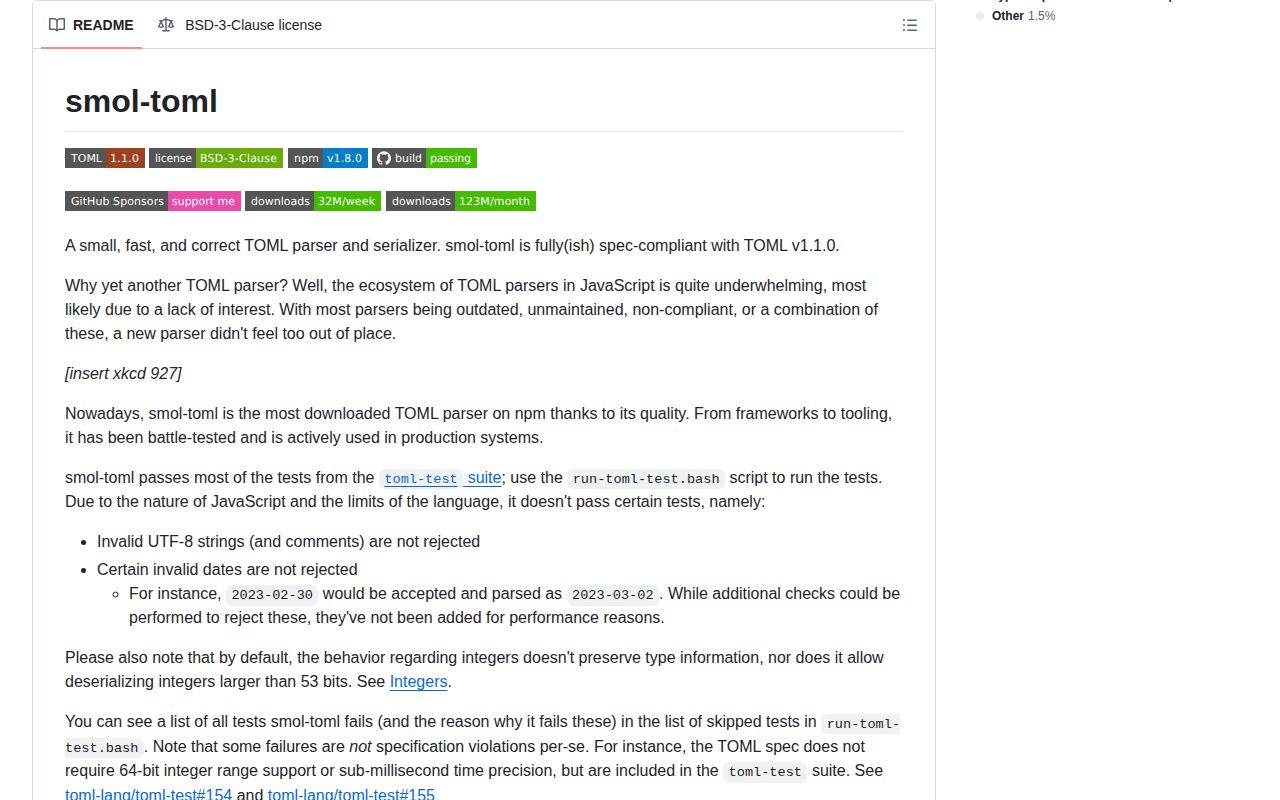
Our smol-toml 1.8.0 install left one 1 MB package and produced a 5.3 KB gzipped browser bundle. It turns TOML 1.1 text into JavaScript objects and writes objects back through parse() and stringify(). TomlError exposes a source location, while TomlDate preserves the difference among offset date-times, local date-times, dates, and times that a plain Date blurs. Version 1.8.0 adds stringify support for Temporal objects. The README also lists its conformance gaps: invalid UTF-8 cannot be detected after bytes become a JavaScript string, and impossible dates such as February 30 normalize instead of raising. It reconstructs whole documents, so comments and application-level schema rules sit outside its scope.
smol-toml 1.8.0 installed in 0.6 seconds, used 1 MB, passed npm audit, and bundled to 5.3 KB gzipped in our sandbox, so it is an easy fit for program-owned TOML in Node or the browser. Choose a patch-oriented parser for human-edited files, and reject or prevalidate dates when calendar correctness is mandatory.
We installed it
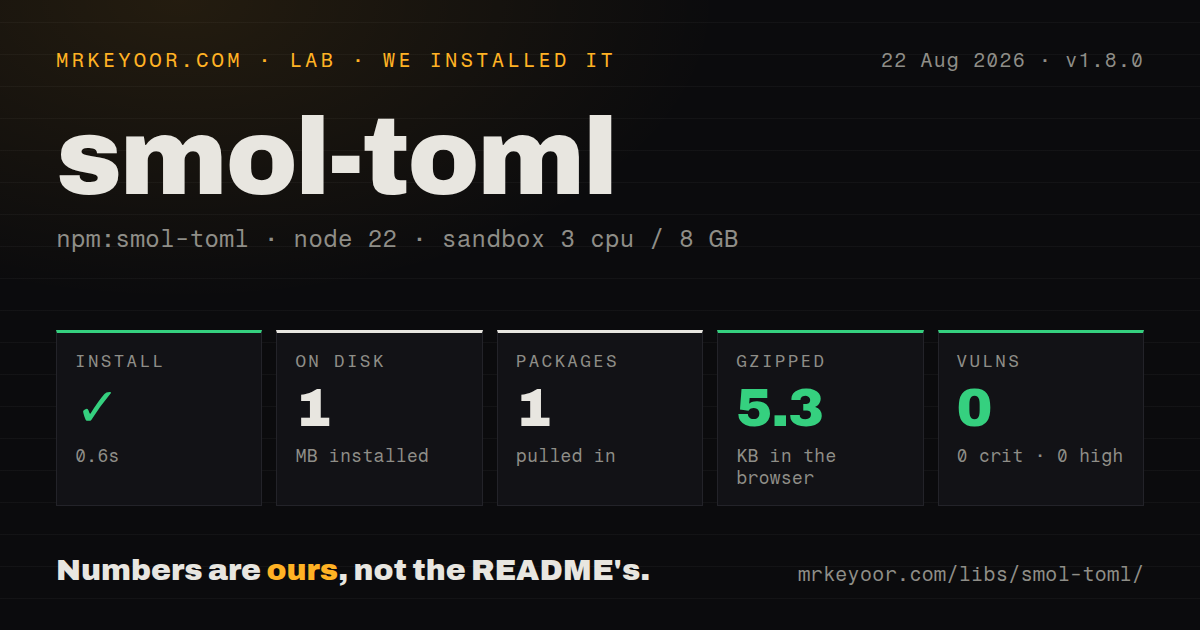
| Install | ✓ · 0.6s | 1 package on disk · 1 MB |
| Import | ✓ | ESM import works · require() works · ESM package with exports map |
| Browser | 5.3 KB | gzipped (13.5 KB minified), bundled with esbuild |
| Types | ✓ | TypeScript types bundled |
| Known vulns | 0 | 0 critical · 0 high · 0 moderate · 0 low (npm audit) |
Answers from our run
Does smol-toml install cleanly?
Yes. In a fresh container with an empty cache, npm install smol-toml finished in 0.6s, leaving 1 package and 1 MB on disk. npm audit reported no known vulnerabilities.
How much does smol-toml add to a browser bundle?
5.3 KB gzipped (13.5 KB minified) when the whole package is bundled for the browser with esbuild. Importing only part of it is usually smaller.
Does smol-toml work with both ESM and CommonJS?
Yes. Both import 'smol-toml' and require('smol-toml') worked in Node 22 in our run. The package is published as ESM with an exports map.
Does smol-toml include TypeScript types?
Yes, type declarations ship inside the package, so no @types install is needed.
smol-toml or @ltd/j-toml: which should you use?
@ltd/j-toml: Use it when selectable TOML-version modes and stricter conformance controls matter. smol-toml 1.8.0 installed in 0.6 seconds, used 1 MB, passed npm audit, and bundled to 5.3 KB gzipped in our sandbox, so it is an easy fit for program-owned TOML in Node or the browser.
When should you not use smol-toml?
Calendar validation must reject impossible values; the README says 2023-02-30 is accepted and normalized to March 2
Use it if
- A Node or browser project needs TOML 1.1 parsing and generation without runtime dependencies
- Syntax failures should expose a line, column, and nearby source through TomlError
- Large TOML integers need an explicit Number, BigInt, or mixed representation policy
- Local dates and times must remain distinguishable through TomlDate or Temporal values
- Calendar validation must reject impossible values; the README says `2023-02-30` is accepted and normalized to March 2
- The parser receives raw bytes and must reject invalid UTF-8 in strings or comments; JavaScript strings have already lost that byte-level evidence
- A tool edits human-owned TOML and must retain comments, whitespace, and ordering; stringify creates a new document from values
- Files may contain integers beyond JavaScript's 53-bit safe range while consumers reject BigInt; the default Number path cannot represent those values exactly
- Another component accepts TOML 1.0 only; smol-toml targets TOML 1.1 syntax, including multiline inline tables and optional seconds
Setup reality
We installed smol-toml 1.8.0 in 0.6 seconds in a clean Node 22 Bookworm container. It left 1 package and 1 MB on disk. npm audit reported zero findings across all severities. The package has 0 direct dependencies, 0 peer dependencies, 148 KB unpacked, bundled TypeScript declarations, a BSD-3-Clause license, and a Node 18 minimum. Both require() and ESM import worked.
No credentials, native compilation, or configuration file are involved. The package declares ESM and supplies an exports map with working import and require targets. parse() expects decoded text, so pass utf8 to readFile rather than handing it a Buffer. It returns objects without checking required keys or application types; add a schema validator after parsing. Our browser build was 13.5 KB minified and 5.3 KB gzipped.
Integer policy belongs at the file boundary. The default uses Number and cannot preserve integers beyond 53 safe bits. integersAsBigInt: true makes every integer a BigInt, while asNeeded produces a Number-or-BigInt union. Either choice reaches arithmetic, validators, and JSON output. numbersAsFloat: true lets stringify emit Number values as TOML floats and reserve integer syntax for BigInt values.
stringify() reconstructs the document, removing comments and original spacing. It omits null or undefined object properties but rejects those values inside arrays. A native Date becomes an offset date-time. TomlDate selects a local form, and version 1.8.0 accepts Temporal objects for output. Temporal.ZonedDateTime retains the observed offset but loses a name such as Europe/Paris because TOML has no named-zone field.
Patterns
Parse a TOML string parse-toml
import { parse } from 'smol-toml'

const config = parse('title = "Docs"\n[server]\nport = 8080')
console.log(config.server.port)
parse() checks TOML syntax but does not enforce your application's required keys or value types.
Decode a file before parsing read-toml-file
import { readFile } from 'node:fs/promises'
import { parse } from 'smol-toml'

const source = await readFile('app.toml', 'utf8')
const config = parse(source)
The parser accepts a string, not a Buffer. Decoding first also means invalid UTF-8 bytes cannot be rejected by smol-toml.
Generate TOML from an object stringify-config
import { stringify } from 'smol-toml'

const source = stringify({
  title: 'Docs',
  server: { port: 8080, hosts: ['a.example', 'b.example'] },
})
stringify() chooses fresh formatting and has no access to comments from a document that was parsed earlier.
Use the CommonJS export load-commonjs
const { parse, stringify } = require('smol-toml')

const value = parse(source)
const output = stringify(value)
The package is declared as ESM, but its exports map provides a separate require target that worked in our Node 22 check.
Return every integer as BigInt parse-bigint-integers
const config = parse('small = 4\nlarge = 9007199254740993', {
  integersAsBigInt: true,
})

console.log(config.small, config.large)
Both values are BigInt. JSON.stringify throws on them unless the application supplies a replacer or converts them first.
Use BigInt only past the safe range parse-bigint-as-needed
const config = parse('small = 4\nlarge = 9007199254740993', {
  integersAsBigInt: 'asNeeded',
})
The returned integer type is number or bigint, so TypeScript code must narrow it before arithmetic.
Separate float and integer output preserve-number-kind
const parsed = parse(source, { integersAsBigInt: true })
const output = stringify(parsed, { numbersAsFloat: true })
With these paired options, BigInt values use TOML integer syntax and Number values use float syntax, including values such as 1.0.
Report a TOML syntax error show-parse-location
import { parse, TomlError } from 'smol-toml'

try {
  parse(source)
} catch (error) {
  if (error instanceof TomlError) {
    console.error(`app.toml:${error.line}:${error.column}`)
    console.error(error.codeblock)
  }
  throw error
}
TomlError.codeblock already includes a source excerpt and caret, so printing another formatted copy duplicates the same context.
Distinguish TOML temporal forms inspect-date-kind
const { created, day, alarm } = parse(
  'created = 2026-08-26T10:30:00Z\nday = 2026-08-26\nalarm = 10:30:00',
)

console.log(created.isDateTime(), created.isLocal())
console.log(day.isDate(), alarm.isTime())
TomlDate keeps flags for offset date-time, local date-time, local date, and local time even though it extends JavaScript Date.
Emit a calendar date without time write-local-date
import { TomlDate, stringify } from 'smol-toml'

const value = new Date('2026-08-26T10:30:00Z')
const day = TomlDate.wrapAsLocalDate(value)
const source = stringify({ day })
A plain Date becomes an offset date-time. wrapAsLocalDate selects the TOML local-date form and removes the time component.
Write a Temporal local date-time stringify-temporal
import { stringify } from 'smol-toml'

const meeting = Temporal.PlainDateTime.from('2026-08-26T10:30:00')
const source = stringify({ meeting })
Temporal serialization requires smol-toml 1.8.0 and a runtime or polyfill that supplies Temporal; parsing still returns TomlDate objects.
Clean values before serialization remove-null-values
const clean = Object.fromEntries(
  Object.entries(config).filter(([, value]) => value != null),
)

const source = stringify(clean)
Object properties set to null or undefined are omitted automatically, while either value inside an array makes stringify() throw.
Alternatives
| Package | Registry | Pick it when |
|---|---|---|
| @ltd/j-toml | npm | Use it when selectable TOML-version modes and stricter conformance controls matter |
| @iarna/toml | npm | Use it to preserve behavior in an established project already written around that parser |
| @decimalturn/toml-patch | npm | Use it when changing values must retain comments, whitespace, ordering, and document shape |
| toml | npm | Use it when a parse-only API is enough and existing code already depends on its grammar behavior |
More utils guides
lru-cache · type-fest · ajv · zod · p-limit · find-up · the whole shelf →
How this guide is made: grounded in the library's documentation, release notes, changelog, and issue history, on a fixed rubric — not a hands-on install of every release. The 50 most-downloaded entries are additionally install-verified in clean containers. Corrections: contact the desk.