sass review
The npm `sass` package is Dart Sass compiled to JavaScript, with a `sass` command and a modern host API for turning SCSS or indented Sass into CSS. The language supplies modules, variables, mixins, functions, loops, maps, selectors, and compile-time color or unit calculations. Build tools call `compile()` or `compileString()` and can supply importers, custom functions, loggers, load paths, source-map settings, and deprecation policy. Version 1.103.1 has no user-visible change. Version 1.103.0 immediately before it changed CSS Color conversion so analogous missing channels remain `none` instead of becoming zero, which the release notes mark as a potentially breaking compatibility fix.
Sass 1.103.1 installed in 3.8 seconds with 12 packages, 9 MB on disk, and 0 audit findings, while our complete browser import reached 684.7 KB gzipped. Keep it in the build pipeline for real Sass sources; new CSS and performance-sensitive compilers should first test native CSS and `sass-embedded`.
We installed it
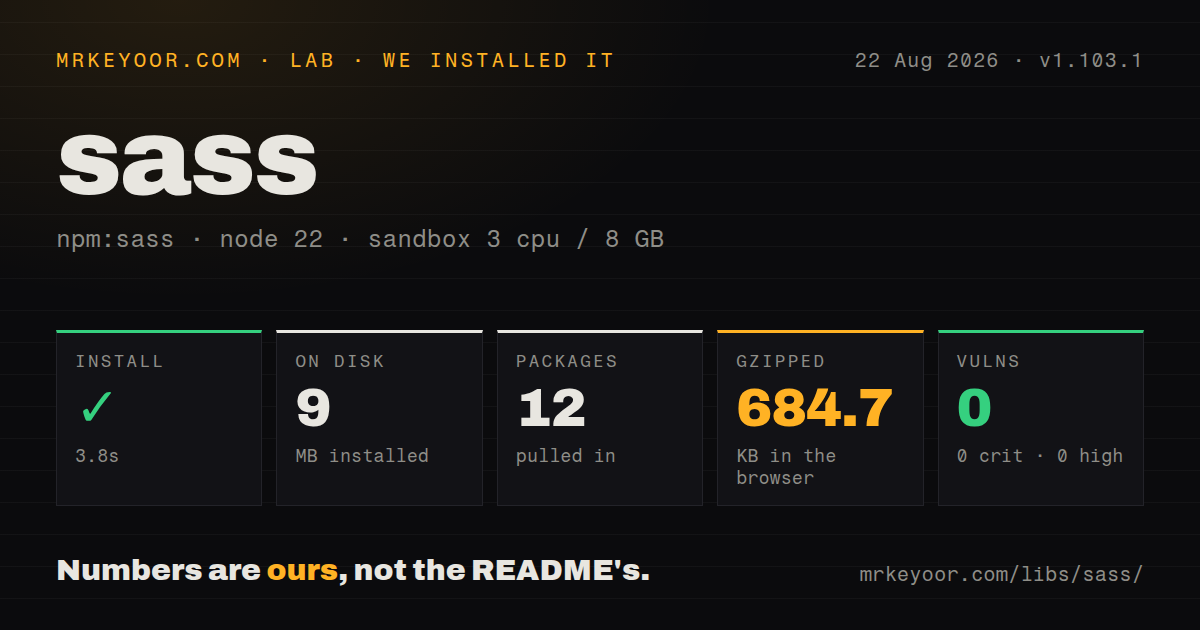
| Install | ✓ · 3.8s | 12 packages on disk · 9 MB |
| Import | ✓ | ESM import works · require() works · CommonJS package with exports map |
| Browser | 684.7 KB | gzipped (3246.2 KB minified), bundled with esbuild |
| Types | ✓ | TypeScript types bundled |
| Known vulns | 0 | 0 critical · 0 high · 0 moderate · 0 low (npm audit) |
Answers from our run
Does sass install cleanly?
Yes. In a fresh container with an empty cache, npm install sass finished in 4 seconds, leaving 12 packages and 9 MB on disk. npm audit reported no known vulnerabilities.
How much does sass add to a browser bundle?
684.7 KB gzipped (3246.2 KB minified) when the whole package is bundled for the browser with esbuild. Importing only part of it is usually smaller.
Does sass work with both ESM and CommonJS?
Yes. Both import 'sass' and require('sass') worked in Node 22 in our run. The package is published as CommonJS with an exports map.
Does sass include TypeScript types?
Yes, type declarations ship inside the package, so no @types install is needed.
sass or sass-embedded: which should you use?
sass-embedded: Choose it for Sass syntax and the modern host API backed by the native Dart compiler process. Sass 1.103.1 installed in 3.8 seconds with 12 packages, 9 MB on disk, and 0 audit findings, while our complete browser import reached 684.7 KB gzipped.
When should you not use sass?
A new stylesheet only needs browser-supported nesting, custom properties, layers, container queries, and current CSS color functions. Start with native CSS before adding another language.
Use it if
- The repository already owns `.scss` or indented `.sass` sources and needs the reference implementation of the current language.
- A component library exposes Sass variables, mixins, functions, or module configuration as its supported theming contract.
- Stylesheets generate selectors or calculated declarations from maps and loops that native CSS cannot express at authoring time.
- A build integration needs a custom importer, typed Sass values, or compiler deprecation controls through the modern JavaScript API.
- A new stylesheet only needs browser-supported nesting, custom properties, layers, container queries, and current CSS color functions. Start with native CSS before adding another language.
- Compilation time is already the bottleneck. `sass-embedded` exposes the modern API while running the native Dart executable and is the package the Sass README points to for faster builds.
- The codebase cannot migrate away from deprecated `@import`, global built-ins, `render()`, or `renderSync()` before Sass 2.0 removes the legacy paths.
- Client-side compilation would put our measured 3,246.2 KB minified and 684.7 KB gzipped import into an application; browser mode also lacks filesystem `compile()`.
- Your runtime is older than Node 20.19.0. Sass 1.103.1 declares that minimum in its npm metadata.
Setup reality
We installed sass 1.103.1 in a fresh Node 22 Bookworm sandbox in 3.8 seconds. The install left 12 packages and 9 MB on disk, and npm audit reported 0 known vulnerabilities. Sass declares 3 direct dependencies and 0 peers, with 5,916 KB unpacked and an MIT license. It is a CommonJS package behind an exports map, includes TypeScript declarations, and worked through both require() and ESM import in our checks.
Install it as a development dependency and call the modern compile, compileString, compileAsync, or compileStringAsync functions. The older render and renderSync interface is deprecated for removal in 2.0. The project README says compileAsync() is substantially slower than compile() in this JavaScript implementation. Use an asynchronous call when an importer or custom function genuinely waits for outside work, rather than by habit.
Sass modules load with @use and re-export with @forward. A @use belongs before ordinary style rules, runs a module once, and keeps members under a namespace. A with (...) clause can set only !default variables and must appear on the module's first load. The official migrator can rewrite old @import syntax, but it cannot choose the intended public boundary for globals that leaked between partials. Compare generated CSS after migration.
Our complete browser import measured 3,246.2 KB minified and 684.7 KB gzipped. Browser code can call compileString() with custom importers, has no filesystem compile(), and needs name preservation in esbuild. In Node, test sass-embedded when repeated compilation is slow. The JS result returns CSS and source-map data; your integration writes the files and map reference. Use deprecation IDs to silence known migration noise temporarily, then make the same ID fatal once fixed.
Patterns
Compile one file or a directory compile-from-cli
npx sass src/app.scss dist/app.css
npx sass src/:dist/ --style=compressed
npx sass --watch src/:dist/ --source-map
Directory mode skips Sass partials whose filename starts with `_`; watch mode recompiles entry points when loaded dependencies change.
Compile a file with the modern API compile-file-in-node
import * as sass from 'sass';

const result = sass.compile('src/app.scss', {
  loadPaths: ['src/styles'],
  style: 'compressed',
  sourceMap: true,
});
console.log(result.css, result.loadedUrls);
The returned source map is a data object. Sass 1.103.1 does not write the map or its CSS reference for your integration.
Compile generated SCSS compile-scss-string
const result = sass.compileString(
  '$gap: 12px; .grid { gap: $gap; }',
  { url: new URL('file:///workspace/generated.scss') },
);
console.log(result.css);
A canonical source URL makes relative loads and compiler diagnostics resolve from a known location.
Load Sass members under a namespace use-namespaced-module
// _tokens.scss
$brand: #0869b8;

// app.scss
@use 'tokens';
@use 'sass:color';

.button {
  background: tokens.$brand;
  border-color: color.scale(tokens.$brand, $lightness: -20%);
}
`@use` loads a module once and keeps members namespaced; place it before ordinary selectors in the stylesheet.
Set a theme's declared defaults configure-module-defaults
// _theme.scss
$radius: 4px !default;
$accent: navy !default;

// app.scss
@use 'theme' with (
  $radius: 8px,
  $accent: maroon,
);
Only variables marked `!default` can be configured, and the configuring `@use` must be the first load of that module.
Publish selected module members forward-module-api
// components/_index.scss
@forward 'button';
@forward 'card' hide $internal-gap;
@forward 'grid' as grid-*;

// app.scss
@use 'components';
`@forward` exposes members to downstream users; `hide`, `show`, and prefixes define the package's public Sass names.
Resolve a package through its exports load-node-package
const result = sass.compile('src/app.scss', {
  importers: [new sass.NodePackageImporter()],
});

// app.scss
// @use 'pkg:some-design-system';
NodePackageImporter reads package export metadata instead of depending on relative paths inside `node_modules`.
Serve an in-memory Sass module provide-virtual-importer
const importer = {
  canonicalize(url) {
    return url === 'theme:tokens' ? new URL('theme:tokens') : null;
  },
  load(url) {
    return url.href === 'theme:tokens'
      ? { contents: '$accent: #0869b8;', syntax: 'scss' }
      : null;
  },
};

sass.compileString("@use 'theme:tokens';", { importers: [importer] });
Return a stable canonical URL so Sass identifies repeated requests as 1 module; `load()` must state the source syntax.
Return a typed Sass value define-custom-function
const result = sass.compileString('.build::after { content: build-id(); }', {
  functions: {
    'build-id()': () => new sass.SassString(process.env.BUILD_ID ?? 'local'),
  },
});
Custom functions exchange Sass value objects, not plain JavaScript strings; keep environment-dependent output out of reproducible builds unless intended.
Route warnings through a logger capture-compiler-warnings
const warnings = [];
const result = sass.compile('src/app.scss', {
  logger: {
    warn(message, options) { warnings.push({ message, deprecation: options.deprecation }); },
    debug() {},
  },
});
A custom logger replaces normal warning output; preserve deprecation information so the build does not hide migration work.
Silence then forbid a deprecation enforce-deprecation-policy
npx sass --silence-deprecation=import,global-builtin src/:dist/
npx sass --fatal-deprecation=import src/:dist/
Silencing buys migration time. Once old imports are removed, making that ID fatal prevents new uses from entering the codebase.
Rewrite modules and slash division run-official-migrator
npx sass-migrator module --migrate-deps src/app.scss
npx sass-migrator division --migrate-deps 'src/**/*.scss'
Run the migrator on a reviewable branch and compare the compiled CSS; automatic edits cannot infer every intended global or module boundary.
Alternatives
| Package | Registry | Pick it when |
|---|---|---|
| sass-embedded | npm | Choose it for Sass syntax and the modern host API backed by the native Dart compiler process. |
| postcss | npm | Choose it when selected CSS transformations should come from an explicit plugin pipeline rather than Sass syntax. |
| less | npm | Choose it when an existing Less theme or codebase already fixes the preprocessor language. |
More web frontend guides
postcss · react · react-dom · tailwindcss · clsx · htmlparser2 · the whole shelf →
How this guide is made: grounded in the library's documentation, release notes, changelog, and issue history, on a fixed rubric — not a hands-on install of every release. The 50 most-downloaded entries are additionally install-verified in clean containers. Corrections: contact the desk.