robots-parser review
robots-parser 3.0.1 converts one robots.txt string into synchronous URL decisions. You give it the policy URL and text, then query `isAllowed`, the matching source line, crawl delay, sitemap declarations, or preferred host for a crawler token. Its wildcard, `$` anchor, and longest-match handling cover the parsing job, while network retrieval and crawler conduct stay outside the package. The current npm release fixed HTTPS default-port comparison so `https://example.com` and an explicit `:443` policy share a scope; newer README methods on the repository are not necessarily in 3.0.1.
robots-parser 3.0.1 installed in 0.7 seconds with 0 dependencies and produced a 3.5 KB minified browser bundle, making it a cheap parser inside an existing crawler. Do not install it as the crawler's policy layer, and avoid `isDisallowed` for untrusted URL scope because 3.0.1 converts `undefined` into `true`.
We installed it
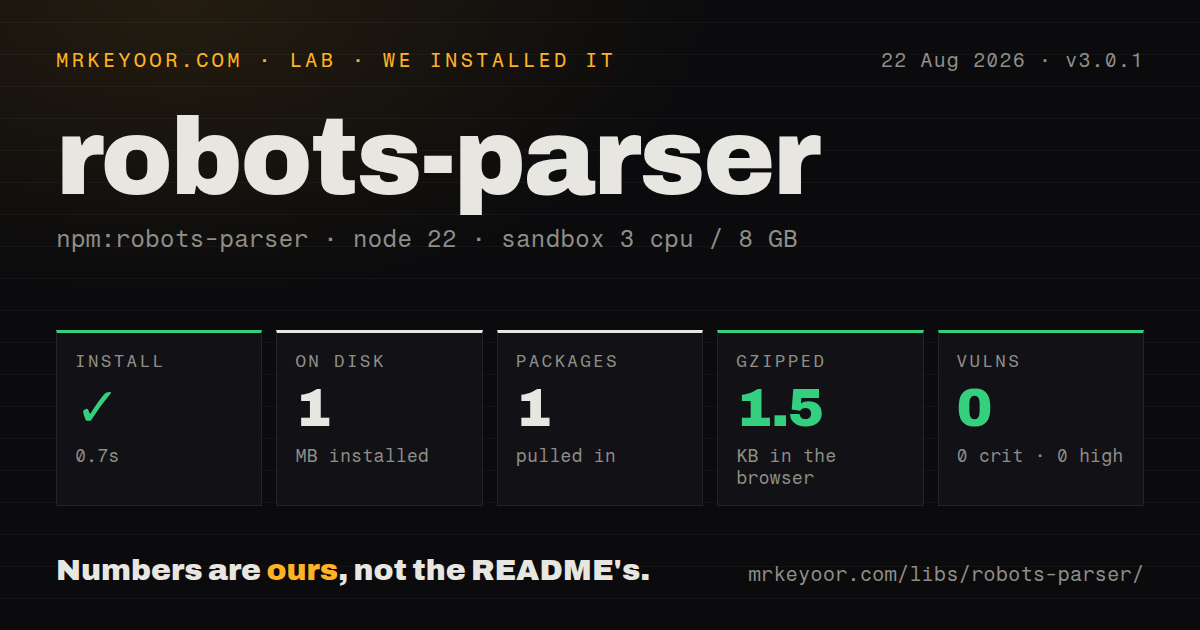
| Install | ✓ · 0.7s | 1 package on disk · 1 MB |
| Import | ✓ | ESM import works · require() works · CommonJS package |
| Browser | 1.5 KB | gzipped (3.5 KB minified), bundled with esbuild |
| Types | ✓ | TypeScript types bundled |
| Known vulns | 0 | 0 critical · 0 high · 0 moderate · 0 low (npm audit) |
Answers from our run
Does robots-parser install cleanly?
Yes. In a fresh container with an empty cache, npm install robots-parser finished in 0.7s, leaving 1 package and 1 MB on disk. npm audit reported no known vulnerabilities.
How much does robots-parser add to a browser bundle?
1.5 KB gzipped (3.5 KB minified) when the whole package is bundled for the browser with esbuild. Importing only part of it is usually smaller.
Does robots-parser work with both ESM and CommonJS?
Yes. Both import 'robots-parser' and require('robots-parser') worked in Node 22 in our run. The package is published as CommonJS.
Does robots-parser include TypeScript types?
Yes, type declarations ship inside the package, so no @types install is needed.
robots-parser or google-robotstxt-parser: which should you use?
google-robotstxt-parser: Use it for another JavaScript implementation based on Google parser behavior with Node and browser targets. robots-parser 3.0.1 installed in 0.7 seconds with 0 dependencies and produced a 3.5 KB minified browser bundle, making it a cheap parser inside an existing crawler.
When should you not use robots-parser?
You want fetching, status-code policy, redirects, byte limits, caching, and request scheduling included. This factory accepts text and performs none of those jobs.
Use it if
- Your crawler already fetches and caches robots.txt and needs many fast allow or deny checks for one origin.
- Wildcard, end-anchored, and longest-match rules must be evaluated without adding runtime dependencies.
- Operators need the 1-based robots.txt line that caused a decision for logs or explanations.
- Crawl-delay, Sitemap, and Host values need parsing, while your own scheduler and fetcher will enforce policy.
- You want fetching, status-code policy, redirects, byte limits, caching, and request scheduling included. This factory accepts text and performs none of those jobs.
- Malformed or unknown directives must produce diagnostics. The parser largely ignores them and exposes no warning list; validation remains an open request.
- You need the repository README's `isExplicitlyDisallowed` method. It exists on main but is absent from the published 3.0.1 tarball.
- Your code calls `isDisallowed` on a URL that may be outside the policy origin. In 3.0.1 it negates `isAllowed`, turning an `undefined` scope result into `true`.
- TypeScript declarations must accurately model current CommonJS exports under Node16 or NodeNext resolution. The published declaration predates the fix now on main.
- One package must guarantee RFC-complete crawler behavior. URL normalization, HTTP responses, cache lifetimes, concurrency, request rate, and bot identification remain your responsibility.
Setup reality
We installed robots-parser 3.0.1 in 0.7 seconds in a fresh Node 22 Bookworm sandbox. It left 1 package and 1 MB on disk. npm audit found 0 known vulnerabilities. The package has 0 direct and 0 peer dependencies, is 80 KB unpacked, bundles TypeScript declarations, and requires Node 10 or newer. Both CommonJS require() and ESM import worked even though the package is CommonJS and has no exports map.
Our full browser import measured 3.5 KB minified and 1.5 KB gzipped. That only covers parsing. You must fetch /robots.txt, choose redirect and HTTP status behavior, cap time and bytes, decode it, cache by origin, and decide when to refresh. Construct one parser per effective origin. A checked URL with a different protocol, hostname, or port returns undefined from isAllowed; handle that third state explicitly.
User-agent matching lowercases the token and strips a version suffix after /. An exact group wins over *; it does not merge the two groups. The longest matching path rule wins, and Allow wins an equal-length tie. Empty or malformed lines are mostly ignored without diagnostics. getCrawlDelay returns seconds but never sleeps, while sitemap and Host values are returned without validation or fetching.
Published 3.0.1 and the current README have drifted apart. isExplicitlyDisallowed is documented from main but is not installed. The release's isDisallowed implementation is also unsafe for scope checks because !undefined becomes true. Read isAllowed once and compare it to false. TypeScript projects with strict Node module resolution may need esModuleInterop, a local declaration patch, or a tiny require wrapper until the repository's type-export correction reaches npm.
Patterns
Parse a robots.txt string parse-policy
const robotsParser = require('robots-parser');

const body = [
  'User-agent: *',
  'Disallow: /private/',
  'Allow: /private/public.html',
].join('\n');

const robots = robotsParser('https://example.com/robots.txt', body);
The first argument fixes protocol, hostname, and port scope. Version 3.0.1 never fetches the text passed as the second argument.
Handle the allow decision as three states check-allowed
const decision = robots.isAllowed(
  'https://example.com/private/report.csv',
  'ExampleBot/1.0',
);

if (decision === true) enqueue();
else if (decision === false) skip();
else throw new Error('URL is outside this robots.txt scope');
`undefined` means this parser cannot judge the URL, commonly because its origin differs. Preserve that state instead of turning it into an ordinary block.
Derive disallowed without the negation trap check-disallowed-safely
const allowed = robots.isAllowed(targetUrl, 'ExampleBot');
const disallowed = allowed === false;

if (allowed === undefined) {
  console.error('wrong robots policy for', targetUrl);
} else if (disallowed) {
  console.log('blocked by robots.txt');
}
In published 3.0.1, `isDisallowed` is `!isAllowed`. Comparing the allow result to `false` avoids converting `undefined` into `true`.
Check separate user-agent groups match-user-agent
const robots = robotsParser('https://example.com/robots.txt', `
User-agent: ExampleBot
Disallow: /exports/

User-agent: *
Disallow: /admin/
`);

robots.isAllowed('https://example.com/exports/a.csv', 'ExampleBot/2.3'); // false
robots.isAllowed('https://example.com/admin/', 'OtherBot'); // false
The parser lowercases the agent and removes its `/version` suffix. An exact group replaces the global group rather than merging with it.
Use wildcard and end-anchored rules use-wildcards
const robots = robotsParser('https://example.com/robots.txt', `
User-agent: *
Disallow: /*?preview=*
Disallow: /draft.pdf$
`);

robots.isAllowed('https://example.com/post?preview=1'); // false
robots.isAllowed('https://example.com/draft.pdf'); // false
robots.isAllowed('https://example.com/draft.pdf?download=1'); // true
A trailing `$` anchors against the end of pathname plus query. Without it, a directive remains a prefix pattern.
Override a broad disallow with a longer allow allow-specific-path
const robots = robotsParser('https://example.com/robots.txt', `
User-agent: *
Disallow: /assets/
Allow: /assets/public/
`);

robots.isAllowed('https://example.com/assets/private/logo.svg'); // false
robots.isAllowed('https://example.com/assets/public/logo.svg'); // true
The longest pattern wins. When Allow and Disallow have equal matching length, the Allow rule wins.
Report the source line that matched explain-matching-rule
const line = robots.getMatchingLineNumber(
  'https://example.com/private/report.csv',
  'ExampleBot',
);

if (line === -1) console.log('No directive matched');
else console.log(`Decision came from robots.txt line ${line}`);
Line numbers start at 1, while `-1` means no directive matched. Pair this with `isAllowed` when URL scope must be distinguished.
Read and enforce Crawl-delay read-crawl-delay
const seconds = robots.getCrawlDelay('ExampleBot');
const delayMs = seconds === undefined ? 1000 : seconds * 1000;

await new Promise((resolve) => setTimeout(resolve, delayMs));
The package returns a numeric delay and does not enforce it. A shared scheduler must coordinate the delay across concurrent workers.
Collect declared sitemap URLs list-sitemaps
for (const sitemapUrl of robots.getSitemaps()) {
  const url = new URL(sitemapUrl);
  if (url.protocol === 'https:') sitemapQueue.add(url.href);
}
Sitemap strings are not validated. Restrict protocols, normalize duplicates, and apply separate fetch limits before queueing them.
Read the non-standard Host directive read-preferred-host
const preferredHost = robots.getPreferredHost();
if (preferredHost !== null) {
  console.log('Declared preferred host:', preferredHost);
}
Host is outside the core RFC 9309 allow and disallow rules. Treat the returned value as advisory metadata.
Parse and check relative URLs together match-relative-urls
const robots = robotsParser('/robots.txt', `
User-agent: *
Disallow: /internal/
`);

robots.isAllowed('/public/index.html'); // true
robots.isAllowed('/internal/report.html'); // false
Relative checks work only when both the robots URL and the target URL are relative. Mixing absolute and relative scope returns no normal decision.
Fetch with explicit limits before parsing fetch-before-parsing
const controller = new AbortController();
const timer = setTimeout(() => controller.abort(), 5000);
try {
  const res = await fetch('https://example.com/robots.txt', { signal: controller.signal });
  if (!res.ok) throw new Error(`robots.txt HTTP ${res.status}`);
  const bytes = new Uint8Array(await res.arrayBuffer());
  if (bytes.byteLength > 512_000) throw new Error('robots.txt too large');
  const robots = robotsParser(res.url, new TextDecoder().decode(bytes));
} finally {
  clearTimeout(timer);
}
This example still leaves redirect, 4xx, 5xx, cache, and decoding policy to the crawler. The 512,000-byte cap is application code, not a package default.
Alternatives
| Package | Registry | Pick it when |
|---|---|---|
| google-robotstxt-parser | npm | Use it for another JavaScript implementation based on Google parser behavior with Node and browser targets. |
| @trybyte/robotstxt-parser | npm | Use it when RFC 9309-oriented TypeScript and newer ESM packaging matter more than this package’s history. |
| robots-txt-parser | npm | Use it when fetching, caching, and promise-based checks should arrive with the parser. |
| @flyyer/robotstxt | npm | Use it for a TypeScript parser and guard with an ESM-focused API. |
More data guides
numpy · pandas · fsspec · lxml · pyarrow · sqlalchemy · the whole shelf →
How this guide is made: grounded in the library's documentation, release notes, changelog, and issue history, on a fixed rubric — not a hands-on install of every release. The 50 most-downloaded entries are additionally install-verified in clean containers. Corrections: contact the desk.