redis review
Our fresh Python 3.12 install of redis 8.1.0 finished in 0.2 seconds, left one package using 3 MB, and loaded `redis` successfully in 1.04 seconds. redis-py is the official Python client for a Redis server. Its sync and asyncio clients expose Redis commands, connection pools, pipelines, Pub/Sub, Streams, Sentinel, and Cluster routing without adding a separate data model. Version 8.1 brings async maintenance notifications to standalone and Cluster clients, plus LMOVEM and BLMOVEM, set cardinality commands, bounded Stream reads, and more Search and Time Series calls. It also repairs Sentinel pool capacity loss after failover and a RESP3 plus hiredis push-data failure.
redis 8.1.0 took 0.2 seconds to install in our sandbox, occupied 3 MB as one package, imported in 1.04 seconds, and returned 0 known vulnerabilities from pip-audit. Choose it only when Redis is an intentional shared service, since an in-process cache is cleaner when the data never leaves one Python worker.
We installed it
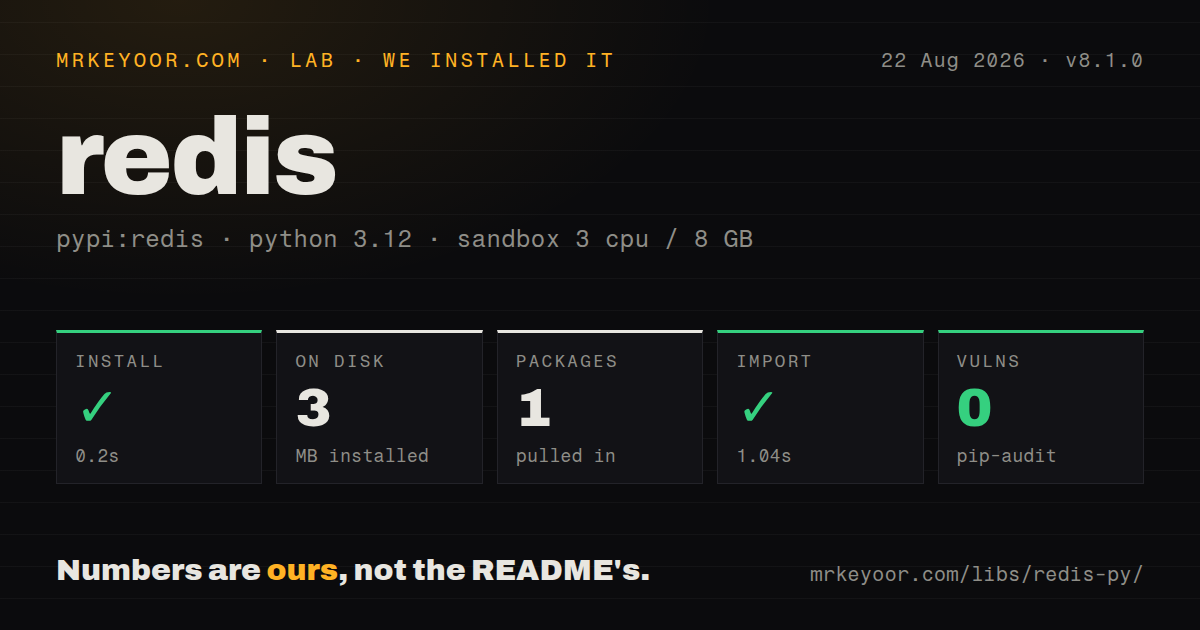
| Install | ✓ · 0.2s | 1 package on disk · 3 MB |
| Import | ✓ | import redis in 1.04s · pure Python · py.typed · requires Python >=3.10 |
| Known vulns | 0 | (pip-audit) |
Answers from our run
Does redis install cleanly?
Yes. In a fresh container with an empty cache, pip install redis finished in 0.2s, leaving 1 package and 3 MB on disk. pip-audit reported no known vulnerabilities.
What does redis need to run?
Python >=3.10, and nothing compiled: it is pure Python. In our run import redis succeeded in 1.04s, and the package ships py.typed for type checkers.
redis or cachetools: which should you use?
cachetools: Choose it for TTL, LRU, or LFU caching that stays inside one Python process and needs no Redis server. redis 8.1.0 took 0.2 seconds to install in our sandbox, occupied 3 MB as one package, imported in 1.04 seconds, and returned 0 known vulnerabilities from pip-audit.
When should you not use redis?
Your application is pinned below Python 3.10. redis 8.1.0 declares Python 3.10 as its minimum, so an older interpreter needs an earlier client release or a runtime upgrade.
Use it if
- Your service already uses Redis for shared cache entries, counters, expiring claims, Streams, or Pub/Sub.
- One client must cover ordinary servers, Sentinel failover, or Redis Cluster while keeping command names close to the server API.
- The codebase needs both synchronous workers and asyncio services, and the team wants the same command vocabulary in each.
- You are prepared to set pool bounds, timeouts, response decoding, and retry rules for the workload instead of accepting connection defaults unchecked.
- Your application is pinned below Python 3.10. redis 8.1.0 declares Python 3.10 as its minimum, so an older interpreter needs an earlier client release or a runtime upgrade.
- The server is older than Redis 7.2. The project's compatibility table places redis-py 6.0 and later on Redis 7.2 through current server releases.
- The cache belongs to one Python process and may vanish when that process exits. `functools.cache` or cachetools avoids a network service, credentials, socket pools, and server operations.
- Your data needs joins, foreign keys, or schema-enforced relationships. redis-py maps Redis commands into Python and does not supply relational constraints or an application model layer.
- You plan to standardize on HIMPORT fieldsets immediately. The 8.1.0 release labels that client API experimental and warns that a future minor version may change it.
- Cluster-wide pattern Pub/Sub is central to the design. The cluster guide says pattern subscribe and publish do not work properly across hash slots and does not recommend those commands.
Setup reality
We installed redis 8.1.0 in a fresh Python 3.12 Bookworm container with 3 CPUs and 8 GB of RAM. The install completed in 0.2 seconds, left 1 package and 3 MB on disk, and import redis worked in 1.04 seconds. The package is pure Python, declares 11 direct dependencies, ships py.typed, and requires Python 3.10 or newer. pip-audit reported 0 known vulnerabilities. The license is MIT.
Redis-py needs no project config file, but it does need a reachable server and whatever username, password, TLS, or certificate settings that server requires. Put those values in a redis:// or rediss:// deployment URL outside source control. Version 8 uses RESP3 on the wire by default while preserving older Python response shapes. Set legacy_responses=False for unified shapes, and choose decode_responses=True only when text decoding is right for every value that client reads.
Every Redis instance receives its own connection pool unless you pass a shared pool. Give busy services a connection ceiling and decide whether exhaustion should fail at once or wait through BlockingConnectionPool. Pipelines batch round trips, but their default transaction=True also wraps queued commands in MULTI and EXEC. Use transaction=False when batching is enough. A WATCH transaction can rerun its callable after contention, so keep email, billing, and other outside effects out of that retrying section.
The asyncio client in 8.1 still owns sockets that need await client.aclose() during shutdown. Cluster multi-key commands require all participating keys in one hash slot unless you choose a documented non-atomic variant. Standalone clients create a jittered policy with 3 retries when no retry object is supplied. Treat a lost reply to a write as an uncertain outcome: Redis may have applied the command before the connection failed, so retry only operations whose duplicate effect you can accept or detect.
Patterns
Create one client from a deployment URL connect-from-url
import os

import redis

client = redis.Redis.from_url(
    os.environ["REDIS_URL"],
    decode_responses=True,
    legacy_responses=False,
    socket_connect_timeout=2,
    socket_timeout=2,
)
client.ping()
redis 8 uses RESP3 on the wire by default. `legacy_responses=False` requests unified Python shapes, while `decode_responses=True` turns bulk strings into text.
Release an asyncio pool at shutdown close-async-client
import os

import redis.asyncio as redis

client = redis.Redis.from_url(os.environ["REDIS_URL"])

async def read_health() -> bytes | None:
    return await client.get("service:health")

async def shutdown() -> None:
    await client.aclose()
`aclose()` closes the async client's owned connection pool. Call it from the application's shutdown hook instead of waiting for garbage collection.
Cap sockets and wait briefly for capacity bound-connection-pool
import os

import redis

pool = redis.BlockingConnectionPool.from_url(
    os.environ["REDIS_URL"],
    max_connections=40,
    timeout=2,
    decode_responses=True,
)
client = redis.Redis(connection_pool=pool)
This pool stops at 40 connections and waits up to 2 seconds for a free one. `ConnectionPool` raises immediately when its limit is reached.
Store JSON with an expiry cache-json-with-ttl
import json

cache_key = "product:42"
raw = client.get(cache_key)
if raw is None:
    product = load_product(42)
    client.set(cache_key, json.dumps(product), ex=300)
else:
    product = json.loads(raw)
redis-py does not serialize application objects. `ex=300` attaches a 300-second expiry to the same SET that writes the JSON string.
Batch independent commands without MULTI batch-round-trips
with client.pipeline(transaction=False) as pipe:
    pipe.hset("user:42", mapping={"plan": "pro"})
    pipe.expire("user:42", 3600)
    wrote_fields, set_expiry = pipe.execute()
`transaction=False` saves round trips but gives no atomicity. The returned list follows the order in which the 2 commands were queued.
Retry an optimistic update after contention watch-and-update
from redis.exceptions import WatchError

while True:
    try:
        with client.pipeline() as pipe:
            pipe.watch("quota:42")
            used = int(pipe.get("quota:42") or 0)
            pipe.multi()
            pipe.set("quota:42", used + 1)
            pipe.execute()
            break
    except WatchError:
        continue
`WATCH` makes EXEC fail if another client changes `quota:42`. The loop can run more than once, so it must not contain an outside side effect.
Iterate through matching keys scan-keyspace
processed: set[str] = set()
for name in client.scan_iter(match="session:*", count=500):
    if name in processed:
        continue
    processed.add(name)
    inspect_session(name)
`count=500` is a work hint to Redis rather than a fixed page size. SCAN may return the same key again while the keyspace is changing.
Read transient Pub/Sub events listen-to-pubsub
with client.pubsub(ignore_subscribe_messages=True) as feed:
    feed.subscribe("deploy-events")
    for message in feed.listen():
        handle_deploy(message["data"])
Redis Pub/Sub has at-most-once delivery. An event sent while this subscriber is disconnected cannot be replayed after it reconnects.
Acknowledge Stream work after processing consume-stream-group
batches = client.xreadgroup(
    groupname="workers",
    consumername="worker-7",
    streams={"jobs": ">"},
    count=20,
    block=5000,
)
for stream, messages in batches.items():
    for message_id, fields in messages:
        process_job(fields)
        client.xack(stream, "workers", message_id)
With `legacy_responses=False`, XREADGROUP returns a dictionary keyed by stream. A crash before `XACK` leaves work pending, so the group also needs a recovery path.
Put a hard limit on connection retries configure-retries
import redis
from redis.backoff import ExponentialWithJitterBackoff
from redis.exceptions import ConnectionError, TimeoutError
from redis.retry import Retry

client = redis.Redis(
    host="redis.internal",
    retry=Retry(ExponentialWithJitterBackoff(), 3),
    retry_on_error=[ConnectionError, TimeoutError],
)
This policy allows 3 retries for the listed connection failures. A write with a lost response may already exist on the server before another attempt runs.
Bound lock acquisition and lease time lease-distributed-lock
lock = client.lock(
    "billing:close:2026-09",
    timeout=30,
    blocking_timeout=2,
)
if not lock.acquire():
    raise TimeoutError("billing lock is busy")
try:
    close_billing_period()
finally:
    lock.release()
The lock expires after 30 seconds and acquisition waits at most 2 seconds. Work that outlives the lease can overlap a new owner.
Keep a multi-key write in one Cluster slot connect-to-cluster
import os

from redis.cluster import RedisCluster

cluster = RedisCluster.from_url(
    os.environ["REDIS_CLUSTER_URL"],
    decode_responses=True,
)
cluster.mset({
    "{account:42}:plan": "pro",
    "{account:42}:state": "active",
})
The shared `{account:42}` hash tag maps both keys to one slot. Atomic multi-key commands raise when their keys belong to different Cluster slots.
Alternatives
| Package | Registry | Pick it when |
|---|---|---|
| cachetools | PyPI | Choose it for TTL, LRU, or LFU caching that stays inside one Python process and needs no Redis server. |
| pymemcache | PyPI | Choose it when the shared cache service is Memcached and you only need its simpler key-value protocol. |
| django-redis | PyPI | Choose it when Django's cache and session backends should own most Redis access through framework settings. |
| valkey | PyPI | Choose it when the deployed service is Valkey and you want the client maintained for that fork's release line. |
More data guides
numpy · pandas · fsspec · pyarrow · lxml · sqlalchemy · the whole shelf →
How this guide is made: grounded in the library's documentation, release notes, changelog, and issue history, on a fixed rubric — not a hands-on install of every release. The 50 most-downloaded entries are additionally install-verified in clean containers. Corrections: contact the desk.