react-use-measure review
react-use-measure 2.1.7 is a React hook that watches one HTML or SVG element and returns its viewport rectangle: `x`, `y`, edges, width, and height. It combines `ResizeObserver` with window resize and orientation events, and can also listen to every scrollable ancestor when `scroll: true` is enabled. Options cover separate resize and scroll debounce times, an injected observer polyfill, and unscaled HTML offset dimensions. The current source returns a callback ref, frozen bounds, and `forceRefresh`; the README still shows a 2-item tuple and a mutable ref. Version 2.1.7 only removed testing install scripts, so there is no application API migration.
react-use-measure 2.1.7 added 4.3 KB gzipped in our browser build and installed in 1.2 seconds with 0 audit findings, a reasonable cost when size and viewport position must update together. Use a narrower ResizeObserver hook when dimensions alone are enough, and plan for 0 values on the first render.
We installed it
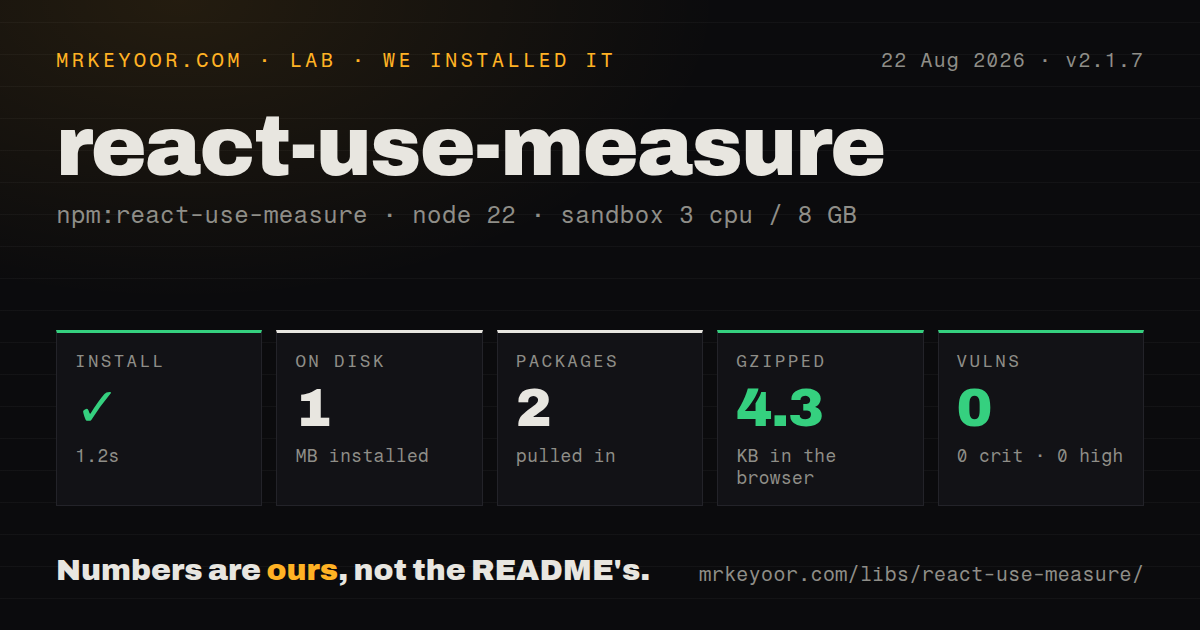
| Install | ✓ · 1.2s | 2 packages on disk · 1 MB |
| Import | ✓ | ESM import works · require() works · ESM package with exports map |
| Browser | 4.3 KB | gzipped (11.4 KB minified), bundled with esbuild |
| Types | ✓ | TypeScript types bundled |
| Known vulns | 0 | 0 critical · 0 high · 0 moderate · 0 low (npm audit) |
Answers from our run
Does react-use-measure install cleanly?
Yes. In a fresh container with an empty cache, npm install react-use-measure finished in 1 seconds, leaving 2 packages and 1 MB on disk. npm audit reported no known vulnerabilities.
How much does react-use-measure add to a browser bundle?
4.3 KB gzipped (11.4 KB minified) when the whole package is bundled for the browser with esbuild. Importing only part of it is usually smaller.
Does react-use-measure work with both ESM and CommonJS?
Yes. Both import 'react-use-measure' and require('react-use-measure') worked in Node 22 in our run. The package is published as ESM with an exports map.
Does react-use-measure include TypeScript types?
Yes, type declarations ship inside the package, so no @types install is needed.
react-use-measure or use-resize-observer: which should you use?
use-resize-observer: Use it when width and height are enough and rounding or observation-box options matter. react-use-measure 2.1.7 added 4.3 KB gzipped in our browser build and installed in 1.2 seconds with 0 audit findings, a reasonable cost when size and viewport position must update together.
When should you not use react-use-measure?
The first server or client render needs real dimensions. Every bound starts at 0 and changes only after the ref attaches and measurement runs.
Use it if
- An overlay, chart, canvas, or pointer interaction needs both element size and viewport coordinates.
- The target can move inside nested scrolling containers and those scroll updates must trigger React state.
- HTML and SVG elements should share one measurement hook, with zero initial values handled explicitly.
- A transformed HTML element needs layout width and height from `offsetWidth` and `offsetHeight` via `offsetSize`.
- The first server or client render needs real dimensions. Every bound starts at 0 and changes only after the ref attaches and measurement runs.
- Only width and height matter. A direct ResizeObserver hook avoids position state and optional ancestor-scroll listeners.
- The runtime lacks `ResizeObserver` and you cannot add a polyfill. The source throws in the browser when neither a native nor injected constructor exists.
- Another library must own the element ref and the project will not compose callback refs. Replacing the returned ref stops observation and cleanup.
- `offsetSize` is expected to cancel every transform. It changes width and height only for `HTMLElement`; coordinates, edges, SVG nodes, rotations, and ancestor transforms still use `getBoundingClientRect()`.
Setup reality
We installed react-use-measure 2.1.7 in a fresh Node 22 Bookworm sandbox. npm finished in 1.2 seconds, left 2 packages using 1 MB, and reported 0 known vulnerabilities. The package has 0 direct dependencies and 2 peer dependencies, React and ReactDOM. It includes TypeScript declarations, uses ESM with an exports map, and worked through both require() and ESM import. Our browser import measured 11.4 KB minified and 4.3 KB gzipped; the package is 60 KB unpacked.
There are no credentials or config files. The hook can render during SSR because it substitutes an inert observer while window is missing, but server and first client values remain 0. Attach the callback ref to exactly one HTML or SVG node. If a local ref or animation library also needs the node, compose callback refs instead of replacing the measurement ref.
Modern browsers supply ResizeObserver; older test runners and browsers need an injected constructor such as @juggle/resize-observer. In jsdom, create a controllable stub and invoke its callback after changing getBoundingClientRect(). The source returns 3 tuple items in 2.1.7: the ref, frozen bounds, and forceRefresh, even though the README signature displays only the first 2.
Measurements are viewport-relative and include CSS transforms. offsetSize: true substitutes offsetWidth and offsetHeight for HTML size only. With scroll: true, the hook walks ancestors whose computed overflow is auto or scroll, installs passive capture listeners, and also watches window scroll. Debounce expensive consumers, accepting that delayed bounds can make an overlay visibly trail movement.
Patterns
Read a card rectangle after layout measure-bounds
import useMeasure from 'react-use-measure'

function Card() {
  const [measureRef, bounds] = useMeasure()
  return <section ref={measureRef}>{Math.round(bounds.width)} x {Math.round(bounds.height)}</section>
}
All 8 rectangle values start at 0. The callback ref and observer schedule a real measurement after the DOM node exists.
Render a chart from container width size-chart
const [ref, bounds] = useMeasure({ debounce: 50 })
return (
  <div ref={ref}>
    {bounds.width > 0 && <Chart width={bounds.width} height={Math.max(240, bounds.width / 2)} />}
  </div>
)
The width guard avoids rendering the chart at 0 pixels. A 50 ms debounce reduces chart rerenders but delays resize feedback.
Update coordinates during nested scroll track-scroll
const [ref, bounds] = useMeasure({
  scroll: true,
  debounce: { scroll: 8, resize: 80 },
})
`scroll: true` attaches passive capture listeners to every ancestor with `auto` or `scroll` overflow and to the window.
Supply ResizeObserver explicitly inject-observer
import { ResizeObserver } from '@juggle/resize-observer'
import useMeasure from 'react-use-measure'

const [ref, bounds] = useMeasure({ polyfill: ResizeObserver })
`@juggle/resize-observer` is a separate install. Version 2.1.7 throws in a browser that has no native or injected observer.
Use HTML layout dimensions ignore-scale-size
const [ref, bounds] = useMeasure({ offsetSize: true })
return <div style={{ transform: 'scale(.75)' }}><div ref={ref}>{bounds.width}</div></div>
`offsetSize` replaces width and height only for an `HTMLElement`. Coordinates and every SVG measurement still come from `getBoundingClientRect()`.
Share one node between callback refs merge-refs
import { mergeRefs } from 'react-merge-refs'

const localRef = useRef(null)
const [measureRef, bounds] = useMeasure()
return <div ref={mergeRefs([localRef, measureRef])}>{bounds.width}</div>
`react-merge-refs` is a separate package. Overwriting `measureRef` prevents react-use-measure from observing the node and cleaning listeners.
Measure after fonts settle force-refresh
const [ref, bounds, forceRefresh] = useMeasure()

useEffect(() => {
  document.fonts?.ready.then(forceRefresh)
}, [forceRefresh])
The third tuple item exists in 2.1.7 source and types but is absent from the README signature. ResizeObserver often makes it unnecessary.
Place a fixed panel below an anchor position-fixed-overlay
const [anchorRef, bounds] = useMeasure({ scroll: true })
return <>
  <button ref={anchorRef}>Details</button>
  <div style={{ position: 'fixed', top: bounds.bottom + 8, left: bounds.left }}>Panel</div>
</>
The bounds are viewport-relative, matching `position: fixed`. Collision handling, focus, portals, and clipping still need application or overlay-library logic.
Convert pointer coordinates to local space map-pointer
const [surfaceRef, bounds] = useMeasure({ scroll: true })
function onPointerMove(event) {
  updateCursor({ x: event.clientX - bounds.left, y: event.clientY - bounds.top })
}
return <div ref={surfaceRef} onPointerMove={onPointerMove} />
`clientX` and `clientY` share the viewport coordinate space of the measured left and top values. CSS scale may require another conversion.
Observe an SVG group measure-svg
const [groupRef, bounds] = useMeasure()
return <svg width="100%" height="240">
  <g ref={groupRef}><circle cx="80" cy="80" r="40" /></g>
  <text y="220">{bounds.width.toFixed(1)}</text>
</svg>
The callback ref accepts `SVGElement`. `offsetSize` has no effect because SVG nodes lack `offsetWidth` and `offsetHeight`.
Wait before showing geometry controls avoid-hydration-branch
const [ref, bounds] = useMeasure()
const ready = bounds.width > 0 || bounds.height > 0
return <div ref={ref}><Content />{ready && <GeometryControls bounds={bounds} />}</div>
SSR and the first client render both see 0 values. Keeping their initial markup stable avoids a geometry-driven hydration mismatch.
Tune resize and scroll separately debounce-events
const [ref, bounds] = useMeasure({
  scroll: true,
  debounce: { scroll: 16, resize: 120 },
})
A 16 ms scroll delay tracks motion more closely than the 120 ms resize delay, but both leave bounds stale until their timers fire.
Alternatives
| Package | Registry | Pick it when |
|---|---|---|
| use-resize-observer | npm | Use it when width and height are enough and rounding or observation-box options matter. |
| react-resize-detector | npm | Use it when you prefer a hook or component API with explicit refresh controls. |
| @react-hook/resize-observer | npm | Use it for a narrow ResizeObserver wrapper when position tracking belongs elsewhere. |
More web frontend guides
postcss · react · react-dom · tailwindcss · clsx · htmlparser2 · the whole shelf →
How this guide is made: grounded in the library's documentation, release notes, changelog, and issue history, on a fixed rubric — not a hands-on install of every release. The 50 most-downloaded entries are additionally install-verified in clean containers. Corrections: contact the desk.