react-universal-interface review
react-universal-interface 0.6.2 lets one React data-provider component accept a function child, `render` prop, component prop, existing custom element, or generated higher-order component. It also includes `hookToRenderProp` for exposing a hook through an older render-prop API. The current version's only release change moved `tslib` from a dependency to a peer dependency, so consumers must supply both React and `tslib`. This is compatibility plumbing from the React 16 render-prop and HOC era, not state management or a visual component.
react-universal-interface 0.6.2 installed in 1 second with 4 packages and 1 MB in our sandbox, bundled to 7.7 KB gzipped, and had 0 audit findings. Keep it for a published multi-style component contract; do not add it to new React code that can expose one hook or one explicit composition API.
We installed it
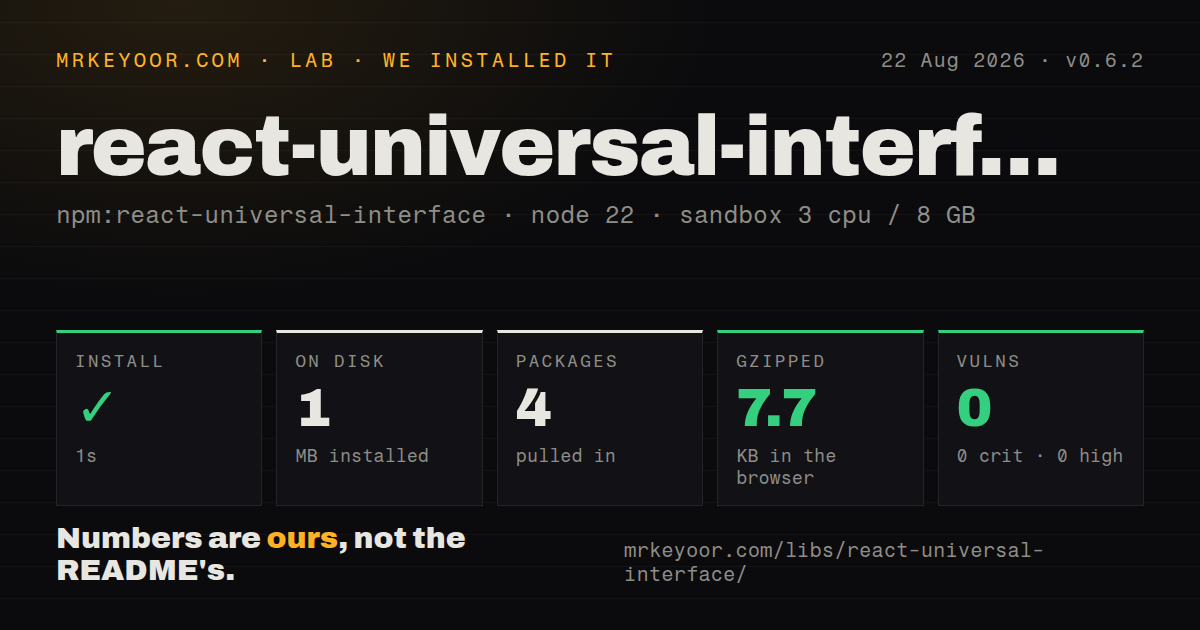
| Install | ✓ · 1s | 4 packages on disk · 1 MB |
| Import | ✓ | ESM import works · require() works · CommonJS package |
| Browser | 7.7 KB | gzipped (21.8 KB minified), bundled with esbuild |
| Types | ✓ | TypeScript types bundled |
| Known vulns | 0 | 0 critical · 0 high · 0 moderate · 0 low (npm audit) |
Answers from our run
Does react-universal-interface install cleanly?
Yes. In a fresh container with an empty cache, npm install react-universal-interface finished in 1 seconds, leaving 4 packages and 1 MB on disk. npm audit reported no known vulnerabilities.
How much does react-universal-interface add to a browser bundle?
7.7 KB gzipped (21.8 KB minified) when the whole package is bundled for the browser with esbuild. Importing only part of it is usually smaller.
Does react-universal-interface work with both ESM and CommonJS?
Yes. Both import 'react-universal-interface' and require('react-universal-interface') worked in Node 22 in our run. The package is published as CommonJS.
Does react-universal-interface include TypeScript types?
Yes, type declarations ship inside the package, so no @types install is needed.
react-universal-interface or react-powerplug: which should you use?
react-powerplug: Use it when an older render-prop application needs state and logic components rather than only interface normalization. react-universal-interface 0.6.2 installed in 1 second with 4 packages and 1 MB in our sandbox, bundled to 7.7 KB gzipped, and had 0 audit findings.
When should you not use react-universal-interface?
You are designing a new component API. Hooks, Context, or one explicit child convention are easier to type and explain than five interchangeable forms.
Use it if
- An existing library already promises several render-prop, function-child, component-prop, and HOC call styles.
- A legacy render-prop public API must stay intact while its internal data source moves to a hook.
- You can test the package against your supported React versions and own an old compatibility layer.
- The differing prop precedence of each rendering form is already part of the public contract.
- You are designing a new component API. Hooks, Context, or one explicit child convention are easier to type and explain than five interchangeable forms.
- Current React support must be documented and tested upstream. Version 0.6.2 uses a `react: *` peer and its development setup came from the React 16.8 period.
- Active runtime maintenance is required. npm dates 0.6.2 to May 2020, and later repository activity has not produced another package release.
- License metadata must be machine-readable without exceptions. Our package check reported an unknown license even though the repository contains an Unlicense file.
- Predictable prop merging matters. Callback forms receive optional extra arguments, component forms receive only data, and cloned custom elements can have same-named props overwritten by provider data.
Setup reality
We installed react-universal-interface 0.6.2 in 1 second in our fresh Node 22 sandbox. It left 4 packages and 1 MB on disk, and npm audit reported 0 known vulnerabilities. The package has 0 direct dependencies and 2 peers, 144 KB unpacked, bundled TypeScript declarations, and unknown package-license metadata in our check. It is CommonJS without an exports map; require() and ESM import both worked.
React and tslib are wildcard peers. Version 0.6.2 specifically moved tslib out of dependencies, so the consuming application must install it. Wildcards prevent npm from warning when a 2020 package is paired with a much newer React build. There is no provider, config file, CSS, or initialization step. The declarations were built with older TypeScript and React-era types, so verify them under the application's compiler settings.
The render helper follows precedence rules that are easy to miss. A defined children value wins over the render prop; a function child receives data and extra arguments. comp wins over component. Component forms receive the data object as props, not every provider prop. A custom React element is cloned with data merged over same-named existing props, while a host element such as <div> is returned without that injection.
Our browser build measured 21.8 KB minified and 7.7 KB gzipped for a full-package import. hookToRenderProp is shipped but absent from the README: without a mapper it passes the wrapper's entire props object as the hook's first argument. Zero-argument and positional hooks need a mapping function that returns an array. The library can preserve an old public contract, but adding it to new app code creates more composition paths without adding new React capability.
Patterns
Serve a function child support-function-child
import { render } from 'react-universal-interface';

function MousePosition(props) {
  return render(props, { x: 20, y: 40 });
}

<MousePosition>{({ x, y }) => <output>{x}, {y}</output>}</MousePosition>
A function in `children` wins over `render`; supplying both produces a development warning and still chooses `children`.
Serve a render callback support-render-prop
<MousePosition
  render={({ x, y }) => <output>{x}, {y}</output>}
/>
The `render` prop is considered only when `children` is `undefined`; even non-function child content takes precedence.
Render a supplied component support-component-prop
const PositionLabel = ({ x, y }) => <output>{x}, {y}</output>;
<MousePosition component={PositionLabel} />;
The component receives the provider's data object as props. Other props passed to `MousePosition` are not forwarded by the helper.
Use the shorter component alias use-comp-alias
<MousePosition comp={PositionLabel} />;`comp` is an alias for `component` and takes priority when both props are present, which can conceal a caller mistake.
Clone a custom child with data inject-custom-element
const PositionLabel = ({ x, y, tone }) => (
  <output data-tone={tone}>{x}, {y}</output>
);

<MousePosition>
  <PositionLabel x={0} y={0} tone="quiet" />
</MousePosition>
Provider data is merged after existing element props, so its `x` and `y` values overwrite the child's 2 supplied values.
Pass actions after provider data pass-extra-callback-arguments
function Counter(props) {
  return render(props, { count: 2 }, { increment: () => {} });
}

<Counter>{({ count }, { increment }) => (
  <button onClick={increment}>{count}</button>
)}</Counter>
Only function-child and render callbacks receive extra positional arguments; component and cloned-element forms receive the data object alone.
Put provider data under one prop create-named-enhancer
const withMouse = createEnhancer(MousePosition, 'mouse');
const Label = ({ mouse }) => <output>{mouse.x}, {mouse.y}</output>;
const LabelWithMouse = withMouse(Label);
A prop name nests the provider result under that name while preserving the wrapped component's ordinary props beside it.
Merge provider fields into wrapped props create-spread-enhancer
const withMouseProps = createEnhancer(MousePosition);
const Enhanced = withMouseProps(({ x, y, prefix }) => (
  <output>{prefix}: {x}, {y}</output>
));
Without a name, provider data is spread first and original component props are spread later, so original props win collisions.
Adapt a zero-argument hook wrap-zero-argument-hook
const OnlineStatus = hookToRenderProp(useOnlineStatus, () => []);

<OnlineStatus>
  {({ online }) => <span>{online ? 'online' : 'offline'}</span>}
</OnlineStatus>
Return an empty array for a zero-argument hook; the default mapper would pass the wrapper's full props object as 1 argument.
Map wrapper props into hook arguments map-hook-arguments
const User = hookToRenderProp(
  useUser,
  (props) => [props.userId]
);

<User userId="42" render={(user) => <strong>{user.name}</strong>} />
The mapping callback must return an array because version 0.6.2 spreads its entries as positional hook arguments.
Alternatives
| Package | Registry | Pick it when |
|---|---|---|
| react-powerplug | npm | Use it when an older render-prop application needs state and logic components rather than only interface normalization. |
| recompose | npm | Use it only when maintaining an existing HOC-heavy React codebase already committed to its helper vocabulary. |
| react-use | npm | Use a hook collection when reusable behavior can be exposed directly to modern function components. |
More web frontend guides
postcss · react · react-dom · tailwindcss · clsx · htmlparser2 · the whole shelf →
How this guide is made: grounded in the library's documentation, release notes, changelog, and issue history, on a fixed rubric — not a hands-on install of every release. The 50 most-downloaded entries are additionally install-verified in clean containers. Corrections: contact the desk.